Ollama Environment Variables and Service Configuration
Ollama has no traditional configuration file; almost all service behavior is controlled by environment variables: listen address, model path, context, concurrency, proxy, and debugging.
This section first covers the setup methods for the three platforms, then explains each core variable in detail across three layers: network entry, request scheduling, and model runtime.
Where Configuration Variables Live in the Service
Let's first create a map: the dozen or so environment variables are not all on the same level; they each act on different stages of the service process.
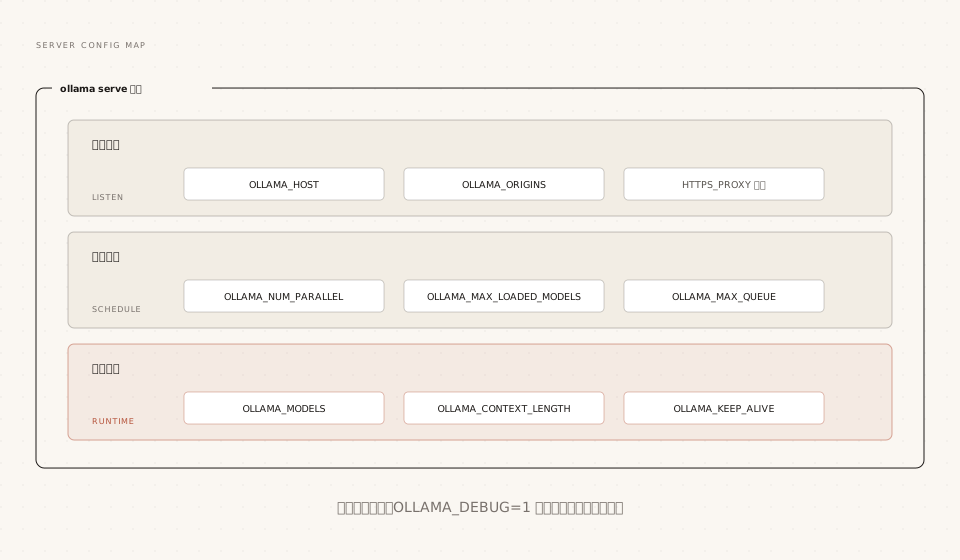
To view the full list of variables supported by the current version, run `ollama serve --help`.
How to Set Environment Variables on Three Platforms
The same variable has completely different setup entry points across the three platforms; this is where beginners get stuck most easily.
macOS:launchctl
When Ollama runs as an app, environment variables must be injected via launchctl; after setting them, restart the app for them to take effect:
Example
launchctl setenv OLLAMA_HOST "0.0.0.0:11434"
# Then quit and reopen the Ollama app
Linux: systemd Service Override
Example
sudo systemctl edit ollama.service
# Add in the editor (note: must be under the [Service] section):
# [Service]
# Environment="OLLAMA_HOST=0.0.0.0:11434"
# Reload and restart the service
sudo systemctl daemon-reload
sudo systemctl restart ollama
Windows: System Environment Variables
Search for "environment variables" in the Start menu, select "Edit environment variables for your account," create or edit the variable, then save.
Key step: quit Ollama from the tray first, then restart it from the Start menu after saving; only then will the new variables take effect in the new process.
There is also a JSON configuration file server.json (located at ~/.ollama/) for a small number of toggle-style settings; for example, write {"disable_ollama_cloud": true} to disable cloud features. The vast majority of configuration still follows environment variables.
Network Entry: HOST, ORIGINS, and Proxy
OLLAMA_HOST: Let Your LAN Access Your Models
By default, it only listens on 127.0.0.1, so only the local machine can use it; to let other devices on the LAN call it, change it to listen on all network interfaces:
Example
OLLAMA_HOST=0.0.0.0:11434 ollama serve
# Verify from another device (replace with your actual IP)
curl http://192.168.1.100:11434/api/version
Opening it to the LAN is equivalent to exposing an unauthenticated model service to all devices on the same subnet. This is acceptable on a home network, but on a corporate network you must pair it with firewall rules or a reverse proxy (discussed in detail in the private deployment chapter).
OLLAMA_ORIGINS: Cross-Origin Allowlisting
By default, Ollama only accepts cross-origin requests from 127.0.0.1 and 0.0.0.0. When web pages or browser extensions connect directly to the local API, you need to explicitly allowlist them:
Example
OLLAMA_ORIGINS=chrome-extension://*,moz-extension://*,safari-web-extension://* ollama serve
Proxy: HTTPS_PROXY Is the Only One Needed
Model downloads use HTTPS for outbound traffic; in network-restricted environments, just point HTTPS_PROXY at the proxy.
Set only HTTPS_PROXY, not HTTP_PROXY: Ollama does not fetch models over HTTP, and adding an HTTP proxy may actually interrupt the connection between client and server. In Docker scenarios, pass -e HTTPS_PROXY=... when starting the container; if using a proxy with a self-signed certificate, you also need to install the CA certificate into the system (or bake it into the image).
Model Runtime: Path, Context, and Keep-Alive
OLLAMA_MODELS: Store Models on Another Drive
By default, models are stored in the user directory; the paths for the three platforms are as follows:
| Platform | Default Model Path |
|---|---|
| macOS | ~/.ollama/models |
| Linux | /usr/share/ollama/.ollama/models |
| Windows | C:\Users\<username>\.ollama\models |
Point OLLAMA_MODELS at the new directory to migrate everything; after moving the downloaded model files there, they can be used directly.
Example
OLLAMA_MODELS=/data/ollama-models ollama serve
# Note: standard Linux installations run the service as the ollama user
# The new directory must have its owner changed, otherwise the service won't have read/write permission
sudo chown -R ollama:ollama /data/ollama-models
OLLAMA_CONTEXT_LENGTH: Global Context Length
Sets the default context length for all models; it takes effect when not overridden at the model or request level:
Example
OLLAMA_CONTEXT_LENGTH=8192 ollama serve
Priority from highest to lowest: options.num_ctx in the API request, PARAMETER num_ctx in the Modelfile, this environment variable, and the automatic tiered default based on VRAM.
OLLAMA_KEEP_ALIVE: Global Keep-Alive Duration
Uniformly adjusts how long a model stays resident after loading; the value format matches the keep_alive parameter in the API:
Example
OLLAMA_KEEP_ALIVE=30m ollama serve
A keep_alive passed individually in an API request takes precedence over this global value, enabling a tiered strategy like "10 minutes globally, key models always resident."
Request Scheduling: The Concurrency Trio
Ollama supports two levels of concurrency: multiple models resident at the same time, and a single model handling multiple requests in parallel—each controlled by its own variable.
| Variable | Default Value | Purpose |
|---|---|---|
| OLLAMA_NUM_PARALLEL | 1 | Number of requests a single model handles simultaneously; memory required scales by this value × context length |
| OLLAMA_MAX_LOADED_MODELS | 3 × number of GPUs (3 for CPU inference) | Total number of models allowed to be loaded simultaneously, provided VRAM/RAM can hold them |
| OLLAMA_MAX_QUEUE | 512 | Maximum number of queued requests when the service is busy; requests beyond this return 503 immediately |
The scheduling logic is worth understanding: when VRAM is sufficient, models process requests in parallel; when VRAM is insufficient, new requests queue up, waiting for idle models to be unloaded and free up space.
NUM_PARALLEL is the variable most likely to trip you up: setting it to 4 means the context cache is multiplied by 4, VRAM usage instantly quadruples, and models may be pushed off the GPU as a result. Planning for multi-user shared instances is covered in the private deployment chapter.
Debugging and Logging: OLLAMA_DEBUG
The first step in troubleshooting is always to enable debugging and check the logs.
Example
OLLAMA_DEBUG=1 ollama serve
To enable debugging in the Windows GUI app: first quit the app from the tray, then run in PowerShell:
Example
& "ollama app.exe"
Summary of log locations across the four environments:
| Environment | Log Location |
|---|---|
| macOS | ~/.ollama/logs/server.log |
| Linux(systemd) | journalctl -u ollama --no-pager --follow --pager-end |
| Windows | %LOCALAPPDATA%\Ollama\server.log |
| Docker | docker logs <container name> (stdout/stderr) |
Quick Reference for Other Useful Variables
The remaining variables are mostly tied to specific scenarios; full chapter-by-chapter explanations are covered in the corresponding topic sections. Here we'll establish an index first.
| Variable | Example Value | Purpose |
|---|---|---|
| OLLAMA_FLASH_ATTENTION | 1 / 0 | Force Flash Attention on/off; significantly saves VRAM with long contexts (detailed in the GPU chapter) |
| OLLAMA_KV_CACHE_TYPE | q8_0 / q4_0 | KV cache quantization type; requires Flash Attention (detailed in the GPU chapter) |
| OLLAMA_VULKAN | 0 | Disable the Vulkan backend (a toggle for when Vulkan is malfunctioning) |
| OLLAMA_LLM_LIBRARY | cpu_avx2 | Force a specific inference library, bypassing automatic detection |
| OLLAMA_TMPDIR | /data/tmp | Change the temp directory location (when the system /tmp is mounted with noexec) |
| OLLAMA_NO_CLOUD | 1 | Disable cloud models and web search; pure local mode |