Ollama RAG: Local Private Knowledge Base Q&A
In this chapter, we combine the embedding, retrieval, and generation capabilities learned earlier into a truly usable application: feed your documents to a local model, and let it answer questions based only on your materials, with sources cited.
The complete code is less than 100 lines, has zero external vector database dependencies, and can run by simply copying it.
Requirements Breakdown and Technology Selection
Let's first clarify the problem: the LLM doesn't know the materials on your hard drive, and asking it directly will only get fabricated answers. The idea of RAG (Retrieval-Augmented Generation) is an "open-book exam" — first retrieve relevant chunks from your materials, stuff them into the prompt, and let the model answer based on them.
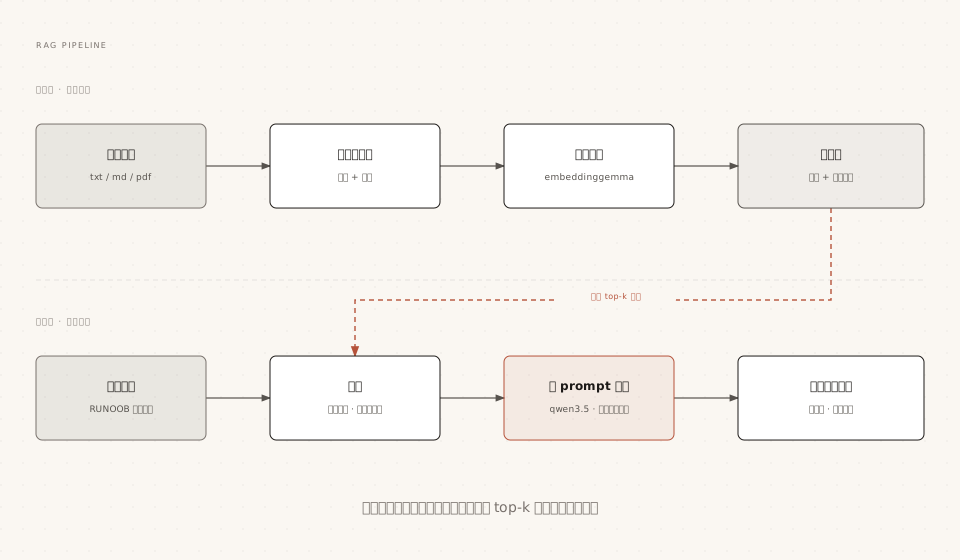
The technology selection follows the "minimal dependencies" principle:
| Stage | Selection | Reason |
|---|---|---|
| Embedding model | embeddinggemma | Small size, fast locally; alternative: qwen3-embedding |
| Generation model | qwen3.5:4b | Good at Chinese, can run on 16GB RAM |
| Vector storage | Python list + cosine similarity | Zero dependencies, clear for teaching; switch to professional libraries like Chroma for large volumes |
| Document format | txt / md | Plain text is enough to explain the principles; see the end of the article for PDF extension |
You need to pull two models:
ollama pull embeddinggemma
ollama pull qwen3.5:4b
EmbeddingGemma is a lightweight multilingual text embedding model open-sourced by Google, specifically designed to convert text into vectors. It is very suitable for offline deployment on local devices. Ollama has already adapted and packaged this model, so you can pull and use it directly.
Step 1: Document Parsing and Chunking
The model's context is limited, and an entire document can't fit into it, so it needs to be split into small chunks. The chunking strategy uses the most basic "fixed length + overlap" approach: each chunk is 300 characters, with adjacent chunks overlapping by 50 characters to avoid cutting off key sentences.
Example
import os
def load_chunks(folder, size=300, overlap=50):
"""Read all txt/md files in the folder, split them into chunks with source markers"""
chunks = []
for name in sorted(os.listdir(folder)):
if not name.endswith(('.txt', '.md')):
continue
path = os.path.join(folder, name)
text = open(path, encoding='utf-8').read().strip()
# Sliding window chunking: step size = size - overlap
step = size - overlap
for i in range(0, len(text), step):
piece = text[i:i + size].strip()
if len(piece) > 20: # Filter out fragments that are too short
chunks.append({'file': name, 'text': piece})
return chunks
Step 2: Vectorization and Retrieval
Convert all chunks and the user's question into vectors, and use cosine similarity to find the top-k chunks most relevant to the question.
Example
EMBED_MODEL = 'embeddinggemma'
def embed(texts):
"""Generate vectors in batch (input a list, output a list of vectors)"""
result = ollama.embed(model=EMBED_MODEL, input=texts)
return result['embeddings']
def cosine(a, b):
"""Cosine similarity: the closer to 1, the more similar"""
dot = sum(x * y for x, y in zip(a, b))
na = sum(x * x for x in a) ** 0.5
nb = sum(x * x for x in b) ** 0.5
return dot / (na * nb)
def search(question, chunks, vectors, top_k=3):
"""Retrieval: return the k most relevant chunks and their similarities"""
q_vec = embed([question])[0]
scored = [
(cosine(q_vec, v), c)
for v, c in zip(vectors, chunks)
]
scored.sort(key=lambda x: -x[0])
return scored[:top_k]
embeddinggemma outputs L2-normalized vectors; the full cosine formula is still retained here to make the principle clear at a glance; replacing it with dot product gives the same result.
Step 3: Assembling the Prompt and Generating Answers with Citations
Write the retrieved chunks along with source numbers into the prompt, and explicitly require the model to "answer based only on the materials" and mark citations.
Example
GEN_MODEL = 'qwen3.5:4b'
def answer(question, chunks, vectors):
hits = search(question, chunks, vectors, top_k=3)
# Concatenate chunks and source numbers into the context
context = '\n\n'.join(
f'[Source {idx}] (from {c["file"]})\n{c["text"]}'
for idx, (score, c) in enumerate(hits, 1)
)
prompt = f'''Answer the question based only on the following materials, and indicate which source numbers were used.
If the materials are insufficient to answer, state directly that you don't know.
Materials:
{context}
Question: {question}'''
response = chat(
model=GEN_MODEL,
messages=[{'role': 'user', 'content': prompt}],
options={'temperature': 0.2}, # Low temperature, reduce creative freedom
)
print(response.message.content)
print('\nReferences: ')
for idx, (score, c) in enumerate(hits, 1):
print(f' [Source {idx}] {c["file"]} (similarity {score:.3f})')
Full Run: Main Program Entry
Example
if __name__ == '__main__':
folder = 'docs' # Put your txt/md documents in the docs folder
chunks = load_chunks(folder)
# Offline indexing: vectorize all chunks at once
print(f'Indexing {len(chunks)} chunks...')
vectors = embed([c['text'] for c in chunks])
print('Indexing complete.'\n')
# Online Q&A loop
while True:
q = input('Question (type exit to quit): ').strip()
if q.lower() == 'exit':
break
if q:
answer(q, chunks, vectors)
print()
Prepare the materials and run:
mkdir docs
cp EXAMPLE-python-notes.md docs/
python rag.py
Output:
$ python rag.py
正在索引 42 个片段...
索引完成。

问题(exit 退出):Python 的切片是什么?
Python 切片是用 [start:stop:step] 从序列截取子序列的语法 [资料1]。
例如 s[1:4] 取索引 1 到 3 的字符 [资料2]。

参考来源:
  [资料1] EXAMPLE-python-notes.md(相似度 0.712)
  [资料2] EXAMPLE-python-notes.md(相似度 0.668)
Note the source citations at the end of the answer: every sentence can be traced back to a specific file in your docs directory. This is exactly the core value of RAG compared to "directly asking the model."
Performance Tuning and Common Issues
If RAG performance is poor, the problem is usually in the retrieval stage rather than the generation stage. The tuning levers, ranked by impact:
| Lever | Default value | Adjustment direction |
|---|---|---|
| Chunk size | 300 characters | Increase if answers are too fragmented; too large makes retrieval inaccurate; empirical range 200~500 |
| Overlap | 50 characters | Increase when sentences are frequently cut off |
| Number of retrieved items top_k | 3 | Increase when materials are dense, but it will consume more context |
| Similarity threshold | Not enabled | Filter out chunks with too low similarity to reduce irrelevant interference |
| Generation temperature | 0.2 | Keep it low; a knowledge base doesn't need creativity |
Quick reference for common issues:
| Symptom | Cause | Solution |
|---|---|---|
| Answer is unrelated to the materials | Retrieval missed | Check whether chunks are too small/large, and confirm the question language is consistent with the materials |
| Model still fabricates answers | Insufficient prompt constraints | Strengthen the "based only on the materials" wording; when nothing is retrieved, directly answer "I don't know" |
| Indexing is very slow | Too many chunks being embedded one by one | Use batch embed; switch to professional vector databases and incremental indexing when document volume is large |
| Answers get worse for long documents | Key information is fragmented | Chunk by semantic boundaries such as headings/paragraphs instead of pure fixed length |
Other ExtensionsProduction roadmap: when you have tens of thousands of documents or need PDF parsing, replace the "list vector store" with a professional vector database like Chroma (which provides persistence and efficient nearest-neighbor retrieval), use pypdf to extract PDF text, and keep the rest of the code skeleton unchanged — this is exactly the point of decoupling each stage in this article.