Ollama Cloud Local and Cloud Hybrid
Not enough local VRAM but want to use a huge model with hundreds of billions of parameters? Ollama Cloud offers a third option: the model runs on cloud GPUs, while your code and toolchain feel no difference at all.
This chapter introduces how Cloud models run, direct API access, pure local mode, and the retirement mechanism, and finally provides a selection strategy for hybrid usage.
What is a Cloud model
A Cloud model is a new model type in Ollama: the weights are stored in Ollama's cloud, inference is done on the official GPU cluster, and the local side only handles forwarding requests.
It solves a very specific pain point: flagship open-source models with hundreds of billions of parameters often require hundreds of GB of VRAM, making local deployment impossible for individuals and small teams, yet the need to use them is real.
Available Cloud models carry the cloud tag in the model library. Taking the qwen3.5 family as an example, the flagship specification is qwen3.5:cloud.
Four ways to run Cloud models
First complete the one-time preparation: register and log in to your Ollama account, then pull the cloud tag (it is just a "pointer" and does not download weights).
Log in with your Ollama account (required for cloud models):
ollama signin
Enter your email in the login window that pops up in the browser (if phone verification is needed later, a domestic Chinese phone number will work):
Pulling the cloud tag completes almost instantly:
ollama pull qwen3.5:cloud
Running it gives an experience identical to local models:
ollama run qwen3.5:cloud
In the interface, you can see a cloud icon:

Python calls
Example
# The only difference from local models: the model name has :cloud
stream = chat(
model='qwen3.5:cloud',
messages=[{'role': 'user', 'content': 'Introduce Python Rookie Tutorial in one sentence'}],
stream=True,
)
for chunk in stream:
print(chunk.message.content, end='', flush=True)
JavaScript calls
Example
const response = await ollama.chat({
model: 'qwen3.5:cloud',
messages: [{ role: 'user', content: 'Introduce Python Rookie Tutorial in one sentence' }],
stream: true,
})
for await (const chunk of response) {
process.stdout.write(chunk.message.content)
}
curl calls
Example
"model": "qwen3.5:cloud",
"messages": [{ "role": "user", "content": "Introduce Python Rookie Tutorial in one sentence" }],
"stream": false
}'
Transparent forwarding: local API can also call cloud models
The elegant part of Cloud is that the forwarding logic is entirely handled by the local service.
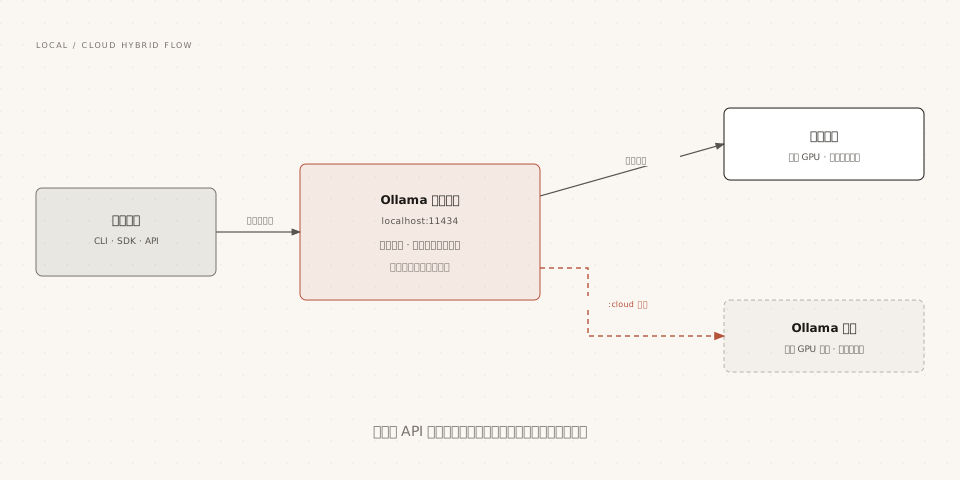
When requesting a :cloud model from localhost:11434, the local service automatically handles authentication and forwarding to the cloud, and your application code, Agent tools, and editor integrations remain completely unaware.
This means existing integrations can immediately enjoy large model capabilities: change Claude Code's model name to qwen3.5:cloud, and the same toolchain switches to the flagship specification.
There is currently one known limitation: Cloud models do not yet support structured output (the format parameter). Tasks requiring JSON Schema constraints should still be assigned to local models, or parsed in the application layer.
Direct connection to ollama.com/api
In addition to forwarding through the local service, you can also skip the local side and call the cloud API directly, which suits scenarios where the server does not have Ollama installed.
First create an API Key on the official website settings page, then carry it in Bearer format:
Example
curl https://ollama.com/api/chat \
-H "Authorization: Bearer $OLLAMA_API_KEY" \
-d '{
"model": "qwen3.5",
"messages": [{ "role": "user", "content": "Introduce Python Rookie Tutorial in one sentence" }],
"stream": false
}'
# The cloud can also list available models
curl https://ollama.com/api/tags
The official SDK also supports specifying the host and authentication header. For the connection method, see the Client(host=...) example in the Programming Access chapter; just change the host to https://ollama.com.
API Keys currently do not expire, but you can revoke them at any time on the official website settings page; they are equivalent to your cloud usage credentials, so do not commit them to code repositories.
Pure local mode: completely disable the cloud
Teams with zero tolerance for data leaving their domain can completely disable Ollama's cloud features, making it purely local software.
Choose either of the two disable methods, then restart Ollama for the change to take effect:
Example
# { "disable_ollama_cloud": true }
# Method 2: environment variable
OLLAMA_NO_CLOUD=1 ollama serve
# After it takes effect, the log will show: Ollama cloud disabled: true
Disabling cloud features will also lose cloud models and online search capabilities, but all local model features remain unaffected. Combined with firewall outbound blocking, you can build a fully physically isolated model service.
Cloud model retirement mechanism
Cloud models have a lifecycle: as stronger open-source models are released, the official team periodically retires old cloud models and notifies users in advance via email and official website announcements, while also providing recommended replacements.
The official announcement takes the form of a "retirement date - model - recommended replacement" mapping table, for example, a cloud model will be taken offline on a certain date and migrated to a new version; just change the model name accordingly.
Two engineering suggestions:
First, when referencing cloud models in automated workflows, make the model name a configuration item rather than hard-coding it, so that when retirement switching occurs, you only need to change the configuration.
Second, prepare local alternative models with equivalent capabilities for critical business, so you can immediately fall back when a cloud model is retired or the network is abnormal.
Retirement only applies to cloud models: model weights downloaded locally are always usable, which is why this tutorial always emphasizes the local approach.
Selection strategy: when to use which
| Scenario | Recommended solution | Reason |
|---|---|---|
| Daily tasks that fit in VRAM | Local model | Zero cost, zero latency, data never leaves the device |
| Privacy-sensitive data | Local model (or pure local mode) | Compliant and controllable |
| Huge model needs / no GPU devices | Cloud model | No hardware investment needed, toolchain unchanged |
| Trying out new models | Try Cloud first, then localize after confirming the value | Avoid buying hardware just for evaluation |
| Long-term automated workflows | Local as primary + cloud as backup | Cloud has a retirement mechanism; local has no such risk |
The best practice for hybrid architecture in one sentence: daily traffic goes through local, heavy tasks use :cloud on demand, and all model names go into configuration files.
Other extensions