MongoDB Replication (Replica Set)
MongoDB replication is the process of synchronizing data across multiple servers.
Replication provides redundant backup of data and stores data copies on multiple servers, improving data availability and ensuring data security.
Replication also allows you to recover data from hardware failures and service interruptions.
What is Replication?
- Ensure data security
- High data availability (24*7)
- Disaster recovery
- No downtime for maintenance (e.g., backup, index rebuild, compaction)
- Distributed reading of data
MongoDB Replication Principle
MongoDB replication requires at least two nodes. One is the primary node, responsible for handling client requests, and the rest are secondary nodes, responsible for replicating the data on the primary node.
Common node configurations in MongoDB are: one primary and one secondary, one primary and multiple secondaries.
The primary node records all operations on it in the oplog. Secondary nodes periodically poll the primary node to obtain these operations, then apply them to their own data copies, thereby ensuring that the secondary nodes' data is consistent with the primary node.
The MongoDB replication structure diagram is as follows:
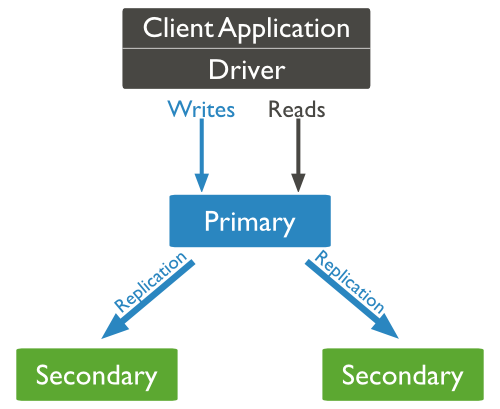
In the above structure diagram, clients read data from the primary node. When clients write data to the primary node, the primary node interacts with secondary nodes to ensure data consistency.
Replica Set Features:
- Cluster of N nodes
- Any node can act as the primary node
- All write operations are on the primary node
- Automatic failover
- Automatic recovery
MongoDB Replica Set Setup
In this tutorial, we use the same MongoDB to perform the MongoDB primary-secondary experiment. The steps are as follows:
1. Shut down the running MongoDB server.
Now we start MongoDB by specifying the --replSet option. The basic syntax format of --replSet is as follows:
mongod --port "PORT" --dbpath "YOUR_DB_DATA_PATH" --replSet "REPLICA_SET_INSTANCE_NAME"
Example
mongod --port 27017 --dbpath "D:\set up\mongodb\data" --replSet rs0
The above example starts a MongoDB instance named rs0 with port number 27017.
After startup, open a command prompt and connect to the MongoDB service.
In the MongoDB client, use the command rs.initiate() to start a new replica set.
We can use rs.conf() to view the replica set configuration.
Use the rs.status() command to view the replica set status.
Add Members to Replica Set
To add members to the replica set, we need to use multiple servers to start the MongoDB service. Enter the MongoDB client and use the rs.add() method to add members to the replica set.
Syntax
The basic syntax format of the rs.add() command is as follows:>rs.add(HOST_NAME:PORT)
Example
Suppose you have started a MongoDB service named mongod1.net with port number 27017. Use the rs.add() command in the client command window to add it to the replica set, as shown below:
>rs.add("mongod1.net:27017")
>
In MongoDB, you can only add a MongoDB service to a replica set through the primary node. You can use the command db.isMaster() to determine whether the currently running MongoDB service is the primary node.
MongoDB's replica set is different from the common primary-secondary setup. With primary-secondary, all services stop when the primary host goes down. With a replica set, when the primary host goes down, a secondary will take over as the primary node, so there is no downtime.
Other Extensions