MongoDB Backup (mongodump) and Restore (mongorestore)
MongoDB Data Backup
In MongoDB, we use the mongodump command to back up MongoDB data. This command can export all data to a specified directory.
The mongodump command can use parameters to specify the server to transfer the exported data to, as well as the amount of data to export.
Syntax
The syntax for the mongodump command script is as follows:
>mongodump -h dbhost -d dbname -o dbdirectory
-
-h:
The address of the server where MongoDB is located, for example: 127.0.0.1. You can also specify a port number: 127.0.0.1:27017
-
-d:
The database instance to back up, for example: test
-
-o:
The location where the backup data is stored, for example: c:\data\dump. This directory needs to be created in advance. After the backup is completed, the system automatically creates a test directory under the dump directory, and this directory stores the backup data of that database instance.
Example
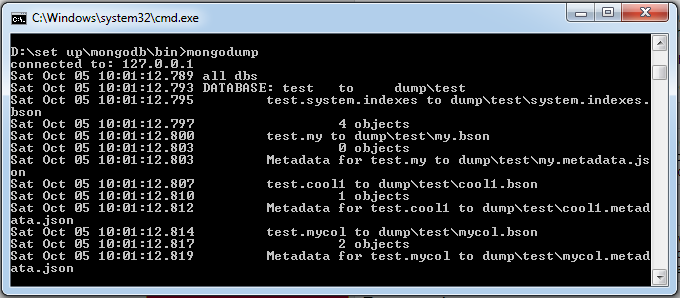
Start your mongod service locally using port 27017. Open a command prompt window, enter the bin directory of the MongoDB installation directory, and type the command mongodump:
>mongodump
After executing the above command, the client will connect to the MongoDB service at IP 127.0.0.1 and port 27017, and back up all data to the bin/dump/ directory. The command output is as follows:
The list of optional parameters for the mongodump command is as follows:
| Syntax | Description | Example |
|---|---|---|
| mongodump --host HOST_NAME --port PORT_NUMBER | This command will back up all MongoDB data. | mongodump --host example.com --port 27017 |
| mongodump --dbpath DB_PATH --out BACKUP_DIRECTORY | mongodump --dbpath /data/db/ --out /data/backup/ | |
| mongodump --collection COLLECTION --db DB_NAME | This command will back up the collections of the specified database. | mongodump --collection mycol --db test |
MongoDB Data Restore
MongoDB uses the mongorestore command to restore backed-up data.
Syntax
The syntax for the mongorestore command script is as follows:
>mongorestore -h <hostname><:port> -d dbname <path>
-
--host
<:port>, -h <:port>: The address of the server where MongoDB is located, default: localhost:27017
-
--db
, -d : The database instance to restore, for example: test. Of course, this name can be different from the one used during backup, such as test2.
-
--drop:
During restoration, it first deletes the current data, then restores the backup data. That is, after restoration, any data added or modified after the backup will be deleted. Use with caution!
-
<path>:
The last parameter of mongorestore sets the location of the backup data, for example: c:\data\dump\test.
You cannot specify both <path> and --dir options at the same time. --dir can also set the backup directory.
-
--dir:
Specify the backup directory
You cannot specify both <path> and --dir options at the same time.
Next, we execute the following command:
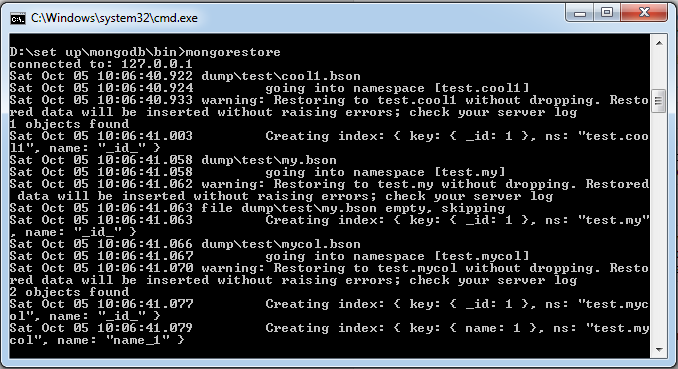
>mongorestore
After executing the above command, the output result is as follows: