Linux File Basic Attributes
The Linux system is a typical multi-user system; different users have different statuses and different permissions.
To protect the security of the system, the Linux system has different regulations on the permissions for different users to access the same file (including directory files).
In Linux, we usually use the following two commands to modify the owner user and permissions of a file or directory:
- chown (change owner): Modify the owner user and group.
- chmod (change mode): Modify user permissions.
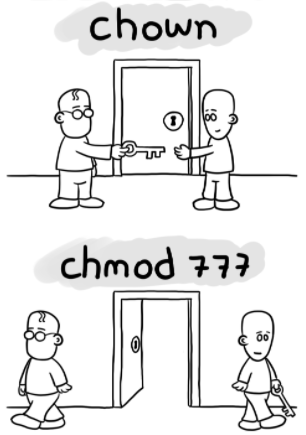
In the figure below, chown is used to authorize the user, and chmod is used to set the user's permission to open the door.
In Linux, we can usellorls –lcommand to display a file's attributes and the user and group the file belongs to, for example:
[root@www /]# ls -l
total 64
dr-xr-xr-x   2 root root 4096 Dec 14  2012 bin
dr-xr-xr-x   4 root root 4096 Apr 19  2012 boot
……
In the example,binThe first attribute of the file is represented bydindicates.dIn Linux, it represents that the file is a directory file.
In Linux, the first character represents whether the file is a directory, file, or link file, etc.
- When it isdthen it is a directory
- When it is-then it is a file;
- If it islthen it represents a link file;
- If it isbthen it represents a storage interface device (random access device) among device files;
- If it iscthen it represents a serial port device among device files, such as a keyboard or mouse (one-time read device).
In the following characters, groups of three are used, and all arerwxcombinations of the three parameters. Among them,rrepresents readable (read),wrepresents writable (write),xrepresents executable (execute). Note that the positions of these three permissions will not change. If there is no permission, a minus sign-only.
The attributes of each file are determined by the first 10 characters in the left part (as shown below).
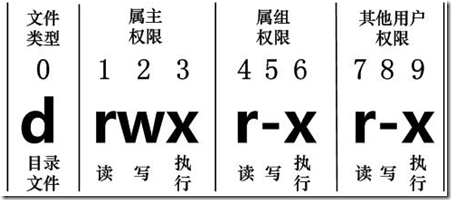
From left to right, use0-9these numbers to represent.
No.0The digit determines the file type, and the1-3digits determine the permissions that the owner (the file's owner) has on the file.
Bits 4-6 determine the permissions that the group (users in the same group as the owner) has on the file, and bits 7-9 determine the permissions that other users have on the file.Among them, the1、4、7digit indicates read permission. If usingrcharacter indicates, then there is read permission; if using-character indicates, then there is no read permission;
No.2、5、8digit indicates write permission. If usingwcharacter indicates, then there is write permission; if using-character indicates, then there is no write permission; the3、6、9digit indicates execute permission. If usingxcharacter indicates, then there is execute permission; if using-character indicates, then there is no execute permission.
Linux File Owner and Group
[root@www /]# ls -l
total 64
drwxr-xr-x 2 root  root  4096 Feb 15 14:46 cron
drwxr-xr-x 3 mysql mysql 4096 Apr 21  2014 mysql
……
For a file, it always has a specific owner, that is, the user who has ownership of the file.
At the same time, in the Linux system, users are classified by groups, and a user belongs to one or more groups.
Users other than the file owner can be further divided into group users in the same group as the file's group and other users.
Therefore, the Linux system specifies different file access permissions based on the file owner, users in the same group as the file owner, and other users.
In the above example, the mysql file is a directory file, both the owner and group are mysql. The owner has read, write, and execute permissions; other users in the same group as the owner have read and execute permissions; other users also have read and execute permissions.
For the root user, in general, file permissions do not apply to them.
Change File Attributes
1. chgrp: Change file group
Syntax:
chgrp [-R] 属组名 文件名
Parameter options
- -R: Recursively change the file group. That is, when changing the group of a directory file, if the-Rparameter is added, the group of all files under that directory will also be changed.
2. chown: Change the file owner (owner), and can also change the file group at the same time.
Syntax:
chown [–R] 所有者 文件名
chown [-R] 所有者:属组名 文件名
Enter the /root directory (~) and change the owner of install.log to the account bin:
[root@www ~] cd ~
[root@www ~]# chown bin install.log
[root@www ~]# ls -l
-rw-r--r--  1 bin  users 68495 Jun 25 08:53 install.log
Change the owner and group of install.log back to root:
[root@www ~]# chown root:root install.log
[root@www ~]# ls -l
-rw-r--r--  1 root root 68495 Jun 25 08:53 install.log
3. chmod: Change the 9 attributes of the file
There are two ways to set Linux file attributes: one is numeric, the other is symbolic.
The basic permissions of a Linux file are nine, namelyowner/group/othersEach of the three identities has its ownread/write/executepermissions.
First, review the data just mentioned above: the permission characters of the file are:-rwxrwxrwxThese nine permissions are grouped in threes! Among them, we can use numbers to represent each permission. The score comparison table for each permission is as follows:
- r:4
- w:2
- x:1
The scores of the three permissions (r/w/x) for each identity (owner/group/others) need to be added together. For example, when the permission is:-rwxrwx---The score is:
- owner = rwx = 4+2+1 = 7
- group = rwx = 4+2+1 = 7
- others= --- = 0+0+0 = 0
So when we set permission changes later, the permission number of the file is770. The syntax of the chmod command for changing permissions is as follows:
chmod [-R] xyz 文件或目录
Options and parameters:
- xyz: This is the numeric permission attribute just mentioned, which is therwxsum of the attribute values.
- -R: Perform a continuous recursive change, and all files in subdirectories will also be changed.
For example, if you want to.bashrcset all permissions of this file to enabled, the command is as follows:
[root@www ~]# ls -al .bashrc
-rw-r--r--  1 root root 395 Jul  4 11:45 .bashrc
[root@www ~]# chmod 777 .bashrc
[root@www ~]# ls -al .bashrc
-rwxrwxrwx  1 root root 395 Jul  4 11:45 .bashrc
What if you want to change the permissions to-rwxr-xr--? Then the permission score becomes [4+2+1][4+0+1][4+0+0]=754.
Symbolic type changes file permissions
There is another way to change permissions. From the previous introduction, we can find that there are basically nine permissions, namely:
- user: user
- group: group
- others: others
Then we can useu, g, oto represent the permissions of the three identities.
In addition,arepresentsall, that is, all identities. The read and write permissions can be written asr, w, x, which can be viewed using the table below:
| chmod | u g o a |
+ (add) - (remove) = (set) |
r w x | File or directory |
If we need to set the file permissions to-rwxr-xr--, we can usechmod u=rwx,g=rx,o=r filenameto set:
#  touch test1    // 创建 test1 文件
# ls -al test1    // 查看 test1 默认权限
-rw-r--r-- 1 root root 0 Nov 15 10:32 test1
# chmod u=rwx,g=rx,o=r  test1    // 修改 test1 权限
# ls -al test1
-rwxr-xr-- 1 root root 0 Nov 15 10:32 test1
What if you want to remove permissions without changing other existing permissions? For example, to remove the execute permission for everyone, then:
#  chmod  a-x test1
# ls -al test1
-rw-r--r-- 1 root root 0 Nov 15 10:32 test1