Linux chmod command
 Linux Command Encyclopedia
Linux chmod (English full spelling: change mode) command is a command that controls user permissions to files.
chmod (change mode) is a command in Linux systems used to change the permissions of files or directories. It controls the access permissions of the file owner, the owning group, and other users to the file.
Only the file owner and the superuser can modify the permissions of a file or directory.
Linux/Unix file access permissions are divided into three levels: file owner (Owner), user group (Group), and other users (Other Users).
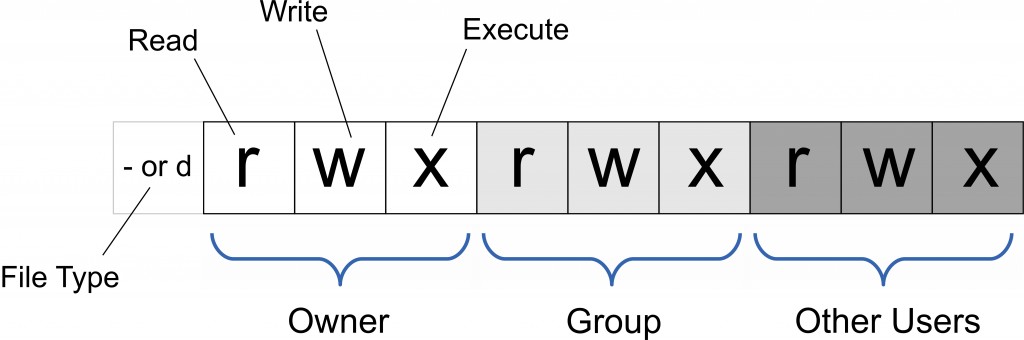
You can use absolute mode (octal numeric mode) and symbolic mode to specify file permissions.
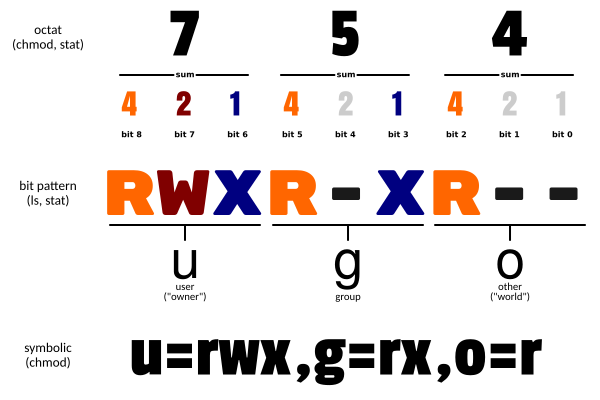
Permission to use: All users
Syntax
chmod [选项] 权限模式 文件...
chmod [选项] --reference=参考文件 文件...
Common Options
- -c : Only display the change action if the file permission has actually been changed
- -f : Do not display error messages if the file permissions cannot be changed
- -v : Display detailed information about permission changes
- -R : Apply the same permission changes to all files and subdirectories under the current directory (that is, change them one by one recursively)
- --help : Display help information
- --version : Display version
mode : Permission setting string, the format is as follows:
Permission Modes
1. Symbolic mode (ugoa+/- permission)
[ugoa...][[+-=][rwxX]...][,...]
Where:
- u represents the owner of the file, g represents those who belong to the same group as the file owner, o represents others, and a represents all of the three.
- + means add permission, - means remove permission, = means set permission uniquely.
- r means readable, w means writable, x means executable, X means only when the file is a subdirectory or the file has already been set as executable.
In symbolic mode, multiple items can be set: who (user type), operator, and permission. The settings of each item can be separated by commas.
The chmod command will modify the access permissions to the file for the user types specified by who. The user type is indicated by one or more letters in the who position, as shown in the who symbolic mode table:
| who | User type | Description |
|---|---|---|
| u | user | File owner |
| g | group | Group of the file owner |
| o | others | All other users |
| a | all | All users, equivalent tougo |
Symbolic mode table for operator:
| Operator | Description |
|---|---|
| + | Add permission to the specified user type |
| - | Remove permission from the specified user type |
| = | Set permissions for the specified user type, i.e., reset all permissions of the user type |
Permission types:
| Mode | Name | Description |
|---|---|---|
| r | read | Set as readable permission |
| w | write | Set as writable permission |
| x | Execute permission | Set as executable permission |
| X | Special execute permission | Only set the file permission as executable when the file is a directory file, or when other types of users have execute permission |
| s | setuid/gid | When the file is executed, set the file's setuid or setgid permission according to the user type specified by the who parameter |
| t | Sticky bit | Set the sticky bit. Only the superuser can set this bit, and only the file owner u can use this bit. |
2. Octal syntax
The chmod command can use octal numbers to specify permissions.
| Number | Permission |
|---|---|
| 4 | Read (r) |
| 2 | Write (w) |
| 1 | Execute (x) |
Combination:
- Owner permission (first digit)
- Group permission (second digit)
- Other user permission (third digit)
Common combinations:
- 755:
rwxr-xr-x - 644:
rw-r--r-- - 700:
rwx------
The permission bits of a file or directory are controlled by 9 permission bits, each group of three bits represents the read, write, and execute permissions of the file owner (User), the read, write, and execute of the group (Group), and the read, write, and execute of other users (Other).
| # | Permission | rwx | Binary |
|---|---|---|---|
| 7 | Read + Write + Execute | rwx | 111 |
| 6 | Read + Write | rw- | 110 |
| 5 | Read + Execute | r-x | 101 |
| 4 | Read-only | r-- | 100 |
| 3 | Write + Execute | -wx | 011 |
| 2 | Write-only | -w- | 010 |
| 1 | Execute-only | --x | 001 |
| 0 | None | --- | 000 |
For example, 765 would be interpreted as follows:
- The owner's permission is expressed in numbers: the sum of the digits of the owner's three permission bits. For example, rwx means 4+2+1, which should be 7.
- The group's permission is expressed in numbers: the sum of the digits of the group's permission bits. For example, rw- means 4+2+0, which should be 6.
- Other users' permission is expressed in numbers: the sum of the digits of the other users' permission bits. For example, r-x means 4+0+1, which should be 5.
Examples
Set file1.txt to be readable by everyone:
chmod ugo+r file1.txt
Set file1.txt to be readable by everyone:
chmod a+r file1.txt
Set file1.txt and file2.txt so that the file owner and those in the same group can write, but others cannot write:
chmod ug+w,o-w file1.txt file2.txt
Add execute permission for the owner of the ex1.py file:
chmod u+x ex1.py
Set all files and subdirectories in the current directory to be readable by anyone:
chmod -R a+r *
In addition, chmod can also use numbers to represent permissions, e.g.:
chmod 777 file
The syntax is:
chmod abc file
Where a, b, c are each a number, representing the permissions of User, Group, and Other respectively.
r=4,w=2,x=1
- For rwx attributes, 4+2+1=7;
- For rw- attributes, 4+2=6;
- For r-x attributes, 4+1=5.
chmod a=rwx file
and
chmod 777 file
The effect is the same
chmod ug=rwx,o=x file
and
chmod 771 file
The effect is the same
If usingchmod 4755 filenameThis can give the program root privileges.
More Notes
| Command | Description |
|---|---|
| chmod a+r file | Add read permission to all users for file |
| chmod a-x file | Remove execute permission from all users for file |
| chmod a+rw file | Add read and write permissions to all users for file |
| chmod +rwx file | Add read, write, and execute permissions to all users for file |
| chmod u=rw,go= file | Set read and write permission for the owner of file, and clear all permissions for the group and other users on file (a space represents no permission) |
| chmod -R u+r,go-r docs | Add read permission for the user to all files in the directory docs and its subdirectory hierarchy, and remove read permission for the group and other users |
| chmod 664 file | Set read and write permission for the owner and group of file, and set read permission for other users |
| chmod 0755 file | Equivalent tou=rwx (4+2+1),go=rx (4+1 & 4+1)。0No special mode. |
| chmod 4755 file | 4The set-user-ID bit is set, and the rest is equivalent to u=rwx (4+2+1), go=rx (4+1 & 4+1). |
| find path/ -type d -exec chmod a-x {} \; | Remove execute permission for all users on path/ and all its directories (not including files); use '-type f' to match files. |
| find path/ -type d -exec chmod a+x {} \; | Allow all users to browse or pass through the directory path/ |