Linux wget Command
 Complete Guide to Linux Commands
What is the wget command?
wget is a powerful non-interactive network download tool in the Linux system. Its name comes from the combination of "World Wide Web" and "get". It supports downloading files via HTTP, HTTPS, and FTP protocols, and has practical features such as resumable downloads and recursive downloads.
Unlike browser downloads or the curl command, the main features of wget are:
- Non-interactive: Can run in the background without user intervention
- Strong stability: Can automatically retry when network fluctuates
- Rich in features: Supports multiple download scenarios and advanced options
wget Basic Syntax
wget [选项] [URL]
Simplest Download Example
Example
This command downloads the file from the specified URL to the current directory.
Detailed Explanation of Common Options and Parameters
Download Control Options
| Option | Description | Example |
|---|---|---|
-O <文件名> |
Specify the saved file name | wget -O myfile.zip https://example.com/file.zip |
-P <目录> |
Specify the download directory | wget -P ~/downloads https://example.com/file.zip |
-c |
Resumable download | wget -c https://example.com/bigfile.iso |
-b |
Background download | wget -b https://example.com/largefile.mp4 |
Connection Settings Options
| Option | Description | Example |
|---|---|---|
--limit-rate=<速度> |
Speed-limited download | wget --limit-rate=200k https://example.com/file.iso |
-t <次数> |
Set the number of retries | wget -t 5 https://example.com/unstable.file |
--timeout=<秒> |
Set the timeout duration | wget --timeout=30 https://example.com/slow.file |
Recursive Download Options
| Option | Description | Example |
|---|---|---|
-r |
Recursive download | wget -r https://example.com/directory/ |
-l <深度> |
Set the recursion depth | wget -r -l 2 https://example.com/ |
-np |
Do not go back to the parent directory | wget -r -np https://example.com/path/ |
Practical Examples and Application Scenarios
Example 1: Download a Single File and Rename It
Example
Description:
- Download the Ubuntu 22.04 image from the specified URL
- Use
-Ooption to save the file as a custom namelinux_distro.iso
Example 2: Download Large Files with Speed Limit
Example
Description:
--limit-rate=500kLimit the download speed to 500KB/s-cSupports resumable downloads; you can continue downloading after a network interruption
Example 3: Recursively Download an Entire Website
Example
Description:
-rEnable recursive download-l 5Set the maximum recursion depth to 5 levels--convert-linksConvert links for local browsing--wait=2Interval of 2 seconds between downloads to reduce server load
Advanced Tips and Precautions
1. Batch Download Files
Create a text file containing multiple URLsurls.txt, then use:
Example
2. Download FTP Resources
Example
Note: The password will be displayed in the command history. It is recommended to use--ftp-userand--ftp-passwordoption to set it separately.
3. Common Problem Solutions
Problem 1: Certificate error
Example
Problem 2: Download denied (403 Forbidden)
Example
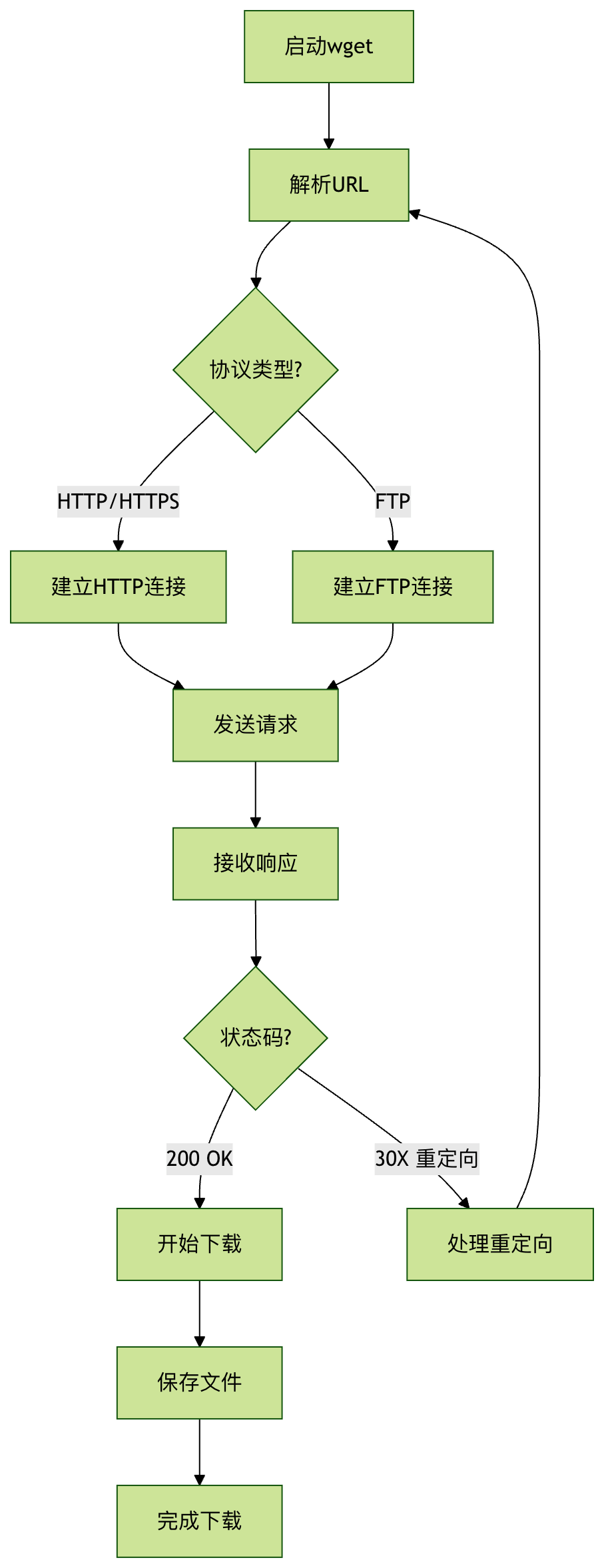
Visualization: wget Workflow
Practical Exercises
Try downloading the Linux kernel source code:
wget https://cdn.kernel.org/pub/linux/kernel/v6.x/linux-6.5.5.tar.xz
Use the resumable download feature to download a large file. After interruption, reconnect and continue downloading.
Create a text file containing multiple image URLs, and use the batch download feature to fetch all images.
Summary
wget is an indispensable download tool in the Linux system. Through this article, you have learned:
- The basic syntax and common options of wget
- Download methods for various practical application scenarios
- Advanced tips and problem-solving solutions
- Implementation of recursive downloads and batch downloads
Mastering the wget command will greatly improve your efficiency in handling network resources in the Linux environment.
Other Extensions