Linux route Command
 Linux Command Reference
1. Overview of the route Command
The route command is a powerful tool in Linux systems for viewing and manipulating the IP routing table. As a basic command for network configuration, it allows administrators to:
- Display current routing table information
- Add/delete static routes
- Modify existing routing rules
- Manage the transmission path of network packets
Basic Syntax
route [选项] [操作] [目标] [命令参数]
2. Basic Concepts of the Routing Table
1. What is a Routing Table
The routing table is a data structure maintained by the operating system kernel that determines how network packets are transmitted from the source address to the destination address. It can be compared to:
"An urban traffic navigation system: when you want to go to a destination, the system tells you which road to take is the fastest and most efficient"
2. Key Fields of the Routing Table
Viaroute -nWhen viewing the routing table, the following important columns are displayed:
| Column Name | Description | Example Value |
|---|---|---|
| Destination | Destination network or host | 192.168.1.0 |
| Gateway | Next-hop gateway | 192.168.1.1 |
| Genmask | Network mask | 255.255.255.0 |
| Flags | Route flags | U (route is enabled) |
| Metric | Route cost | 0 |
| Iface | Outgoing interface | eth0 |
3. Common Operations of the route Command
1. View the Routing Table
Example
route -n
# Example output:
Kernel IP routing table
Destination Gateway Genmask Flags Metric Ref Use Iface
0.0.0.0 192.168.1.1 0.0.0.0 UG 0 0 0 eth0
192.168.1.0 0.0.0.0 255.255.255.0 U 0 0 0 eth0
2. Add a Route
Example
route add -host 192.168.1.100 dev eth0
# Add a route to a network
route add -net 192.168.2.0 netmask 255.255.255.0 gw 192.168.1.1
# Add a default gateway
route add default gw 192.168.1.1
3. Delete a Route
Example
route del -net 192.168.2.0 netmask 255.255.255.0
# Delete the default gateway
route del default gw 192.168.1.1
4. Detailed Explanation of Command Options
The route command supports the following common options:
| Option | Description |
|---|---|
| -n | Display addresses in numeric form (do not resolve hostnames) |
| -e | Display the routing table using netstat format |
| -v | Display detailed operation information |
| -A family | Specify the address family (inet, inet6, etc.) |
| -F | Display the kernel FIB routing table |
| -C | Display the route cache |
Special command parameters:
add: Add a routedel: Delete a route-host: Operation targets a specific host-net: Operation targets an entire networkgw: Specify the gatewaydev: Specify the network interface
5. Practical Application Scenarios
Scenario 1: Multi-NIC Route Configuration
When a server has multiple network interfaces, you need to specify the egress for different networks:
Example
route add -net 10.0.0.0 netmask 255.255.255.0 dev eth1
Scenario 2: VPN Route Settings
After connecting to a VPN, you need to add specific routes:
Example
route add -net 172.16.0.0 netmask 255.240.0.0 dev tun0
Scenario 3: Temporary Route Testing
Example
route add -host 8.8.8.8 gw 192.168.1.254
ping 8.8.8.8 # Test whether the route is effective
route del -host 8.8.8.8 # Delete after testing is complete
6. Persistent Route Configuration
Routes added via the route command will be lost after a reboot. To make them take effect permanently:
1. Debian/Ubuntu Systems
Edit/etc/network/interfaces:
Example
iface eth0 inet static
address 192.168.1.100
netmask 255.255.255.0
gateway 192.168.1.1
up route add -net 10.0.0.0 netmask 255.0.0.0 gw 192.168.1.2
2. RHEL/CentOS Systems
Create a route configuration file/etc/sysconfig/network-scripts/route-eth0:
10.0.0.0/8 via 192.168.1.2
7. Troubleshooting Common Issues
1. Steps to Check When a Route Is Not Effective
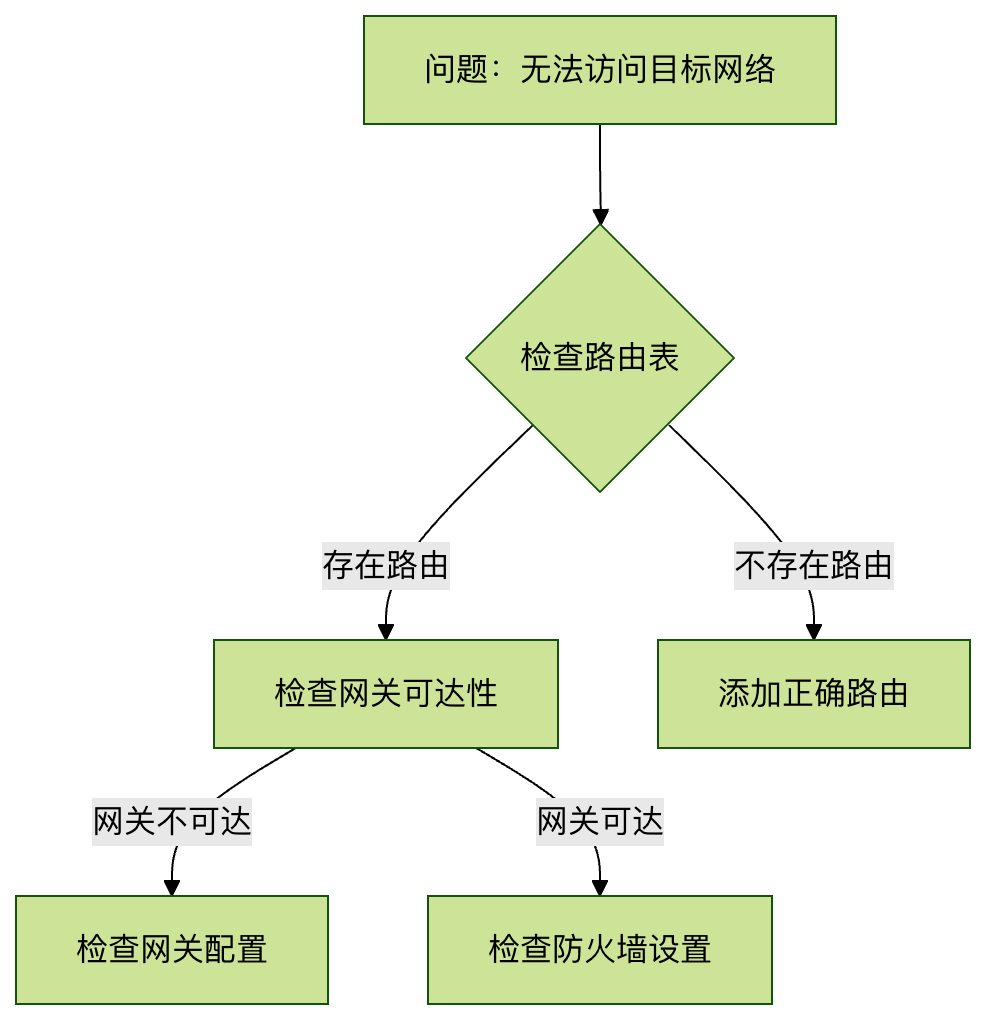
2. Typical Error Resolution
Error 1:"SIOCADDRT: Network is unreachable"
- Cause: The gateway is not within the direct broadcast domain of the local network
- Solution: First make sure you can ping the gateway address
Error 2:"RTNETLINK answers: File exists"
- Cause: Attempting to add an already existing route
- Solution: Delete the old route first and then add it, or use the
replaceoption
8. Alternative Command: ip route
Modern Linux systems recommend using theip routecommand:
Example
ip route show
# Add a route
ip route add 10.0.0.0/8 via 192.168.1.2
# Delete a route
ip route del 10.0.0.0/8
Althoughip routeis more powerful, but theroutecommand is still widely used because it is simple and intuitive.
Through this guide, you should have mastered the core usage of the route command. It is recommended to practice these commands more in a real environment and observe the impact of route changes on network connections. When encountering complex routing problems, you can combine them withtracerouteandpingand other tools for comprehensive diagnosis.