ASP.NET MVC - Internet Application
In order to learn ASP.NET MVC, we will build an Internet application.
Part 1: Create the application.
What will we build
We will build an Internet application that supports adding, editing, deleting, and listing database stored information.
What will we do
Visual Web Developer provides different templates for building web applications.
We will useVisual Web Developerto create a ... withHTML5 markupempty MVC Internet application.
Once this empty Internet application is created, we will gradually add code to the application until it is complete. We will useC#as the programming language, and use the latestRazorserver code markup.
Along the way, we will explain the content, code, and all components of this application.
Create Web Application
If you have Visual Web Developer installed, launch Visual Web Developer and selectNew Projectto create a new project. Otherwise, you can only learn by reading the tutorial.
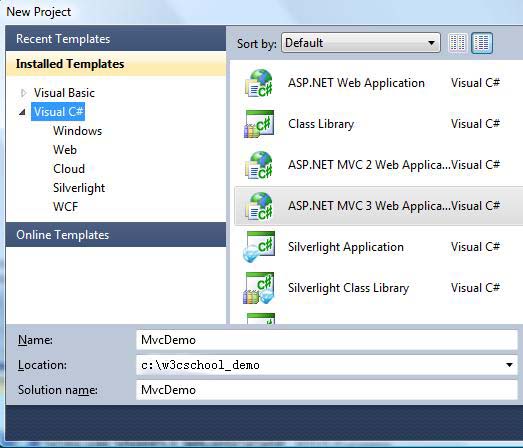
In the New Project dialog:
- OpenVisual C#Templates
- Select templateASP.NET MVC 3 Web Application
- Set the project name toMvcDemo
- Set the disk location, for examplec:\example_demo
- ClickOK
When the New Project dialog opens:
- SelectInternet ApplicationTemplates
- SelectRazor Engine(Razor engine)
- SelectHTML5 Markup(HTML5 markup)
- ClickOK
Visual Studio Express will create a project similar to the one shown below:
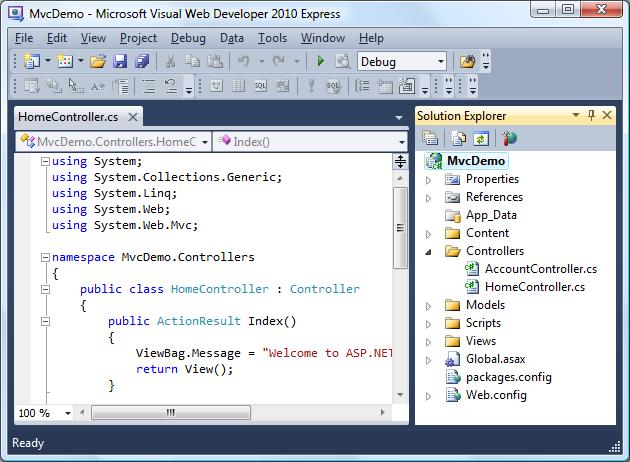
We will explore the files and folders in the next chapter of this tutorial.
Other extensions