Keywords: sequential block, parallel block, nested block, named block, disable
Verilog statement blocks provide a mechanism for grouping two or more statements into a structure that is syntactically equivalent to a single statement. There are mainly two types: sequential blocks and parallel blocks.
Sequential block
A sequential block is represented by the keywords begin and end.
Statements in a sequential block are executed one by one. Of course, non-blocking assignments are an exception.
The delay of each statement in a sequential block is always related to the execution time of the statement preceding it.
In the simulations before this section, the blocking assignments in initial blocks are all instances of sequential blocks.
Parallel block
A parallel block is represented by the keywords fork and join.
Statements in a parallel block are executed in parallel, even if they are blocking assignments.
The delay of each statement in a parallel block is related to the time when the block statement begins execution.
The difference between sequential blocks and parallel blocks is obvious; the following simulation illustrates this.
The simulation code is as follows:
Example
module test ;
reg [3:0] ai_sequen, bi_sequen ;
reg [3:0] ai_paral, bi_paral ;
reg [3:0] ai_nonblk, bi_nonblk ;
//============================================================//
//(1)Sequence block
initial begin
#5 ai_sequen = 4'd5 ; //at 5ns
#5 bi_sequen = 4'd8 ; //at 10ns
end
//(2)fork block
initial fork
#5 ai_paral = 4'd5 ; //at 5ns
#5 bi_paral = 4'd8 ; //at 5ns
join
//(3)non-block block
initial fork
#5 ai_nonblk <= 4'd5 ; //at 5ns
#5 bi_nonblk <= 4'd8 ; //at 5ns
join
endmodule
The simulation results are as follows:
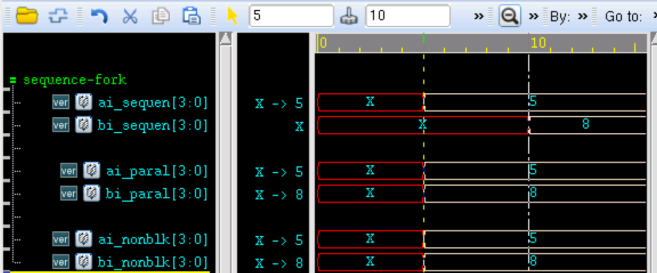
As shown in the figure, the sequential block executes sequentially, and at 10ns, signal bi_sequen is only assigned a value of 8.In the parallel block, the assignments of ai_paral and bi_paral are executed simultaneously, so both are assigned at 5ns.
Non-blocking assignments can also achieve the same assignment effect as a parallel block.
Nested block
Sequential blocks and parallel blocks can also be nested.
The simulation code is as follows:
Example
module test ;
reg [3:0] ai_sequen2, bi_sequen2 ;
reg [3:0] ai_paral2, bi_paral2 ;
initial begin
ai_sequen2 = 4'd5 ; //at 0ns
fork
#10 ai_paral2 = 4'd5 ; //at 10ns
#15 bi_paral2 = 4'd8 ; //at 15ns
join
#20 bi_sequen2 = 4'd8 ; //at 35ns
end
endmodule
The simulation results are as follows:
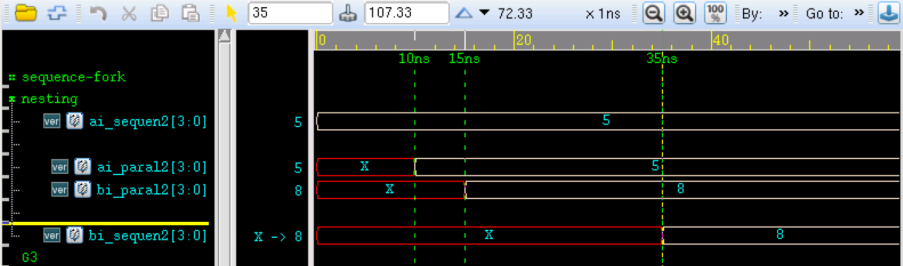
Statements within the parallel block are executed in parallel, so signals ai_paral2 and bi_paral2 are assigned at 10ns and 15ns respectively. The longest execution time in the parallel block is 15ns, so signal bi_sequen2 in the sequential block is assigned at 35ns.
Named block
We can name block statement structures.
Local variables can be declared in a named block, and variables can be accessed through hierarchical name references.
The simulation code is as follows:
Example
module test;
initial begin: example //Name the named block example; the semicolon cannot be omitted
integer i ; //This variable can be used by other modules via test.example.i
i = 0 ;
forever begin
#10 i = i + 10 ;
end
end
reg stop_flag ;
initial stop_flag = 1'b0 ;
always begin : detect_stop
if ( test.example.i == 100) begin //i is incremented 10 times, i.e., simulation stops at 100ns
$display("Now you can stop the simulation!!!");
stop_flag = 1'b1 ;
end
#10 ;
end
endmodule
The simulation results are as follows:

A named block can also be disabled, represented by the keyword disable.
disable can terminate the execution of a named block and can be used to exit a loop, handle errors, etc.
It is similar to break in C language, but break can only exit the current loop, while disable can disable any named block in the design.
The simulation code is as follows:
Example
module test;
initial begin: example_d //Name the named block example_d
integer i_d ;
i_d = 0 ;
while(i_d<=100) begin: example_d2
# 10 ;
if (i_d >= 50) begin //Stop incrementing after 5 increments
disable example_d3.clk_gen ;//Stop external block: clk_gen
disable example_d2 ; //Stop current block: example_d2
end
i_d = i_d + 10 ;
end
end
reg clk ;
initial begin: example_d3
while (1) begin: clk_gen //Clock generation module
clk=1 ; #10 ;
clk=0 ; #10 ;
end
end
endmodule
The simulation results are as follows:
As can be seen from the figure, signal i_d stops incrementing after reaching 50, and the clk clock is no longer generated thereafter.
It can be seen that disable exits the current while block.

It should be noted that when disable is used in an always or forever block, it can only exit the current iteration; the next time, the statement will still execute in the always or forever block. Because always blocks and forever blocks execute continuously, disable at this point is somewhat similar to the continue function in C language.
Source code download
Download