Keywords: if, selector
Conditional Statements
Conditional (if) statements are used to control whether execution statements are executed based on condition evaluation.
Conditional statements are declared using the keywords if and else, and the condition expression must be enclosed in parentheses.
The usage structure of conditional statements is described as follows:
if (condition1)       true_statement1 ;
else if (condition2)        true_statement2 ;
else if (condition3)        true_statement3 ;
else                      default_statement ;
- When the if statement is executed, if condition1 is true, true_statement1 is executed; if condition1 is false and condition2 is true, true_statement2 is executed; and so on.
- The else if and else structures can be omitted; that is, a single if condition check and one set of execution statements, true_statement1, can form an execution process.
- Multiple else if clauses can be chained, not limited to just 1 or 2.
- Execution statements such as true_statement1 can be a single statement or multiple statements. If there are multiple execution statements, they need to be enclosed with the begin and end keywords.
The following code implements a 4-to-1 selector.
Example
input [1:0] sel ,
input [1:0] p0 ,
input [1:0] p1 ,
input [1:0] p2 ,
input [1:0] p3 ,
output [1:0] sout);
reg [1:0] sout_t ;
always @(*) begin
if (sel == 2'b00)
sout_t = p0 ;
else if (sel == 2'b01)
sout_t = p1 ;
else if (sel == 2'b10)
sout_t = p2 ;
else
sout_t = p3 ;
end
assign sout = sout_t ;
endmodule
The testbench code is as follows:
Example
module test ;
reg [1:0] sel ;
wire [1:0] sout ;
initial begin
sel = 0 ;
#10 sel = 3 ;
#10 sel = 1 ;
#10 sel = 0 ;
#10 sel = 2 ;
end
mux4to1 u_mux4to1 (
.sel (sel),
.p0 (2'b00), //path0 are assigned to 0
.p1 (2'b01), //path1 are assigned to 1
.p2 (2'b10), //path2 are assigned to 2
.p3 (2'b11), //path3 are assigned to 3
.sout (sout));
//finish the simulation
always begin
#100;
if ($time >= 1000) $finish ;
end
endmodule
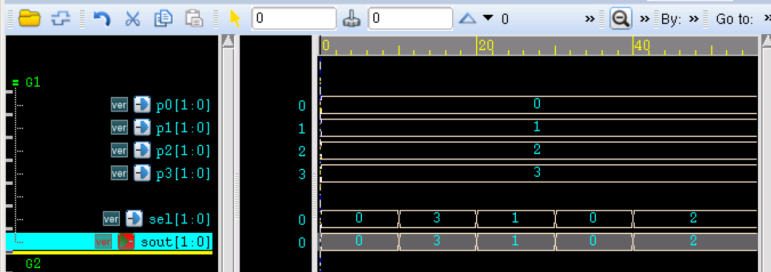
The simulation results are as follows.
It can be seen from the figure that the output signal matches the states of the select signal and input signal.
In the example, each if condition executes only one statement, so the begin and end keywords are not used. However, in an if-if-else form, even if there is only one execution statement, not using begin and end can cause ambiguity.
For example, in the following code, although the formatting distinguishes it, which if condition the else corresponds to is ambiguous.
Example
if(sel == 2'b1)
sout = p1s ;
else
sout = p0 ;
Of course, compilers generally follow the nearest-match principle, making else correspond to the nearest if (the second if in the example).
But obviously this style of writing is non-standard and unsafe.
Therefore, it is a good habit to add the begin and end keywords in conditional statements.
For example, if the above code is slightly modified, there will be no more ambiguity in writing.
Example
if(sel == 2'b1) begin
sout = p1s ;
end
else begin
sout = p0 ;
end
end
Source Code Download
Download