Keywords: while, for, repeat, forever
Verilog loop statements have 4 types: while, for, repeat, and forever loops. Loop statements can only be used in always or initial blocks, but can contain delay expressions.
while Loop
The syntax format of the while loop is as follows:
while (condition) begin
    …
end
The while loop terminates when condition is false.
If condition is already false when the while loop is entered, the loop statement will not execute even once.
Of course, when there is only one execution statement, the keywords begin and end can be omitted.
When the code below executes, counter runs 11 times.
Example
module test ;
reg [3:0] counter ;
initial begin
counter = 'b0 ;
while (counter<=10) begin
#10 ;
counter = counter + 1'b1 ;
end
end
//stop the simulation
always begin
#10 ; if ($time >= 1000) $finish ;
end
endmodule
The simulation result is as follows:

for Loop
The syntax format of the for loop is as follows:
for(initial_assignment; condition ; step_assignment)  begin
    …
end
initial_assignment is the initial condition.
condition is the termination condition; when condition is false, the loop exits immediately.
step_assignment is a procedural assignment statement that changes the control variable, usually incrementing or decrementing the loop variable count.
Generally speaking, because processes such as the initial condition and increment operation are already included in the for loop, the for loop syntax is more compact than while, but it is not always possible to use a for loop instead of a while loop.
The following for loop example achieves the same effect as the while loop example. Note that i = i + 1 cannot be written as i++ like in C language, and i = i -1 cannot be written as i -- either.
Example
integer i ;
reg [3:0] counter2 ;
initial begin
counter2 = 'b0 ;
for (i=0; i<=10; i=i+1) begin
#10 ;
counter2 = counter2 + 1'b1 ;
end
end
repeat Loop
The syntax format of the repeat loop is as follows:
repeat (loop_times) begin
    …
end
The function of repeat is to execute a loop a fixed number of times. It cannot use a logical expression to determine whether the loop should continue, as a while loop does. The number of repeat loops must be a constant, variable, or signal. If the loop count is a variable signal, the loop count is the value of the variable signal when the repeat loop starts executing. Even if the value of the variable signal represented by the loop count changes during execution, the number of times repeat executes will not change.
The following repeat loop example achieves the same effect as the while loop example.
Example
reg [3:0] counter3 ;
initial begin
counter3 = 'b0 ;
repeat (11) begin // repeat 11 times
#10 ;
counter3 = counter3 + 1'b1 ;
end
end
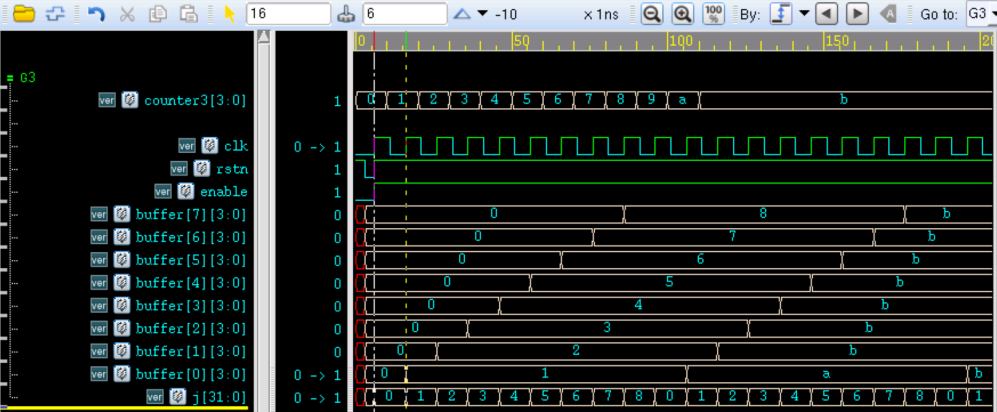
The following repeat loop example implements the function of continuously storing 8 data items:
Example
j = 0 ;
if (!rstn) begin
repeat (8) begin
buffer[j] <= 'b0 ; // assignment without delay, i.e., assign all to 0 at the same time
j = j + 1 ;
end
end
else if (enable) begin
repeat (8) begin
@(posedge clk) buffer[j] <= counter3 ; // assign at the next rising edge of clk
j = j + 1 ;
end
end
end
The simulation result is shown in the figure below.
It can be seen from the figure that when rstn is pulled high, the 8 vectors of buffer are assigned 0 at the same time.
After the second clock cycle, buffer is sequentially assigned by counter3, realizing the function of continuously storing 8 data items.
forever Loop
The syntax format of the forever loop is as follows:
forever begin
    …
end
The forever statement represents a permanent loop. It does not contain any conditional expression. Once executed, it continues indefinitely. The system function $finish can exit the forever loop.
forever is equivalent to while(1).
Usually, the forever loop is used together with timing control structures.
For example, use the forever statement to generate a clock:
Example
initial begin
clk = 0 ;
forever begin
clk = ~clk ;
#5 ;
end
end
For example, use the forever statement to implement a clock-edge-controlled register-to-register data transfer function:
Example
reg data_in, data_temp ;
initial begin
forever @(posedge clk) data_temp = data_in ;
end
Source Code Download
Download