Python Template Method Pattern
The Template Method Pattern is a behavioral design pattern that defines the skeleton of an algorithm in an operation, deferring some steps to subclasses. It allows subclasses to redefine certain steps of an algorithm without changing the algorithm's structure.
In simple terms, it's like a cooking recipe: the recipe specifies the order of steps (washing vegetables, chopping, stir-frying, plating), but how exactly to wash, chop, and stir-fry can be implemented by different chefs according to their own style.
Why do we need the Template Method Pattern?
Code Reuse
The Template Method Pattern moves invariant behavior into the superclass, avoiding code duplication in subclasses. Multiple subclasses can share the algorithm structure defined by the same template method.
Extensibility
Subclasses can extend or modify part of the algorithm's behavior by overriding hook methods or concrete step methods, without changing the overall structure of the algorithm.
Inversion of Control
The parent class controls the execution flow of the algorithm, and subclasses only need to focus on the specific steps they need to implement, realizing the "Hollywood Principle" — "Don't call us, we'll call you."
Structure of the Template Method Pattern
Let's understand the structure of the Template Method Pattern through a class diagram:
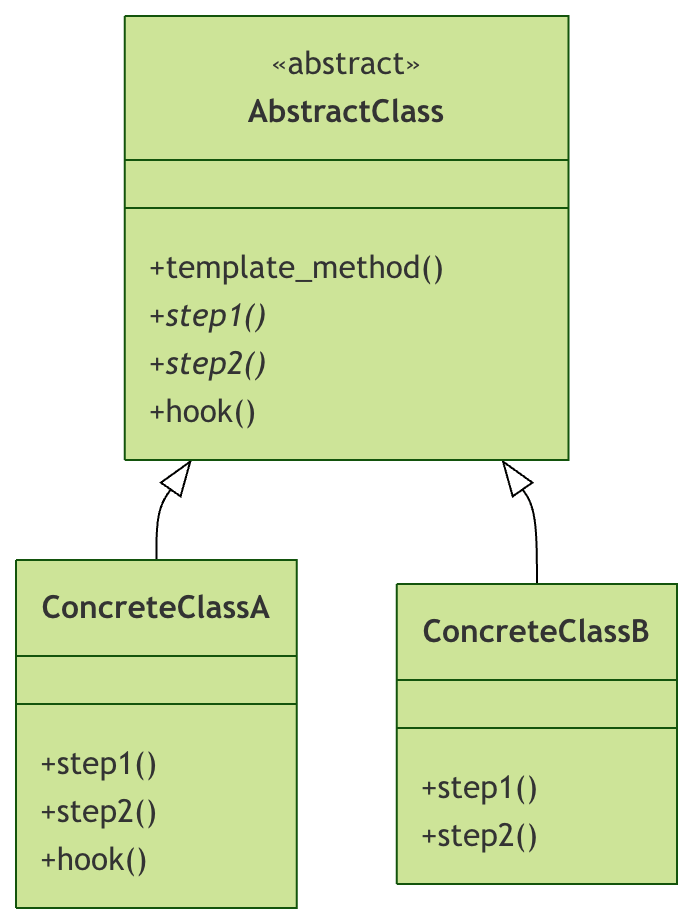
Core Component Description
| Component | Responsibility | Description |
|---|---|---|
| AbstractClass | Define the algorithm skeleton | Contains template method and abstract step methods |
| ConcreteClass | Implement concrete steps | Implement abstract methods defined by the parent class |
| template_method | Template Method | Defines the invariant parts of the algorithm |
| step1, step2 | Abstract Method | Specific steps that need to be implemented by subclasses |
| hook | Hook Method | Optional step; subclasses may choose whether to override |
Basic Syntax and Implementation
Definition of the Abstract Base Class
Example
class AbstractClass(ABC):
"""Abstract base class of the Template Method Pattern"""
def template_method(self):
"""Template method - defines the algorithm skeleton"""
self.step1()
self.step2()
self.hook()
self.step3()
@abstractmethod
def step1(self):
"""Abstract method 1 - must be implemented by subclasses"""
pass
@abstractmethod
def step2(self):
"""Abstract method 2 - must be implemented by subclasses"""
pass
def step3(self):
"""Concrete method - has a default implementation"""
print("Execute step 3 - default implementation")
def hook(self):
"""Hook method - optional step; subclasses may choose to override"""
print("Execute hook method - default does nothing")
Implementation of Concrete Subclasses
Example
"""Concrete implementation class A"""
def step1(self):
print("ConcreteClassA - executing step 1")
def step2(self):
print("ConcreteClassA - executing step 2")
def hook(self):
print("ConcreteClassA - overriding hook method to add extra functionality")
class ConcreteClassB(AbstractClass):
"""Concrete implementation class B"""
def step1(self):
print("ConcreteClassB - executing step 1")
def step2(self):
print("ConcreteClassB - executing step 2")
# Do not override the hook method; use the default implementation
Real-world Application Examples
Let's gain a deeper understanding of the Template Method Pattern through several practical examples.
Example 1: Data Processing Template
Example
import json
import csv
class DataProcessor(ABC):
"""Data processing template"""
def process_data(self, input_file, output_file):
"""Data processing template method"""
print(f"Start processing data: {input_file} -> {output_file}")
# Read data
data = self.read_data(input_file)
print(f"Read {len(data)} records")
# Transform data
transformed_data = self.transform_data(data)
print("Data transformation complete")
# Save data
self.save_data(transformed_data, output_file)
print("Data saving complete")
# Cleanup
self.cleanup()
@abstractmethod
def read_data(self, file_path):
"""Read data - abstract method"""
pass
@abstractmethod
def transform_data(self, data):
"""Transform data - abstract method"""
pass
def save_data(self, data, file_path):
"""Save data - concrete method"""
with open(file_path, 'w', encoding='utf-8') as f:
if isinstance(data, list):
for item in data:
f.write(str(item) + '\n')
else:
f.write(str(data))
def cleanup(self):
"""Cleanup - hook method"""
print("Cleanup complete")
class JSONProcessor(DataProcessor):
"""JSON data processor"""
def read_data(self, file_path):
with open(file_path, 'r', encoding='utf-8') as f:
return json.load(f)
def transform_data(self, data):
# Simple transformation: convert all string values to uppercase
if isinstance(data, dict):
return {k: v.upper() if isinstance(v, str) else v
for k, v in data.items()}
elif isinstance(data, list):
return [item.upper() if isinstance(item, str) else item
for item in data]
return data
class CSVProcessor(DataProcessor):
"""CSV data processor"""
def read_data(self, file_path):
data = []
with open(file_path, 'r', encoding='utf-8') as f:
reader = csv.DictReader(f)
for row in reader:
data.append(row)
return data
def transform_data(self, data):
# Add a processing timestamp to each record
import datetime
timestamp = datetime.datetime.now().isoformat()
for record in data:
record['processed_at'] = timestamp
return data
def cleanup(self):
"""Override the cleanup method to add extra cleanup logic"""
print("CSV processor cleanup complete")
print("Release CSV parser resources")
# Usage example
if __name__ == "__main__":
# Create test data
import os
# Test the JSON processor
json_data = {'name': 'john', 'age': 30, 'city': 'new york'}
with open('test.json', 'w') as f:
json.dump(json_data, f)
json_processor = JSONProcessor()
json_processor.process_data('test.json', 'output_json.txt')
print("\n" + "="*50 + "\n")
# Test the CSV processor
csv_data = "name,age,city\njohn,30,new york\njane,25,los angeles"
with open('test.csv', 'w') as f:
f.write(csv_data)
csv_processor = CSVProcessor()
csv_processor.process_data('test.csv', 'output_csv.txt')
# Clean up test files
for file in ['test.json', 'test.csv', 'output_json.txt', 'output_csv.txt']:
if os.path.exists(file):
os.remove(file)
Example 2: Beverage Making Template
Example
class BeverageMaker(ABC):
"""Beverage making template"""
def make_beverage(self):
"""Template method for making beverages"""
self.boil_water()
self.brew()
self.pour_in_cup()
if self.customer_wants_condiments():
self.add_condiments()
self.serve()
def boil_water(self):
"""Boil water - concrete method"""
print("Boiling water")
@abstractmethod
def brew(self):
"""Brew - abstract method"""
pass
def pour_in_cup(self):
"""Pour into cup - concrete method"""
print("Pour into the cup")
@abstractmethod
def add_condiments(self):
"""Add condiments - abstract method"""
pass
def customer_wants_condiments(self):
"""Hook method - whether the customer wants condiments"""
return True
def serve(self):
"""Serve beverage - concrete method"""
print("Your beverage is ready, enjoy!")
class CoffeeMaker(BeverageMaker):
"""Making coffee"""
def brew(self):
print("Brew coffee grounds with boiling water")
def add_condiments(self):
print("Add sugar and milk")
def customer_wants_condiments(self):
answer = input("Would you like sugar and milk in your coffee? (y/n): ")
return answer.lower() == 'y'
class TeaMaker(BeverageMaker):
"""Making tea"""
def brew(self):
print("Steep tea leaves in boiling water")
def add_condiments(self):
print("Add lemon")
# Usage example
if __name__ == "__main__":
print("Making coffee:")
coffee = CoffeeMaker()
coffee.make_beverage()
print("\n" + "="*30 + "\n")
print("Making tea:")
tea = TeaMaker()
tea.make_beverage()
Variants of the Template Method Pattern
1. Template Method with Parameters
Example
"""Configurable data processor"""
def process_with_config(self, input_file, output_file, config):
"""Template method with configuration parameters"""
self.validate_config(config)
data = self.read_data(input_file)
processed_data = self.process_with_config_impl(data, config)
self.save_data(processed_data, output_file)
self.post_process(config)
def validate_config(self, config):
"""Validate configuration - concrete method"""
required_keys = ['format', 'encoding']
for key in required_keys:
if key not in config:
raise ValueError(f"Missing required key in configuration: {key}")
@abstractmethod
def process_with_config_impl(self, data, config):
"""Implementation for processing data using configuration"""
pass
def post_process(self, config):
"""Post-processing - hook method"""
if config.get('cleanup', False):
print("Performing cleanup operations")
2. Multi-step Template Method
Example
"""Multi-step processor"""
def complex_processing(self):
"""Complex processing flow"""
self.initialize()
self.pre_process()
self.main_process()
self.post_process()
self.finalize()
def initialize(self):
print("Initializing processor")
def pre_process(self):
"""Preprocessing - hook method"""
pass
@abstractmethod
def main_process(self):
"""Main processing logic"""
pass
def post_process(self):
"""Post-processing - hook method"""
pass
def finalize(self):
print("Processing complete")
Best Practices and Considerations
1. Use Abstract Methods Appropriately
- Only declare methods that truly need to be implemented by subclasses as abstract methods
- Provide hook methods with default implementations for optional steps
2. Access Control of Template Methods
- Template methods should usually be declared as
final(In Python, this can be done through naming conventions) - Step methods should be protected to avoid direct external calls
3. Error Handling
Example
"""Robust template class"""
def template_method(self):
try:
self.setup()
self.execute_steps()
except Exception as e:
self.handle_error(e)
finally:
self.cleanup()
def execute_steps(self):
"""Execution step sequence"""
self.step1()
self.step2()
self.step3()
def handle_error(self, error):
"""Error handling - hook method"""
print(f"An error occurred during processing: {error}")
@abstractmethod
def setup(self):
pass
@abstractmethod
def step1(self):
pass
@abstractmethod
def step2(self):
pass
@abstractmethod
def step3(self):
pass
def cleanup(self):
print("Clean up resources")
Practical Exercises
Now it's your turn to practice! Complete the following exercises to consolidate your understanding of the Template Method pattern:
Exercise 1: Implement a File Export Template
Create a file export template that supports exporting to different formats (TXT, HTML, JSON).
Requirements:
- Define an abstract base class
FileExporter - Implement concrete subclasses
TXTExporter、HTMLExporter、JSONExporter - The template method should include: preparing data, formatting data, saving files, post-processing, and other steps.
Exercise 2: Improve the Beverage Making Template
Extend the previous beverage-making template and add the following features:
- Support selecting beverage size (small, medium, large)
- Add price calculation functionality
- Support custom condiments
Summary
The Template Method pattern is a powerful and practical design pattern that helps us build better code in the following ways:
Main Advantages
- Improve code reusability: Put common code in the parent class
- Improve extensibility: Extend specific steps through subclasses
- Adhere to the Open/Closed Principle: Open for extension, closed for modification
- Inversion of control: The parent class controls the flow, and subclasses implement the details
Applicable Scenarios
- Multiple classes have the same method, but the concrete implementations differ
- Need to control the extension points of subclasses
- Need to define an algorithm skeleton, but allow certain steps to vary
Key Points
- The template method defines the invariant parts of the algorithm
- Abstract methods define the variable parts of the algorithm
- Hook methods provide optional extension points