Python Composite Pattern
The Composite Pattern is a structural design pattern that allows you to compose objects into tree structures to represent part-whole hierarchies. The Composite Pattern lets clients treat individual objects and object compositions uniformly, without having to care whether they are dealing with an individual object or the entire composite structure.
Real-life Analogy
Imagine the organizational structure of a file system:
- Individual file: is the most basic unit
- Folder: can contain multiple files or other folders
- Whether you are operating on a file or a folder, you can perform operations such as "open," "delete," "rename," etc.
This "part-whole" hierarchical relationship is a typical application scenario of the Composite Pattern.
Core Components of the Composite Pattern
1. Component Interface (Component)
This is the core of the Composite Pattern, defining a common interface for all objects (including leaf nodes and composite nodes).
Example
from typing import List
class FileSystemComponent(ABC):
"""File system component abstract base class"""
def __init__(self, name: str):
self.name = name
self.parent = None
@abstractmethod
def display(self, indent: int = 0) -> None:
"""Display component information"""
pass
@abstractmethod
def get_size(self) -> int:
"""Get component size"""
pass
def get_path(self) -> str:
"""Get full path"""
if self.parent:
return f"{self.parent.get_path()}/{self.name}"
return self.name
2. Leaf Node (Leaf)
Represents leaf objects in the composition; leaf nodes have no child nodes.
Example
"""File class - leaf node"""
def __init__(self, name: str, size: int):
super().__init__(name)
self._size = size
def display(self, indent: int = 0) -> None:
"""Display file information"""
spaces = " " * indent
print(f"{spaces}📄 {self.name} ({self._size} bytes)")
def get_size(self) -> int:
"""Return file size"""
return self._size
3. Composite Node (Composite)
Represents composite objects that can contain child components, defining methods for storing child components.
Example
"""Directory class - composite node"""
def __init__(self, name: str):
super().__init__(name)
self._children: List[FileSystemComponent] = []
def add(self, component: FileSystemComponent) -> None:
"""Add child component"""
component.parent = self
self._children.append(component)
def remove(self, component: FileSystemComponent) -> None:
"""Remove child component"""
self._children.remove(component)
component.parent = None
def display(self, indent: int = 0) -> None:
"""Display directory and all its child components"""
spaces = " " * indent
print(f"{spaces}📁 {self.name}/")
# Recursively display all child components
for child in self._children:
child.display(indent + 1)
def get_size(self) -> int:
"""Calculate total directory size (including all child components)"""
total_size = 0
for child in self._children:
total_size += child.get_size()
return total_size
def find_component(self, name: str) -> FileSystemComponent:
"""Find a component by the specified name"""
for child in self._children:
if child.name == name:
return child
if isinstance(child, Directory):
found = child.find_component(name)
if found:
return found
return None
Complete Example: File System Simulation
Let's demonstrate the practical application of the Composite Pattern with a complete example:
Example
"""Demonstrate the use of the Composite Pattern"""
# Create root directory
root = Directory("root")
# Create subdirectory
documents = Directory("documents")
pictures = Directory("pictures")
music = Directory("music")
# Create files
readme = File("README.txt", 1024)
notes = File("notes.md", 2048)
photo1 = File("vacation.jpg", 1536000)
photo2 = File("family.png", 2048000)
song1 = File("song1.mp3", 4096000)
song2 = File("song2.mp3", 5120000)
# Build directory structure
root.add(readme)
root.add(documents)
root.add(pictures)
root.add(music)
documents.add(notes)
pictures.add(photo1)
pictures.add(photo2)
music.add(song1)
music.add(song2)
# Display the entire file system structure
print("=== File System Structure ===")
root.display()
print("\n=== Size Statistics ===)
print(f"Root directory total size: {root.get_size()} bytes")
print(f"Pictures directory size: {pictures.get_size()} bytes")
print(f"Music directory size: {music.get_size()} bytes")
print("\n=== Path Information ===)
print(f"File path: {photo1.get_path()}")
print(f"Directory path: {pictures.get_path()}")
print("\n=== Find Component ===)
found = root.find_component("song1.mp3")
if found:
print(f"Found file: {found.get_path()}")
# Run the demo
if __name__ == "__main__":
demonstrate_composite_pattern()
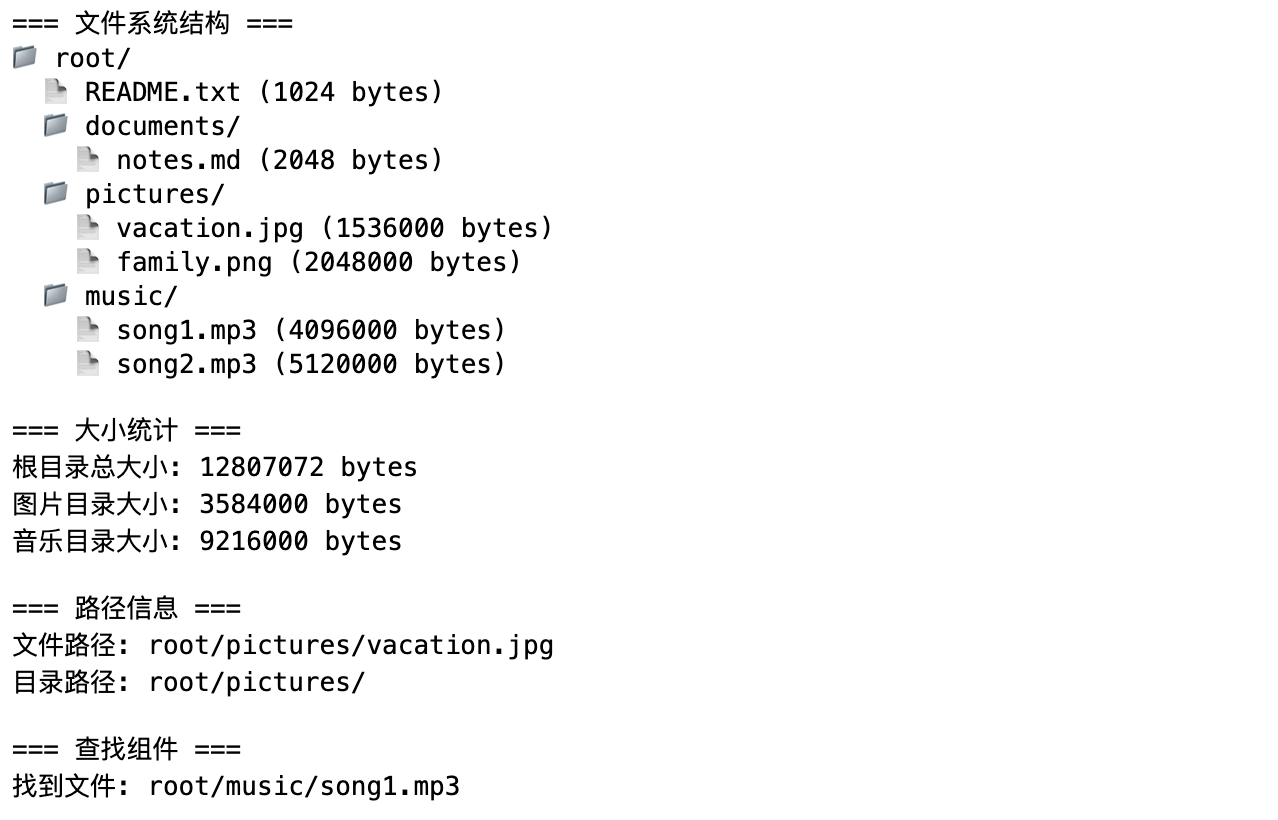
Running the above code will produce the following output:
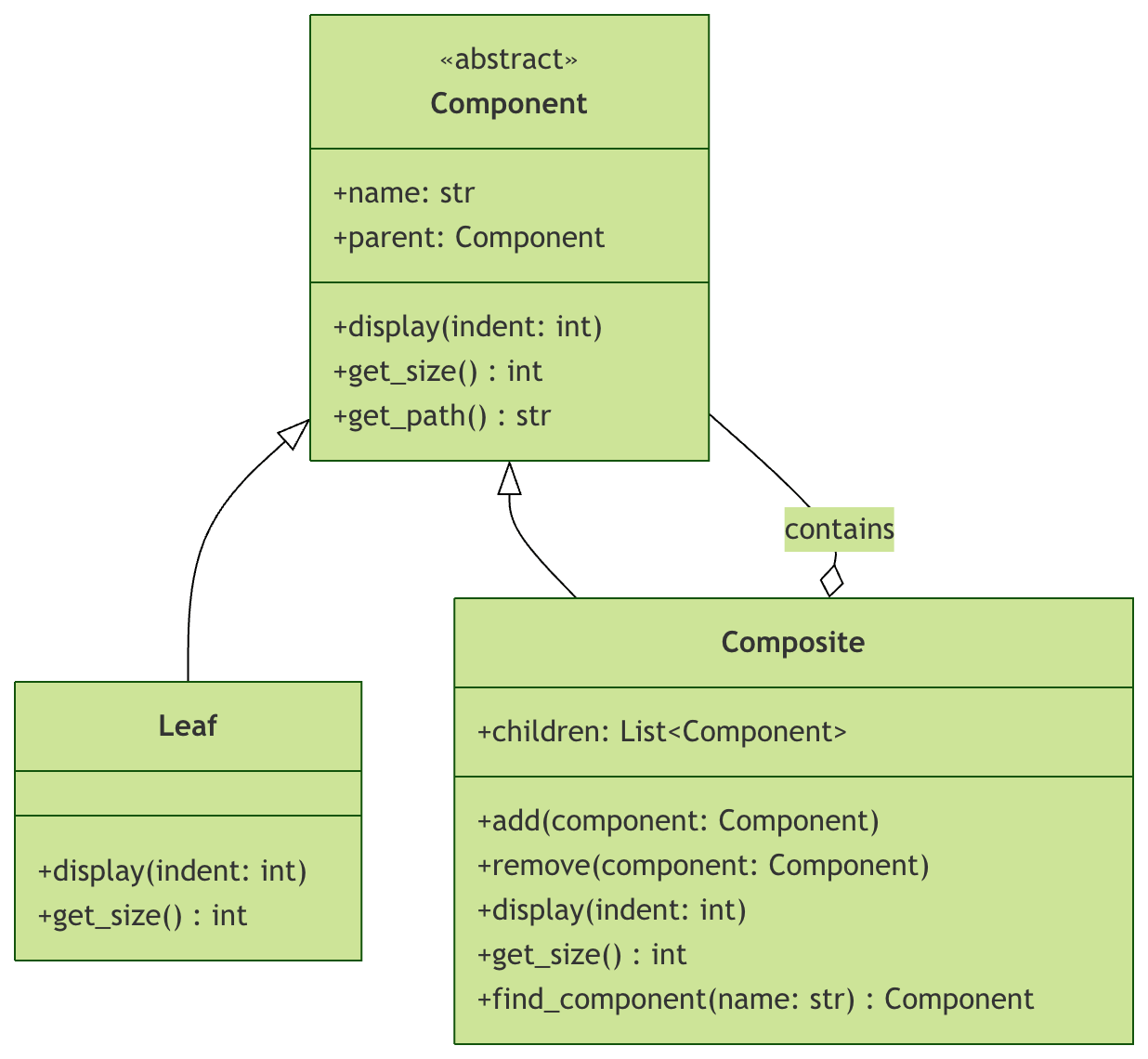
UML Class Diagram of the Composite Pattern
Advantages and Disadvantages of the Composite Pattern
Advantages
- Unified interface: Clients can use individual objects and composite objects consistently
- Open/Closed Principle: It is easy to add new types of components without modifying existing code
- Simplified client code: Clients don't need to determine whether they are dealing with an individual object or a composite
- Flexible hierarchy: Can build complex tree structures
Disadvantages
- Design complexity: Overly generalized design may make the system complex
- Type safety issues: In some cases, runtime type checking may be required
- Performance considerations: For large hierarchies, recursive operations may affect performance
Practical Application Scenarios
1. GUI Component System
Example
"""UI component base class"""
def render(self):
pass
def add(self, component):
pass
class Button(UIComponent):
"""Button - leaf node"""
def render(self):
print("Render button")
class Panel(UIComponent):
"""Panel - composite node"""
def __init__(self):
self.children = []
def add(self, component):
self.children.append(component)
def render(self):
print("Start rendering panel")
for child in self.children:
child.render()
print("End rendering panel")
2. Organizational Structure Management
Example
"""Employee base class"""
def get_salary(self):
pass
class Developer(Employee):
"""Developer - leaf node"""
def __init__(self, salary):
self.salary = salary
def get_salary(self):
return self.salary
class Department(Employee):
"""Department - composite node"""
def __init__(self):
self.employees = []
def add(self, employee):
self.employees.append(employee)
def get_salary(self):
return sum(emp.get_salary() for emp in self.employees)
Practical Exercises
Exercise 1: Extending the File System
Add the following features to the file system:
- Implement file copy functionality
- Add file type filter search
- Implement directory depth-limited display
Exercise 2: Menu System Design
Design a restaurant menu system with the following requirements:
- A menu can contain dishes or submenus
- Be able to calculate the total price
- Support filtering dishes by category
Exercise 3: Organizational Chart
Create a company organizational structure system:
- Employees can be individuals or departments
- Departments can contain other employees or subdepartments
- Be able to calculate the total number of people and total salary of a department
Summary
The Composite Pattern handles individual objects and object compositions through a unified interface, making client code more concise and flexible. This pattern is particularly suitable for scenarios with hierarchical structures, such as file systems, GUI components, organizational structures, and so on.
Key Points:
- The component interface defines common operations for all objects
- Leaf nodes implement basic functionality
- Composite nodes manage child components and provide aggregate operations
- Clients do not need to distinguish between individual objects and object compositions