Python Prototype Pattern
Imagine you want to make a batch of identical toy cars. You wouldn't design and manufacture each one from scratch every time; instead, you first make a perfect prototype and then copy based on that prototype. This is the core idea of the Prototype Pattern!
Prototype Patternis a creational design pattern that creates new objects by copying an existing object (the prototype) rather than instantiating through a class. This approach is especially suitable when the cost of creating an object is high, or when multiple similar objects need to be created.
Why do we need the Prototype Pattern?
Let's first look at what problems exist with the traditional way of creating objects:
Example
class Car:
def __init__(self, brand, model, color, engine_type):
self.brand = brand
self.model = model
self.color = color
self.engine_type = engine_type
# Assume there is some complex initialization logic here
self.initialize_complex_components()
def initialize_complex_components(self):
# Simulate the complex initialization process
import time
time.sleep(1) # Assume initialization takes 1 second
print(f"Initializing complex components of {self.brand} {self.model}...")
# Create multiple similar objects
car1 = Car("Toyota", "Camry", "Red", "2.5L")
car2 = Car("Toyota", "Camry", "Blue", "2.5L") # Need to re-execute complex initialization
Disadvantages of the traditional way:
- Each time an object is created, the full initialization process must be executed.
- If initialization is complex, it will consume a lot of time and resources.
- Code duplication, low efficiency.
Implementation principle of the Prototype Pattern
The Prototype Pattern solves the above problems by letting the object be responsible for creating its own copy. In Python, we can use thecopymodule to easily implement the Prototype Pattern.
Core Components
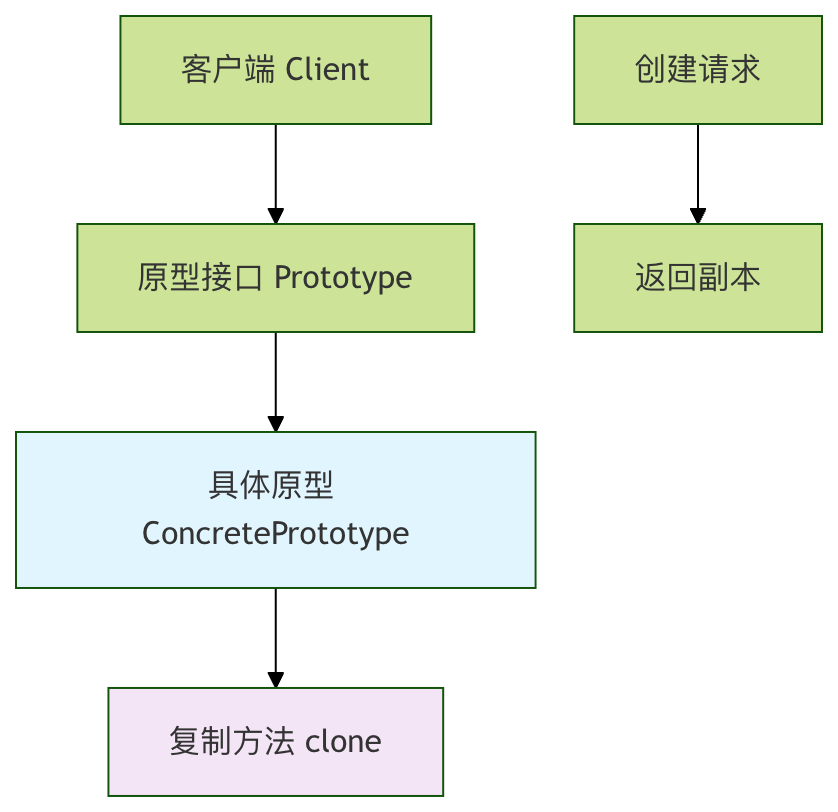
Copy mechanism in Python
Python provides two ways of copying:
| Copy type | Method | Features | Applicable scenarios |
|---|---|---|---|
| Shallow copy | copy.copy() |
Only copies the object itself, not nested objects. | Object structure is simple, no nested references. |
| Deep copy | copy.deepcopy() |
Copies the object and all its nested objects. | Object structure is complex, with nested references. |
Implementing the Prototype Pattern
Let's learn how to implement the Prototype Pattern through a complete example.
Basic implementation
Example
from abc import ABC, abstractmethod
from typing import Any
class Prototype(ABC):
"""Prototype abstract base class"""
@abstractmethod
def clone(self) -> Any:
"""Clone method - must be implemented by subclasses"""
pass
class CarPrototype(Prototype):
"""Car prototype class"""
def __init__(self, brand: str, model: str, color: str, engine_type: str):
self.brand = brand
self.model = model
self.color = color
self.engine_type = engine_type
self.accessories = [] # Accessories list
self.initialize_complex_components()
def initialize_complex_components(self):
"""Simulate the complex initialization process"""
print(f"Initializing complex components of {self.brand} {self.model}...")
# Here you can simulate some time-consuming initialization operations
def add_accessory(self, accessory: str):
"""Add accessory"""
self.accessories.append(accessory)
def clone(self) -> 'CarPrototype':
"""Implement the clone method - use deep copy"""
return copy.deepcopy(self)
def display_info(self):
"""Display car information"""
info = f"{self.brand} {self.model} - Color: {self.color}, Engine: {self.engine_type}"
if self.accessories:
info += f", Accessories: {', '.join(self.accessories)}"
print(info)
Usage example
Example
print("=== Creating a prototype object ===")
original_car = CarPrototype("Toyota", "Camry", "White", "2.5L")
original_car.add_accessory("Navigation system")
original_car.add_accessory("Sunroof")
original_car.display_info()
print("\n"=== Creating new objects by cloning ===")
# Create a new object based on the prototype
car1 = original_car.clone()
car1.color = "Red" # Only modify the color
car1.display_info()
car2 = original_car.clone()
car2.color = "Blue"
car2.add_accessory("Leather seats") # Add a new accessory
car2.display_info()
# Verify that the prototype object has not been modified
print("\n"=== Verify that the prototype object has not been modified ===")
original_car.display_info()
Output:
=== 创建原型对象 ===
正在初始化 Toyota Camry 的复杂组件...
Toyota Camry - 颜色: 白色, 发动机: 2.5L, 配件: 导航系统, 天窗

=== 通过克隆创建新对象 ===
Toyota Camry - 颜色: 红色, 发动机: 2.5L, 配件: 导航系统, 天窗
Toyota Camry - 颜色: 蓝色, 发动机: 2.5L, 配件: 导航系统, 天窗, 真皮座椅

=== 验证原型对象未被修改 ===
Toyota Camry - 颜色: 白色, 发动机: 2.5L, 配件: 导航系统, 天窗
Advanced application scenarios
Scenario 1: Character creation in game development
Example
"""Game character prototype"""
def __init__(self, name: str, character_class: str, level: int = 1):
self.name = name
self.character_class = character_class
self.level = level
self.skills = []
self.equipment = {}
self.initialize_character()
def initialize_character(self):
"""Initialize character - simulate complex data loading"""
print(f"Loading character data for {self.name}...")
# Simulate loading data from a database or configuration file
base_skills = {
"Warrior": ["Slash", "Block", "Charge"],
"Mage": ["Fireball", "Ice Arrow", "Teleport"],
"Archer": ["Precise Shot", "Trap Setting", "Fast Movement"]
}
self.skills = base_skills.get(self.character_class, [])
def add_skill(self, skill: str):
"""Add skill"""
self.skills.append(skill)
def equip_item(self, slot: str, item: str):
"""Equip item"""
self.equipment[slot] = item
def clone(self) -> 'GameCharacter':
"""Clone character"""
return copy.deepcopy(self)
def show_status(self):
"""Display character status"""
print(f"Character: {self.name} ({self.character_class}) - Level: {self.level}")
print(f"Skills: {', '.join(self.skills)}")
if self.equipment:
equipment_str = ', '.join([f"{k}: {v}" for k, v in self.equipment.items()])
print(f"Equipment: {equipment_str}")
# Usage example
print("=== Game Character Prototype Example ===")
warrior_template = GameCharacter("Warrior template", "Warrior")
warrior_template.equip_item("Weapon", "Steel Longsword")
warrior_template.equip_item("Armor", "Chainmail")
warrior_template.show_status()
print("\n"=== Creating player characters ===")
player1 = warrior_template.clone()
player1.name = "Brave Adventurer"
player1.level = 5
player1.add_skill("Whirlwind Slash")
player1.show_status()
player2 = warrior_template.clone()
player2.name = "Fearless Guardian"
player2.level = 3
player2.equip_item("Shield", "Steel Shield")
player2.show_status()
Scenario 2: Document template system
Example
"""Document template prototype"""
def __init__(self, template_name: str):
self.template_name = template_name
self.headers = {}
self.content_sections = []
self.styles = {}
self.load_template_config()
def load_template_config(self):
"""Load template configuration - simulate complex configuration loading"""
print(f"Loading template configuration for {self.template_name}...")
# Simulate loading configuration from a file or database
self.headers = {
"title": f"{self.template_name} document",
"author": "System-generated",
"date": "2024-01-01"
}
self.styles = {
"font_family": "Arial",
"font_size": "12pt",
"line_spacing": "1.5"
}
def clone(self) -> 'DocumentTemplate':
"""Clone document template"""
return copy.deepcopy(self)
def customize(self, title: str = None, author: str = None):
"""Customize document"""
if title:
self.headers["title"] = title
if author:
self.headers["author"] = author
self.headers["date"] = "2024-12-19" # Update date
def add_section(self, section_title: str, content: str):
"""Add content section"""
self.content_sections.append({
"title": section_title,
"content": content
})
def render(self):
"""Render document"""
print(f"\n=== {self.headers['title']} ===")
print(f"Author: {self.headers['author']}")
print(f"Date: {self.headers['date']}")
print(f"Styles: {self.styles}")
for section in self.content_sections:
print(f"\n## {section['title']}")
print(section['content'])
print("=" * 50)
# Usage example
print("=== Document Template System ===")
report_template = DocumentTemplate("Standard Report")
report_template.add_section("Introduction", "This is the introduction part of the report.")
report_template.render()
print("\n"=== Creating specific reports ===")
monthly_report = report_template.clone()
monthly_report.customize("Monthly Sales Report", "Sales Department")
monthly_report.add_section("Sales Data", "This month's sales reached 1 million yuan.")
monthly_report.render()
project_report = report_template.clone()
project_report.customize("Project Progress Report", "Project Manager")
project_report.add_section("Project Progress", "The project is proceeding as planned.")
project_report.render()
Pros and cons of the Prototype Pattern
Advantages
- Performance optimization: avoid repeatedly executing expensive initialization operations
- Simplify the creation process: The client does not need to know the details of object creation
- Dynamic configuration: Products can be dynamically added or removed at runtime
- Reduced subclasses: No need to create a corresponding subclass for each product
Disadvantages
- Copy complexity: For complex objects with circular references, copying can be complex
- Memory usage: If the prototype object is large, copying may consume a lot of memory
- Deep copy overhead: Deep copying may be more time-consuming than creating a new instance
Best practices and considerations
1. Choose the appropriate copy method
Example
def __init__(self, data):
self.data = data
self.reference_data = [] # Data that may need to be shared
def clone(self):
"""Smart copying: choose shallow or deep copy based on requirements"""
new_obj = copy.copy(self) # Shallow copy the main object
new_obj.reference_data = self.reference_data # Share reference data
new_obj.data = copy.deepcopy(self.data) # Deep copy important data
return new_obj
2. Handle circular references
Example
def __init__(self, value):
self.value = value
self.children = []
def add_child(self, child):
self.children.append(child)
def clone(self):
"""Handle possible circular references"""
# Using deep copy automatically handles circular references
return copy.deepcopy(self)
3. Prototype registry pattern
Example
"""Prototype registry - manage multiple prototypes"""
def __init__(self):
self._prototypes = {}
def register_prototype(self, name: str, prototype: Prototype):
"""Register a prototype"""
self._prototypes[name] = prototype
def unregister_prototype(self, name: str):
"""Unregister a prototype"""
if name in self._prototypes:
del self._prototypes[name]
def clone_prototype(self, name: str) -> Prototype:
"""Clone a prototype by name"""
if name not in self._prototypes:
raise ValueError(f"Prototype {name} is not registered")
return self._prototypes[name].clone()
def list_prototypes(self):
"""List all available prototypes"""
return list(self._prototypes.keys())
# Using the registry
registry = PrototypeRegistry()
registry.register_prototype("basic_car", CarPrototype("Toyota", "Camry", "White", "2.5L"))
registry.register_prototype("warrior", GameCharacter("Warrior", "Warrior"))
# Quickly create objects
new_car = registry.clone_prototype("basic_car")
new_warrior = registry.clone_prototype("warrior")
Practice exercises
Now it's your turn! Try to complete the following exercises to consolidate your understanding of the Prototype Pattern:
Exercise 1: Improve the car prototype
ModifyCarPrototypeclass, add the following functionality:
- Record the car's manufacturing date
- Add vehicle identification number (VIN) generation logic
- Implement a method to determine whether two car objects are the same
Exercise 2: Create a configuration manager
Design a configuration manager prototype with the following requirements:
- Able to store application configuration information
- Support cloning and customization of configurations
- Provide configuration validation functionality
Exercise 3: Implement prototype caching
Create a prototype system with caching:
- Cache commonly used prototype objects
- Provide cache cleanup and update mechanisms
- Support prototype version management
Summary
The Prototype Pattern is a very practical design pattern in Python. It creates new objects by copying existing objects, and is especially suitable for the following scenarios:
- High object creation cost: When the initialization process for creating a new object is complex or time-consuming
- Need similar objects: When you need to create multiple similar but slightly different objects
- Dynamic configuration: When an object's configuration may change at runtime
Key points:
- Use
copymodule to implement copying functionality - Choose shallow copy or deep copy based on requirements
- Consider using a prototype registry to manage multiple prototypes
- Be careful to handle circular references and memory usage issues