Python Builder Pattern
The Builder Pattern allows us to create different object representations using the same construction process. Imagine building a house: whether you are building a villa or an apartment, you need to go through steps such as laying the foundation, building walls, and installing plumbing and electrical systems, but the final results are completely different.
Core Idea
The Builder Pattern separates the construction process of a complex object from its representation, allowing the same construction process to create different representations. This pattern is especially suitable for creating complex objects that consist of multiple components.
Why Do We Need the Builder Pattern?
Problems with Traditional Construction Methods
Let's first look at an example that does not use the Builder Pattern:
Example
def __init__(self, cpu, memory, storage, graphics_card, monitor):
self.cpu = cpu
self.memory = memory
self.storage = storage
self.graphics_card = graphics_card
self.monitor = monitor
def __str__(self):
return f"Computer: CPU={self.cpu}, Memory={self.memory}GB, Storage={self.storage}GB, Graphics={self.graphics_card}, Monitor={self.monitor}"
# Create computer object
computer = Computer("Intel i7", 16, 512, "NVIDIA RTX 3060", "27-inch 4K")
print(computer)
Disadvantages of this approach:
- Too many constructor parameters, making it difficult to maintain
- Must remember the order of all parameters
- The creation process is not flexible enough
- Poor code readability
Components of the Builder Pattern
The Builder Pattern involves four main roles:
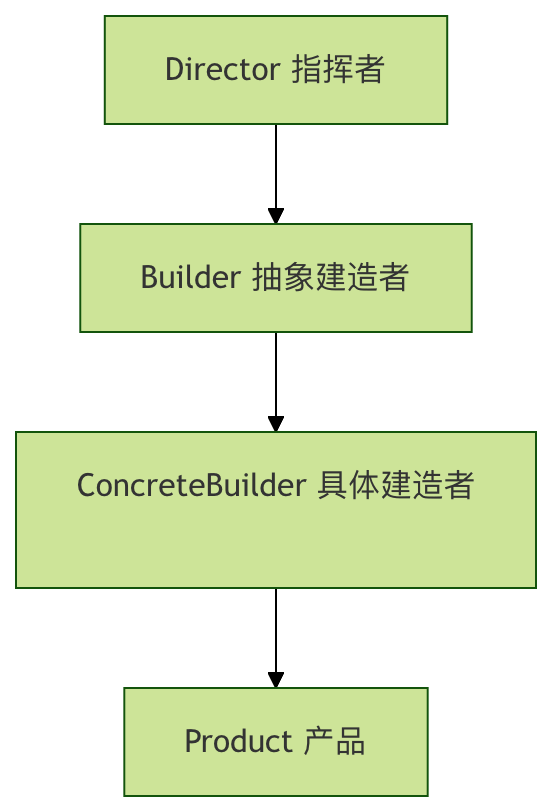
1. Product
The complex object to be created
2. Builder (Abstract Builder)
Defines the abstract interface for creating the various parts of a product
3. ConcreteBuilder (Concrete Builder)
Implements the Builder interface, constructing and assembling the various parts
4. Director
Builds an object that uses the Builder interface
Complete Code Implementation
Let's fully implement the Builder Pattern with a computer configuration example:
1. Product Class
Example
"""Computer Product Class"""
def __init__(self):
self.cpu = None
self.memory = None
self.storage = None
self.graphics_card = None
self.monitor = None
def __str__(self):
specs = []
if self.cpu:
specs.append(f"CPU: {self.cpu}")
if self.memory:
specs.append(f"Memory: {self.memory}GB")
if self.storage:
specs.append(f"Storage: {self.storage}GB")
if self.graphics_card:
specs.append(f"Graphics Card: {self.graphics_card}")
if self.monitor:
specs.append(f"Monitor: {self.monitor}")
return "Computer Configuration:\n" + "\n".join(f" - {spec}" for spec in specs)
2. Abstract Builder (Builder)
Example
class ComputerBuilder(ABC):
"""Computer Builder Abstract Class"""
def __init__(self):
self.computer = Computer()
@abstractmethod
def build_cpu(self):
pass
@abstractmethod
def build_memory(self):
pass
@abstractmethod
def build_storage(self):
pass
@abstractmethod
def build_graphics_card(self):
pass
@abstractmethod
def build_monitor(self):
pass
def get_computer(self):
return self.computer
3. ConcreteBuilder (Concrete Builder)
Example
"""Gaming Computer Builder"""
def build_cpu(self):
self.computer.cpu = "Intel i9-13900K"
def build_memory(self):
self.computer.memory = 32
def build_storage(self):
self.computer.storage = 2000 # 2TB
def build_graphics_card(self):
self.computer.graphics_card = "NVIDIA RTX 4090"
def build_monitor(self):
self.computer.monitor = "32-inch 4K 144Hz"
class OfficeComputerBuilder(ComputerBuilder):
"""Office Computer Builder"""
def build_cpu(self):
self.computer.cpu = "Intel i5-13400"
def build_memory(self):
self.computer.memory = 16
def build_storage(self):
self.computer.storage = 512
def build_graphics_card(self):
self.computer.graphics_card = "Integrated Graphics"
def build_monitor(self):
self.computer.monitor = "24-inch 1080P"
4. Director
Example
"""Computer Builder Director"""
def __init__(self, builder):
self.builder = builder
def construct_computer(self):
"""The complete process of building a computer"""
self.builder.build_cpu()
self.builder.build_memory()
self.builder.build_storage()
self.builder.build_graphics_card()
self.builder.build_monitor()
def get_computer(self):
return self.builder.get_computer()
Usage Example
Now let's see how to use the Builder Pattern to create different types of computers:
Example
print("=== Builder Pattern Demo ===\n\n")
# Create gaming computer
print("1. Building gaming computer:")
gaming_builder = GamingComputerBuilder()
director = ComputerDirector(gaming_builder)
director.construct_computer()
gaming_computer = director.get_computer()
print(gaming_computer)
print("\n" + "="*50 + "\n")
# Create office computer
print("2. Building office computer:")
office_builder = OfficeComputerBuilder()
director = ComputerDirector(office_builder)
director.construct_computer()
office_computer = director.get_computer()
print(office_computer)
print("\n" + "="*50 + "\n")
# Create custom computer
print("3. Custom computer build:")
custom_builder = CustomComputerBuilder()
custom_builder.build_cpu("AMD Ryzen 7 7800X3D")
custom_builder.build_memory(64)
custom_builder.build_storage(4000)
custom_builder.build_graphics_card("AMD RX 7900 XTX")
custom_builder.build_monitor("34-inch curved ultrawide monitor")
custom_computer = custom_builder.get_computer()
print(custom_computer)
# Custom builder (build with optional steps)
class CustomComputerBuilder:
"""Custom Computer Builder"""
def __init__(self):
self.computer = Computer()
def build_cpu(self, cpu):
self.computer.cpu = cpu
return self # Return self to support chained calls
def build_memory(self, memory):
self.computer.memory = memory
return self
def build_storage(self, storage):
self.computer.storage = storage
return self
def build_graphics_card(self, graphics_card):
self.computer.graphics_card = graphics_card
return self
def build_monitor(self, monitor):
self.computer.monitor = monitor
return self
def get_computer(self):
return self.computer
if __name__ == "__main__":
main()
Variants of the Builder Pattern
1. Fluent Interface Builder
Example
def __init__(self):
self.size = None
self.cheese = False
self.pepperoni = False
self.mushrooms = False
def __str__(self):
ingredients = []
if self.cheese: ingredients.append("Cheese")
if self.pepperoni: ingredients.append("Italian sausage")
if self.mushrooms: ingredients.append("Mushrooms")
return f"{self.size}-inch pizza, toppings: {', '.join(ingredients)}"
class PizzaBuilder:
def __init__(self, size):
self.pizza = Pizza()
self.pizza.size = size
def add_cheese(self):
self.pizza.cheese = True
return self
def add_pepperoni(self):
self.pizza.pepperoni = True
return self
def add_mushrooms(self):
self.pizza.mushrooms = True
return self
def build(self):
return self.pizza
# Use the fluent interface
pizza = (PizzaBuilder(12)
.add_cheese()
.add_pepperoni()
.add_mushrooms()
.build())
print(pizza)
Pros and Cons of the Builder Pattern
Advantages
| Advantages | Description |
|---|---|
| Good encapsulation | The construction process is separated from the representation; clients do not need to know internal details. |
| Strong extensibility | New concrete builders can be added conveniently. |
| Better control | Allows finer-grained control over the construction process. |
| Code readability | Code is clearer when using chained calls. |
Disadvantages
| Disadvantages | Description |
|---|---|
| Adds complexity | Requires defining multiple classes, increasing system complexity. |
| Not suitable when products differ greatly | If the products differ greatly from each other, the Builder Pattern is not very suitable. |
| Builders depend on the product | The builder needs to know the specific details of the product. |
Applicable Scenarios
Cases suitable for the Builder Pattern:
- Creating complex objects: need to create complex objects consisting of multiple parts.
- Stable construction process: the construction process is relatively stable, but the components of the object change frequently.
- Multiple representations: the object to be created has multiple different representations.
- Avoid overlapping constructors: avoid using constructors with many parameters.
Practical application examples:
- Document converter: convert documents to different formats such as PDF, Word, HTML.
- Meal preparation: prepare meals for different sets (combinations of burgers, fries, drinks).
- UI component construction: build complex user interface components.
- Report generation: generate reports containing different parts (header, data, charts).
Practice Exercises
Exercise 1: Implement a Car Builder
Try to implement a car builder pattern with the following components:
- Engine (gasoline, electric, hybrid)
- Body color (red, blue, black, white)
- Wheel size (16 inches, 18 inches, 20 inches)
- Interior (leather, fabric)
Exercise 2: Improve the Computer Builder
Add the following features to the computer builder:
- Optional components (e.g., whether to install an optical drive)
- Validation logic (e.g., memory cannot be less than 4GB)
- Price calculation function
Summary
The Builder Pattern is a powerful creational design pattern. By decomposing the construction process of a complex object into multiple simple steps, it makes the creation process more flexible and controllable. Although it increases system complexity, in scenarios where complex objects need to be created and the construction process is relatively fixed, the Builder Pattern can significantly improve code maintainability and scalability.
Remember the core idea of design patterns:Do not use patterns for the sake of using patterns, but to solve specific design problems.In actual development, decide whether to use the Builder Pattern based on specific requirements.
Other Extensions