Python Proxy Pattern
The Proxy Pattern is a structural design pattern that provides a substitute or placeholder for another object to control access to it. In simple terms, a proxy is an intermediary that acts as a go-between between the client and the target object.
Real-Life Proxy Metaphors
Imagine a scenario from real life:
- Real estate agent: You don't need to communicate directly with the homeowner; you can learn about property listings and schedule viewings through the agent.
- Celebrity agent: If a company wants to invite a celebrity for endorsement, it needs to negotiate the cooperation details through the agent.
- Network proxy server: Your network request goes through the proxy server first, and then the proxy server forwards it to the target website.
In these examples, the intermediary/agent is the proxy, and they control access to the real object.
Core Components of the Proxy Pattern
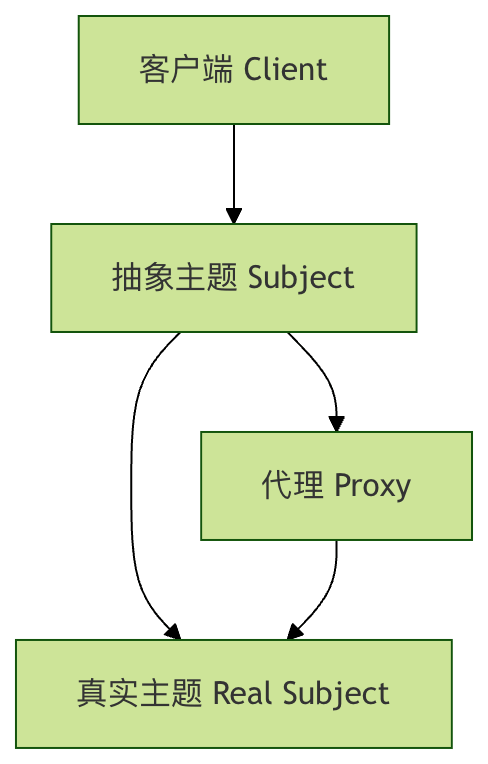
The Proxy Pattern typically involves three key roles:
1. Abstract Subject (Subject)
Defines a common interface for the real subject and the proxy subject, so that the proxy subject can be used wherever the real subject is used.
2. Real Subject
Defines the real object that the proxy represents; it is the object that will ultimately be referenced.
3. Proxy
Holds a reference that allows the proxy to access the entity, provides an interface identical to the real subject, and controls access to the real subject.
Types of Proxy Pattern
The Proxy Pattern has several variants, each with different use cases:
1. Virtual Proxy
Delays the creation of expensive objects until they are actually needed.
2. Protection Proxy
Controls access to the original object, used when the object should have different access permissions.
3. Remote Proxy
Provides a local representative for an object located in a different address space.
4. Smart Reference Proxy
Performs additional operations when accessing the object, such as reference counting, lazy loading, etc.
Implementing the Proxy Pattern in Python
Let's understand the implementation of the Proxy Pattern through specific code examples.
Basic Interface Definition
First, we define the abstract subject interface:
Example
from typing import Any
class Subject(ABC):
"""
Abstract subject interface, defining the common operations of the real subject and the proxy
"""
@abstractmethod
def request(self) -> Any:
"""Main method to execute a request"""
pass
Real Subject Implementation
Example
"""
Real subject class, containing the core business logic
Usually expensive to create and initialize
"""
def __init__(self, name: str):
self.name = name
print(f"Creating RealSubject instance: {self.name} (this is an expensive operation)")
def request(self) -> str:
"""Execute the real request"""
print(f"RealSubject: handling request - {self.name}")
return f"Response from {self.name}"
Proxy Class Implementation
Example
"""
Proxy class, controlling access to the real subject
Additional features can be added, such as lazy loading, access control, etc.
"""
def __init__(self, subject_name: str):
self.subject_name = subject_name
self._real_subject = None # Lazy initialization
def _lazy_init(self) -> None:
"""Lazily load the real subject object"""
if self._real_subject is None:
self._real_subject = RealSubject(self.subject_name)
def request(self) -> str:
"""Proxy's request method, where additional logic can be added"""
print("Proxy: preprocessing before calling the real object")
# Lazily load the real object
self._lazy_init()
# Call the real object's method
result = self._real_subject.request()
print("Proxy: post-processing after calling the real object")
return f"Enhanced result from proxy: {result}"
Client Code
Example
"""
Client code, interacting with the subject through the abstract interface
Does not know or care whether it is using the real subject or the proxy
"""
print("Client: starting operation")
result = subject.request()
print(f"Client: received result - {result}")
print()
# Usage example
if __name__ == "__main__":
print("Using the real subject directly:")
real_subject = RealSubject("Real object A")
client_code(real_subject)
print("Using the proxy:")
proxy = Proxy("Proxy object B")
client_code(proxy)
# Use the same proxy again to observe the lazy loading effect
print("Using the same proxy again:")
client_code(proxy)
Running the above code, you will see the following output:
直接使用真实主题:
创建 RealSubject 实例: 真实对象A (这是一个昂贵的操作)
客户端: 开始执行操作
RealSubject: 处理请求 - 真实对象A
客户端: 收到结果 - 来自 真实对象A 的响应

使用代理:
客户端: 开始执行操作
Proxy: 在调用真实对象前进行预处理
创建 RealSubject 实例: 代理对象B (这是一个昂贵的操作)
RealSubject: 处理请求 - 代理对象B
Proxy: 在调用真实对象后进行后处理
客户端: 收到结果 - 代理增强的结果: 来自 代理对象B 的响应

再次使用同一个代理:
客户端: 开始执行操作
Proxy: 在调用真实对象前进行预处理
RealSubject: 处理请求 - 代理对象B
Proxy: 在调用真实对象后进行后处理
客户端: 收到结果 - 代理增强的结果: 来自 代理对象B 的响应
Real-World Example: Image Loading Proxy
Let's look at a more practical example — a virtual proxy for image loading.
Image Loading System
Example
import time
class Image:
"""Real image class, simulating the expensive operation of loading a large image"""
def __init__(self, filename: str):
self.filename = filename
self._load_image()
def _load_image(self) -> None:
"""Simulate the expensive operation of loading a large image"""
print(f"Loading image: {self.filename} (this may take a few seconds...)")
time.sleep(2) # Simulate loading time
print(f"Image {self.filename} loaded successfully!")
def display(self) -> None:
"""Display the image"""
print(f"Displaying image: {self.filename}")
class ImageProxy:
"""Image proxy, implementing lazy loading"""
def __init__(self, filename: str):
self.filename = filename
self._image = None
def display(self) -> None:
"""Display the image, loading it first if necessary"""
if self._image is None:
print("Proxy: detected that the image is not loaded, starting lazy loading...")
self._image = Image(self.filename)
else:
print("Proxy: image is already loaded, displaying directly")
self._image.display()
# Usage example
def demo_image_proxy():
print("Creating image proxy (the image will not be loaded immediately)")
proxy = ImageProxy("large_photo.jpg")
print("\n"First call to display() - triggers lazy loading:")
proxy.display()
print("\n"Second call to display() - directly uses the already loaded image:")
proxy.display()
# Run the example
demo_image_proxy()
Protection Proxy Example: Access Control
Protection proxies are used to control access to sensitive resources.
Example
"""Sensitive data class"""
def __init__(self, data: str):
self.data = data
def read_data(self) -> str:
"""Read sensitive data"""
return f"Sensitive data: {self.data}"
class ProtectionProxy:
"""Protection proxy, implementing access control"""
def __init__(self, sensitive_data: SensitiveData, user_role: str):
self._sensitive_data = sensitive_data
self.user_role = user_role
def read_data(self) -> str:
"""Read data, but perform permission checking"""
if self.user_role != "admin":
return "Error: insufficient permissions, only administrators can access sensitive data"
return self._sensitive_data.read_data()
# Usage example
def demo_protection_proxy():
sensitive_data = SensitiveData("Confidential information: project budget is 1 million yuan")
# A regular user attempts to access
user_proxy = ProtectionProxy(sensitive_data, "user")
print("Regular user attempts to access:")
print(user_proxy.read_data())
# Administrator accesses
admin_proxy = ProtectionProxy(sensitive_data, "admin")
print("\nAdministrator access:)
print(admin_proxy.read_data())
demo_protection_proxy()
Advantages and Disadvantages of the Proxy Pattern
Advantages
- Control object access: The proxy can control how and when the client accesses the real object
- Lazy loading optimization: Virtual proxies can delay the creation of expensive objects, improving performance
- Enhanced security: The protection proxy can add access control logic
- Open/Closed Principle: New proxies can be introduced without modifying client code
- Separation of concerns: The proxy can handle auxiliary functions unrelated to core business logic
Disadvantages
- Increased complexity: Introducing a new abstraction layer makes the code structure more complex
- Response latency: The proxy may increase request processing time
- Possibility of over-engineering: For simple scenarios, using a proxy may seem unnecessary
Application Scenarios of the Proxy Pattern
The Proxy Pattern is particularly useful in the following scenarios:
1. Lazy Loading
When object creation is expensive but the object may not be used immediately.
2. Access Control
When access rights to certain objects need to be restricted.
3. Local Representative (Remote Representation)
Provide a local interface for remote objects, such as RPC calls.
4. Logging
Add logging before and after method calls.
5. Caching
Provide caching for the results of expensive operations.
Practical Exercises
To reinforce your understanding of the Proxy Pattern, try to complete the following exercises:
Exercise 1: Caching Proxy
Create a cache proxy that adds caching functionality to a function that computes the Fibonacci sequence:
Example
"""Compute the Fibonacci sequence"""
def fibonacci(self, n: int) -> int:
if n <= 1:
return n
return self.fibonacci(n - 1) + self.fibonacci(n - 2)
# Your task: implement the FibonacciCacheProxy class
# Requirement: add caching to Fibonacci calculation to avoid repeated computation
class FibonacciCacheProxy:
def __init__(self):
self._calculator = FibonacciCalculator()
self._cache = {} # Implement the caching logic here
def fibonacci(self, n: int) -> int:
# Implement caching logic
pass
# Test code
def test_cache_proxy():
proxy = FibonacciCacheProxy()
print("First computation of fib(10):")
result1 = proxy.fibonacci(10)
print(f"Result: {result1}")
print("Second computation of fib(10) (should be obtained from cache):")
result2 = proxy.fibonacci(10)
print(f"Result: {result2}")
print(f"Both results are the same: {result1 == result2}")
Exercise 2: Logging Proxy
Create a logging proxy that records method call information:
Example
"""Database service"""
def query(self, sql: str) -> str:
return f"Executing query: {sql}"
def update(self, sql: str) -> str:
return f"Executing update: {sql}"
# Your task: implement the LoggingProxy class
# Requirement: record the call time, parameters, and result of each method
class LoggingProxy:
def __init__(self):
self._service = DatabaseService()
def query(self, sql: str) -> str:
# Add logging logic
pass
def update(self, sql: str) -> str:
# Add logging logic
pass
Summary
The Proxy Pattern is a powerful design pattern that controls access to real objects by introducing an intermediate layer. Implementing the Proxy Pattern in Python is relatively simple, mainly thanks to Python's dynamic features.
Key Points
- The proxy is a mediator: Acts as an intermediary between the client and the real object
- Consistent interface: The proxy and the real object implement the same interface
- Access control: The proxy can add extra control logic, such as lazy loading, permission checks, etc.
- Flexible application: Choose different types of proxies according to needs