PostgreSQL Delete Database
PostgreSQL databases can be deleted in the following three ways:
- 1. UsingDROP DATABASESQL statements to delete.
- 2. Usingdropdbthe command to delete.
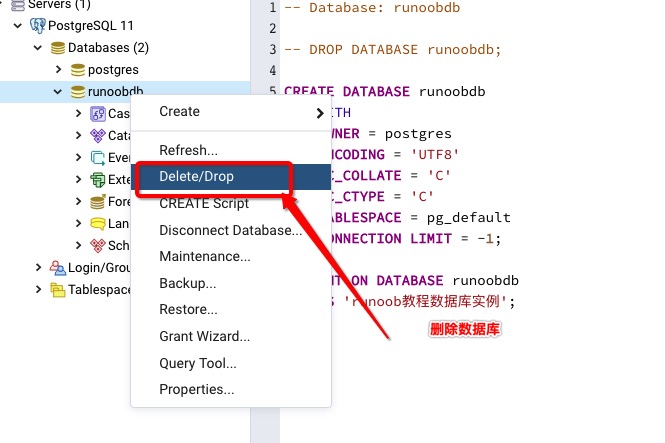
- 3. UsingpgAdminthe tool.
Note:Deleting a database should be done with caution. Once deleted, all information will be lost.
DROP DATABASE - Delete Database
DROP DATABASE deletes the database's system catalog entries and deletes the file directories containing the data.
DROP DATABASE can only be executed by the superuser or the database owner.
The DROP DATABASE command needs to be executed in the PostgreSQL command window. The syntax format is as follows:
DROP DATABASE [ IF EXISTS ] name
Parameter description:
- IF EXISTS: If the database does not exist, issue a notification instead of an error message.
- name: The name of the database to be deleted.
For example, we delete a database named exampledb:
postgres=# DROP DATABASE exampledb;
dropdb Command - Delete Database
dropdb is a wrapper around DROP DATABASE.
dropdb is used to delete PostgreSQL databases.
The dropdb command can only be executed by the superuser or the database owner.
The syntax format of the dropdb command is as follows:
dropdb [connection-option...] [option...] dbname
Parameter description:
dbname: The name of the database to be deleted.
options: Optional parameters, which can be the following values:
| No. | Option & Description |
|---|---|
| 1 | -e Display the commands generated by dropdb and send them to the database server. |
| 2 | -i Issue a verification prompt before performing the deletion. |
| 3 | -V Print the dropdb version and exit. |
| 4 | --if-exists If the database does not exist, issue a notification instead of an error message. |
| 5 | --help Display help information about the dropdb command. |
| 6 | -h host Specify the host name of the server running. |
| 7 | -p port Specify the port the server listens on, or the socket file. |
| 8 | -U username The username to connect to the database. |
| 9 | -w Ignore the password prompt when connecting. |
| 10 | -W Force a password prompt when connecting. |
| 11 |
--maintenance-db=dbname Specify the database to connect to when deleting the target database. The default is postgres; if it does not exist, template1 is used. |
Next, open a command window, go to the PostgreSQL installation directory, and then enter the bin directory. dropdb is located in thePostgreSQL installation directory/bindirectory. Execute the command to delete the database:
$ cd /Library/PostgreSQL/11/bin/
$ dropdb -h localhost -p 5432 -U postgres exampledb
password ******
In the above command, we used the superuser postgres to log in to the PostgreSQL database with host address localhost and port number 5432, and deleted the exampledb database.
pgAdmin Tool - Delete Database
The pgAdmin tool provides complete database operation functionality: