Pi Agent Security and Project Trust
Pi Agent runs with your current user's permissions.
This chapter introduces the project trust mechanism, security boundaries, and containerized execution options.
Pi Agent Security Model
Pi Agent is alocal coding agent—it runs with the user permissions you had when you started it, and can read, write, edit files, and execute shell commands.
This means:
- It can access all files your user account can access
- The range of commands it can execute is exactly the same as what you would run manually in a terminal
- itNo built-insandbox isolation mechanism
This is intentional—Pi Agent needs to invoke project toolchains, run tests, and install dependencies, all of which require real system permissions.
Pi Agent's design philosophy is: not to provide a half-baked sandbox that "looks safe but is easy to misunderstand."
Real isolation should come from the OS level or from virtualization/container boundaries.
Project Trust Mechanism
Project trust controls whether Pi Agent loads project-local configuration and extensions.
It is not a sandbox—it only controlswhat is loaded at startup, and does not restrict what the model can do during a conversation.
When is a trust check triggered?
Pi Agent triggers a trust check when it detects any of the following in the project directory:
- .pi/settings.json (project configuration file)
- .pi/extensions, .pi/skills, .pi/prompts, .pi/themes (project resource directories)
- .pi/SYSTEM.md or .pi/APPEND_SYSTEM.md (project system prompts)
- .agents/skills (project Skills directory)
An empty .pi directory alone will not trigger a trust check.
Trust decision process
Pi Agent decides whether to load the current project's resources in a fixed order.
- Check whether trust.json contains a saved decision (searching upward from the current directory)
- If yes, use the saved decision
- If not, follow the behavior of the defaultProjectTrust setting (default: ask)
- After the user makes a decision, they can choose "Remember" to write it to trust.json
Trust decisions are saved per directory in the global ~/.pi/agent/trust.json.
When searching, it matches against this file level by level up the parent directories; only when no saved decision is found does it fall back to the defaultProjectTrust logic.
When you first enter an untrusted project, the UI shows the following prompt:
检测到项目本地配置 .pi/settings.json
是否信任此项目并加载其配置与扩展?(y/n/always/never)
The prompt text and options may vary by version; refer to the actual UI.
Project trust only controls loading of protected resources such as extensions and skills.
Context files such as AGENTS.md and CLAUDE.md are loaded regardless of trust status.
defaultProjectTrust setting
This setting determines Pi Agent's default choice when no one confirms; behavior differs between interactive and non-interactive modes.
| Value | Interactive mode behavior | Non-interactive mode behavior |
|---|---|---|
| "ask" (default) | Show a trust confirmation prompt | Do not load project resources (behavior same as "never") |
| "always" | Auto-trust | Auto-trust |
| "never" | Auto-reject | Auto-reject |
Configuration method:
Examples
"defaultProjectTrust": "always"
}
You can also override per-invocation behavior with command-line arguments:
# 本次运行信任项目
$ pi --approve
$ pi -a

# 本次运行不信任项目
$ pi --no-approve
$ pi -na
Use the /trust command to save decisions
In interactive mode, you can use the /trust command at any time to save a trust decision for the current project:
/trust
This command writes to~/.pi/agent/trust.json, which stores trust decisions saved per directory.
/trust saves the current decision but does not reload the current session.
If you change a trust decision, you need to restart Pi Agent for the change to take effect.
Security considerations for non-interactive mode
In Print mode (-p), JSON mode (--mode json), and RPC mode (--mode rpc), Pi Agent does not display trust prompts.
Behavior in this case depends entirely on the defaultProjectTrust setting:
- Set to "ask" or "never": project resources are ignored
- Set to "always": project resources are loaded
Use --approve or --no-approve to temporarily override this behavior.
Running untrusted code
When you need to handle untrusted repositories or automated tasks, it is recommended to run Pi Agent in a container or sandbox:
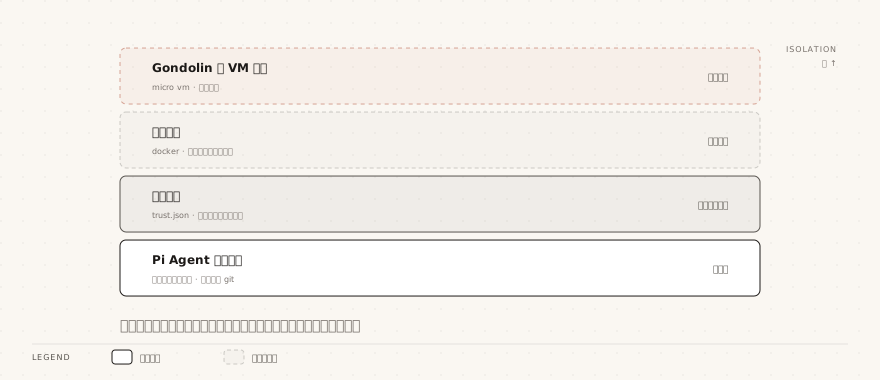
- Container approach: Run the entire pi process in a Docker container or VM
- Gondolin approach: Run pi on the host and route tool execution into a Gondolin micro VM
- OpenShell approach: Run the entire pi process in an NVIDIA policy-controlled sandbox, creating sandboxes via a gateway
- Mount control: Mount only the working directories the agent needs to access
- Credential management: Avoid mounting the host's ~/.pi/agent/ directory; pass a least-privilege, temporary API key
- Network isolation: If the task does not need network access, restrict the container's network
- Result review: Review diffs and modifications before copying output back to a trusted system
Gondolin is a separate open-source micro VM project (a local Linux micro VM requiring QEMU support); Pi routes built-in tool execution into it via an example extension.
OpenShell viaopenshell sandbox create --from pito create sandboxes, you need to register and select a gateway first.
Remote gateway mode does not bind-mount local directories; you need to use upload/download commands to transfer files between inside and outside the sandbox. Model credentials can stay outside the sandbox.
If you bind-mount the host working directory into the container with read-write access, write operations inside the container will still affect host files.
If you need stricter protection, use read-only mounts or copy files in and out of the sandbox.
Security tips
The following security recommendations are organized by common usage scenarios; check them before you start.
| Scenario | Recommendation |
|---|---|
| Reviewing third-party code | Run in a container with read-only mounts |
| Automated CI/CD | Use temporary credentials and restrict the tool allowlist |
| Team-shared configuration | Use the project's .pi/settings.json, but do not put sensitive information in it |
| Installing third-party extension packages | Review the source code before installing; extensions can execute arbitrary code |
| Installing third-party Skills | Review the SKILL.md content; Skills can instruct the model to perform arbitrary actions |