Pi Agent Core Concepts
Before using Pi Agent officially, understanding its core concepts and working methods can help you get started faster.
Understanding Pi Agent in One Sentence
Pi Agent is an AI programming assistant that runs in the terminal.
After starting, you'll see an interface similar to chat software. Input natural language requirements, and the AI can read your code, execute commands, and modify files.
Four Running Modes
Pi Agent supports four running modes to suit different scenarios:
| Mode | Command | Description | Use Case |
|---|---|---|---|
| Interactive Mode | pi (default) | Terminal TUI interface, real-time conversation, supports all features | Daily development, interactive programming |
| Print Mode | pi -p "prompt" | One-shot Q&A, exits after outputting the result | Script integration, quick queries |
| JSON Mode | pi --mode json | All events are output as JSON lines, suitable for program parsing | Toolchain integration, data analysis |
| RPC Mode | pi --mode rpc | Integrated via JSONL protocol over stdin/stdout | Inter-process communication, editor plugins |
Interactive mode starts directly into the TUI interface:
$ pi
Pi Agent 0.1.x  |  ~/projects/example-demo
claude-sonnet-4  |  上下文 2%  |  $0.0000
>
Print mode exits after answering, suitable for putting into scripts:
$ pi -p "总结这个项目"
这是一个 TypeScript 命令行工具,核心逻辑位于 src/ 目录,包含会话管理、工具调度和扩展加载三个模块。
Tokens: 1.2k 输入 / 320 输出  |  费用 $0.0081
JSON mode outputs each event as a line of JSON, making it easy for programs to parse:
$ pi --mode json -p "总结这个项目"
{"type":"session","id":"a1b2c3d4"}
{"type":"message_start","role":"assistant"}
{"type":"message_end","usage":{"input":1200,"output":320}}
RPC mode sends and receives JSONL messages via stdin/stdout for editor plugin calls:
$ pi --mode rpc
{"id":1,"method":"prompt","params":{"message":"列出 src 目录"}}
{"id":1,"result":{"state":"idle","messages":2}}
As a beginner, you'll spend most of your time working in interactive mode.
Once you're proficient, Print mode can be used for script automation.
Built-in Tools
After startup, Pi Agent gives the AI the following four built-in tools by default. In addition, three read-only tools—grep, find, and ls—can be enabled optionally:
| Tool Name | Function | Example | Default Status |
|---|---|---|---|
| read | Read file content | AI reads src/main.ts to understand the code logic | Enabled by default |
| write | Create or overwrite files | AI creates a new file or rewrites the entire file | Enabled by default |
| edit | Replace content in a file precisely | AI modifies a few lines of code in a function | Enabled by default |
| bash | Execute shell commands | AI runs tests, installs dependencies, and runs lint | Enabled by default |
| grep | Search for text in files | AI searches for which files call a certain function | Optional |
| find | Search for files by name | AI finds all files named *.test.ts | Optional |
| ls | List directory contents | AI views the directory structure to locate modules | Optional |
The three read-only tools are enabled via the--toolsparameter manually, for examplepi --tools read,grep,find,ls。
Extension System
Pi Agent extends its functionality in the following five ways:
| Extension Method | File Format | Purpose | Difficulty |
|---|---|---|---|
| Extensions | TypeScript(.ts) | Register custom tools, event listeners, commands, and UI components | Requires programming |
| Skills | Markdown(SKILL.md) | Provides workflow instructions and scripts for specialized fields | Knowing how to write Markdown is enough |
| Prompt Templates | Markdown(.md) | Reusable prompts with parameter support | Simplest |
| Themes | JSON(.json) | Customize terminal interface color scheme | Simple |
| Packages | npm/git projects | Package and share the above four types of resources | As needed |
As a beginner, you don't need to understand all extension methods immediately.
Start with basic usage first, and gradually explore the extension system as your needs grow.
File Loading Order
When Pi Agent starts, it automatically loads project instruction files, allowing you to define expected behavior for the AI:
| Level | Path | Scope | Priority |
|---|---|---|---|
| Global configuration | ~/.pi/agent/AGENTS.md | All projects | Lowest, serves as a general baseline |
| Project configuration | AGENTS.md or CLAUDE.md in the project directory and parent directories | Current project | Highest, can override global instructions |
Project-level configuration is loaded by traversing upward from the parent directory, and is finally merged with the configuration in the current directory.
If you've used Claude Code before, you can directly reuse existing CLAUDE.md files; Pi Agent will automatically recognize and load them.
Sessions and Branches
Pi Agent's session system is one of its most distinctive features.
Each conversation is automatically saved as a session file, stored in~/.pi/agent/sessions/the directory.
Internally, sessions use a tree structure: you can "branch" out new exploration directions from any historical node without losing previous conversations.
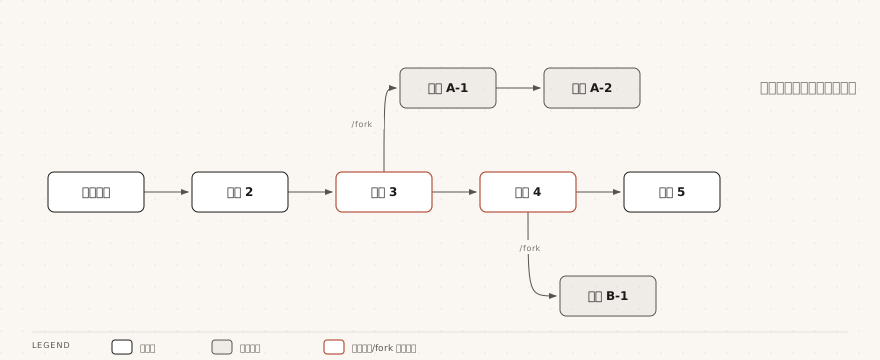
This is very useful when you need to experiment with different implementation approaches—each line of thought can be preserved independently and revisited at any time.
Other Extensions