Pi Agent Package Management
Pi Packages allow you to bundle Extensions, Skills, prompt templates, and themes, and distribute and install them via npm or git.
Package Management Commands
All package operations are done through the pi command, with no need to manually edit settings.json.
| Command | Function | Example |
|---|---|---|
| pi install <source> | Install a package; -l installs it at the project level | pi install npm:@example/pi-todo-kit |
| pi remove <source> | Remove a package | pi remove npm:@example/pi-todo-kit |
| pi uninstall <source> | Same as remove | pi uninstall npm:@example/pi-todo-kit |
| pi list | List installed packages | pi list |
| pi update --all | Update Pi Agent and all packages | pi update --all |
| pi update --extensions | Update only installed packages (not including Pi Agent itself) | pi update --extensions |
| pi update <source> | Update a specified package | pi update npm:@example/pi-todo-kit |
Usage example:
# 安装 npm 包
$ pi install npm:@example/pi-todo-kit@1.0.0

# 安装 git 包
$ pi install git:github.com/example/pi-todo-kit@v1

# 安装本地包
$ pi install ./packages/pi-todo-kit
$ pi install ~/projects/pi-share-kit

# 安装为项目级(写入 .pi/settings.json)
$ pi install -l npm:@example/pi-todo-kit

# 临时试用包(不安装到配置中)
$ pi -e npm:@example/pi-todo-kit
$ pi -e git:github.com/example/pi-todo-kit
The installation output is roughly as follows (illustrative), where the number of extensions and skills depends on the package's pi field:
$ pi install npm:@example/pi-todo-kit
Resolving @example/pi-todo-kit@1.2.0
Downloading @example/pi-todo-kit (12.4 kB)
Running npm install in ~/.pi/agent/npm/@example/pi-todo-kit
Installed @example/pi-todo-kit@1.2.0
  extensions: 2
  skills:     1
  prompts:    3
Saved to ~/.pi/agent/settings.json
The package names and versions above are illustrative values; replace them with the package you actually want to install.
Package Sources
Pi Agent supports three package sources, each with different installation behavior and cache locations.
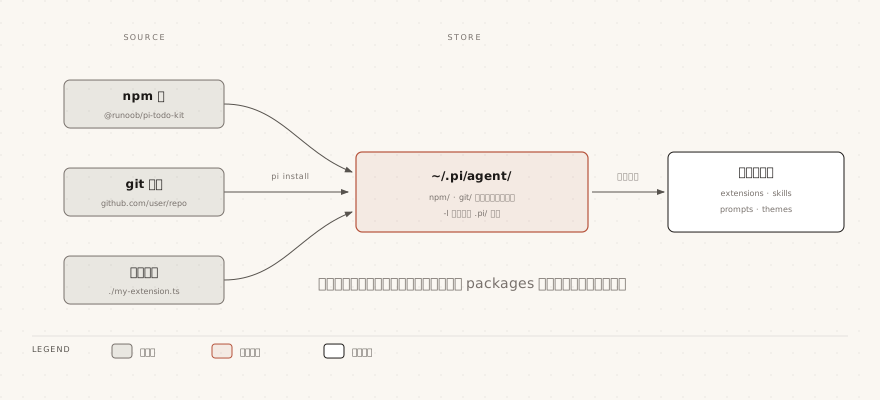
npm Packages
npm is the recommended package distribution method:
pi install npm:@scope/pkg@1.2.3
pi install npm:pkg
npm packages with a version number are locked, and pi update will not automatically upgrade them.
Package installation location: global packages are in~/.pi/agent/npm/, project-level packages are in.pi/npm/。
Git Packages
Supports HTTPS and SSH protocols:
# HTTPS
pi install https://github.com/user/repo@v1

# SSH(git@host:path 需要 git: 前缀)
pi install git:git@github.com:user/repo@v1

# SSH 协议
pi install ssh://git@github.com/user/repo@v1
The ref of a Git package is locked, and pi update will not automatically move to a new ref.
Clone location: global packages are in~/.pi/agent/git/, project-level packages are in.pi/git/。
Local Paths
Points to a local filesystem path; files are not copied:
pi install /Users/example/.pi/agent/packages/my-kit
pi install ./packages/my-kit
Creating Pi Packages
Add thepifield to package.json:
Example
"name": "@example/pi-todo-kit",
"keywords": ["pi-package"],
"pi": {
"extensions": ["./extensions"],
"skills": ["./skills"],
"prompts": ["./prompts"],
"themes": ["./themes"],
"video": "https://example.com/demo.mp4",
"image": "https://example.com/screenshot.png"
}
}
If there is nopifield, Pi Agent will automatically discover resources from the conventional directories:
| Conventional Directory | Loaded Content |
|---|---|
| extensions/ | Load the .ts and .js files in it |
| skills/ | Recursively find folders containing SKILL.md, and also load top-level .md files as standalone Skills |
| prompts/ | Load the .md template files in it |
| themes/ | Load the .json theme files in it |
Addingpi-packagekeywords can make your package appear in thePi Agent Package Gallery.
The video and image fields are used to display previews in the gallery.
Package Filtering
When installing a package, you can precisely control which resources are loaded, avoiding loading everything at once.
The packages array below is written to~/.pi/agent/settings.json(applies globally) or.pi/settings.json(applies only to the current project).
Packages installed with pi install -l are written into the project's .pi/settings.json; both methods ultimately end up in the same configuration.
Array entries support two forms: the string form loads all resources of the package, while the object form filters item by item according to resource type.
Example
"packages": [
"npm:simple-pkg",
{
"source": "npm:@example/pi-todo-kit",
"extensions": ["extensions/*.ts", "!extensions/legacy.ts"],
"skills": ["skills/brave-search"],
"prompts": [],
"themes": ["+themes/legacy.json"]
}
]
}
In the official documentation, skills filtering uses both package-internal path notation and skill name notation; in practice, refer to the installed package's documentation.
The filtering rules are as follows:
| Syntax | Meaning | Example |
|---|---|---|
| Omit a key | Load all resources of that type | Not writing the skills key = load all Skills |
| Set to [] | Load no resources of that type | "prompts": [] |
| !pattern | Exclude matching resources | "!extensions/legacy.ts" |
| +path | Force include the specified path | "+themes/legacy.json" |
| -path | Force exclude the specified path | "-skills/internal" |
Dependency Management
Pi Agent will executenpm installfor each installed npm/git package, automatically installing dependencies.
Local dependencies distributed with the package can bebundledDependenciesbundled.
The following core packages are provided by Pi Agent itself and should be listed aspeerDependencies; do not bundle them again in your package:
| Package Name | Description |
|---|---|
| @earendil-works/pi-ai | AI tools and types |
| @earendil-works/pi-agent-core | Agent core |
| @earendil-works/pi-coding-agent | Pi Agent main package |
| @earendil-works/pi-tui | TUI components |
| typebox | Parameter Schema definitions |
Managing Resources with pi config
Usepi configto interactively enable or disable extensions, Skills, templates, and themes of installed packages:
# 编辑全局配置
$ pi config

# 编辑项目配置
$ pi config -l
The Tab key switches between global and project modes.
Scope and Deduplication
The same package can appear in both global and project configurations.
If a project entry exists, it takes precedence over the global entry.
The exception is when a project entry setsautoload: false, in which case it no longer overwrites entirely, but is added incrementally on top of the global entry.
A package's identity is determined in the following ways, and Pi Agent uses this to determine whether two configurations point to the same package:
| Source | Identity |
|---|---|
| npm package | Package name (e.g., @example/pi-todo-kit) |
| git package | Repository URL (without ref) |
| Local path | Resolved absolute path |