Comprehensive Analysis of Deep Learning Frameworks: From TensorFlow to Model Deployment
 Linux Command Reference
Overview of Deep Learning Frameworks
Deep learning frameworks are the cornerstone of modern AI development. They provide a range of tools and interfaces that allow developers to efficiently build, train, and deploy neural network models. Mainstream deep learning frameworks include:
- TensorFlow/Keras: An industry-grade framework developed by Google, suitable for production environments
- PyTorch: A research-oriented framework led by Facebook, with prominent dynamic computation graph features
- Transformers Library: A dedicated natural language processing framework introduced by HuggingFace
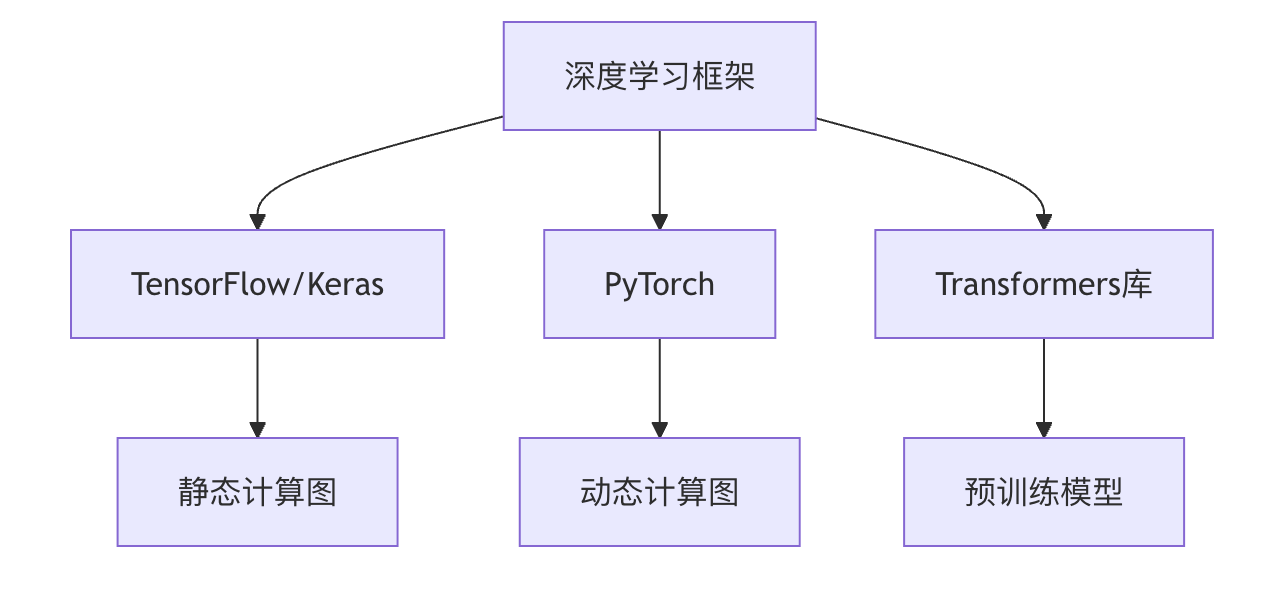
TensorFlow/Keras Explained
Core Architecture
TensorFlow adopts a layered design:
- Front-end API: Interfaces for languages such as Python, C++, etc.
- Computation Graph: Represents operations as a directed acyclic graph (DAG)
- Distributed Runtime: Executes across CPU/GPU/TPU
Keras High-Level API
Keras, as the official high-level API of TensorFlow, simplifies the model building process:
Examples
from tensorflow.keras import layers
model = keras.Sequential([
layers.Dense(64, activation='relu', input_shape=(784,)),
layers.Dense(10, activation='softmax')
])
model.compile(optimizer='adam',
loss='sparse_categorical_crossentropy',
metrics=['accuracy'])
Key Feature Comparison
| Feature | TensorFlow | Keras |
|---|---|---|
| Abstraction Level | Low-level | High-level |
| Ease of Use | Relatively complex | Simple |
| Flexibility | High | Medium |
| Typical Use Cases | Production deployment | Rapid prototyping |
In-Depth Analysis of PyTorch
Advantages of Dynamic Computation Graphs
PyTorch's core feature isdynamic computation graph(Define-by-Run), which makes:
- Debugging more intuitive (can use standard Python debugging tools)
- Network structure can change dynamically
- More consistent with Python programming conventions
Typical Model Construction Example
Example
import torch.nn as nn
import torch.optim as optim
class Net(nn.Module):
def __init__(self):
super(Net, self).__init__()
self.fc1 = nn.Linear(784, 64)
self.fc2 = nn.Linear(64, 10)
def forward(self, x):
x = torch.relu(self.fc1(x))
x = torch.softmax(self.fc2(x), dim=1)
return x
model = Net()
criterion = nn.CrossEntropyLoss()
optimizer = optim.Adam(model.parameters())
Automatic Differentiation System
How PyTorch's automatic differentiation works:
- Records the computation graph during forward propagation
- Automatically computes gradients during backpropagation
- Through
.backward()trigger gradient computation
Special Topic: Transformers Library
Pretrained Model Ecosystem
HuggingFace Transformers provides a rich set of pretrained models:
- BERT (Google)
- GPT (OpenAI)
- RoBERTa (Facebook)
- T5 (Google)
Typical Usage Workflow
Example
# Load pretrained model and tokenizer
tokenizer = AutoTokenizer.from_pretrained("bert-base-uncased")
model = AutoModel.from_pretrained("bert-base-uncased")
# Text processing
inputs = tokenizer("Hello world!", return_tensors="pt")
outputs = model(**inputs)
Model Fine-Tuning Modes
Example
training_args = TrainingArguments(
output_dir='./results',
num_train_epochs=3,
per_device_train_batch_size=16
)
trainer = Trainer(
model=model,
args=training_args,
train_dataset=train_dataset
)
trainer.train()
Model Deployment and Optimization
Comparison of Deployment Solutions
| Solution | Applicable Scenarios | Toolchain |
|---|---|---|
| On-premises service | Enterprise internal applications | Flask + ONNX |
| Cloud deployment | Internet services | AWS SageMaker |
| Edge computing | IoT devices | TensorRT |
| Mobile | Mobile applications | Core ML |
Model Optimization Techniques
- **Quantization**:
- Convert FP32 to INT8
- Reduce memory usage by 75%
- Speed up inference
Example
converter = tf.lite.TFLiteConverter.from_saved_model(saved_model_dir)
converter.optimizations = [tf.lite.Optimize.DEFAULT]
tflite_quant_model = converter.convert()
**Pruning**:
- Remove unimportant neural connections
- Typically reduces parameters by 60-90%
- Maintains model accuracy essentially unchanged
Knowledge Distillation:
- Large model (teacher) guides small model (student)
- Preserve the knowledge of the large model
- Significantly reduce model size
Framework Selection Guide
Decision Factor Analysis
Project Type:
- Research prototype → PyTorch
- Production system → TensorFlow
- NLP tasks → Transformers
Team Skills:
- Proficient in Python → PyTorch
- Java/C++ background → TensorFlow Serving
Hardware Environment:
- TPU → TensorFlow
- Multiple GPUs → PyTorch Distributed
Learning Path Suggestions

Hands-on Exercises
Exercise 1: Image Classification Comparison
Implement the same CNN model using TensorFlow and PyTorch respectively, on the CIFAR-10 dataset:
- Compare code complexity
- Record training time
- Test accuracy differences
Exercise 2: Model Conversion
Convert a PyTorch model to:
- ONNX format
- TensorFlow Lite format
- Compare inference speed before and after conversion
Exercise 3: Optimization Practice
Choose a pretrained model:
- Apply quantization techniques
- Implement pruning
- Measure changes in model size and inference speed before and after optimization
Through this tutorial, you should have mastered the core features and application scenarios of mainstream deep learning frameworks. It is recommended to start learning deep learning programming with PyTorch, and then expand to other frameworks based on project needs once you have a solid foundation. Remember, frameworks are just tools; the real value lies in the real-world problems you solve with them.
Other Extensions