Linux top Command
 Linux Command Complete List
Linux topis a real-time system monitoring tool commonly used on Linux and other Unix-like systems. It provides a dynamic, interactive real-time view showing overall system performance information and information about running processes.
Permissions: All users.
Syntax
top [-] [d delay] [q] [c] [S] [s] [i] [n] [b]
Parameter Description:
-d <秒数>: Specifies the refresh time interval of the top command, in seconds.-n <次数>: Specifies the number of runs after which the top command automatically exits.-p <进程ID>: Display only information for the specified process ID.-u <用户名>: Display only process information for the specified username.-H: Display detailed thread information in the process information.-i: Do not display idle or useless processes.-b: Run in batch mode, directly outputting results to a file.-c: Display the full command line without truncation.-S: Accumulatively display the CPU time used by processes.
Display Information
Some common functions and display information of the top command:
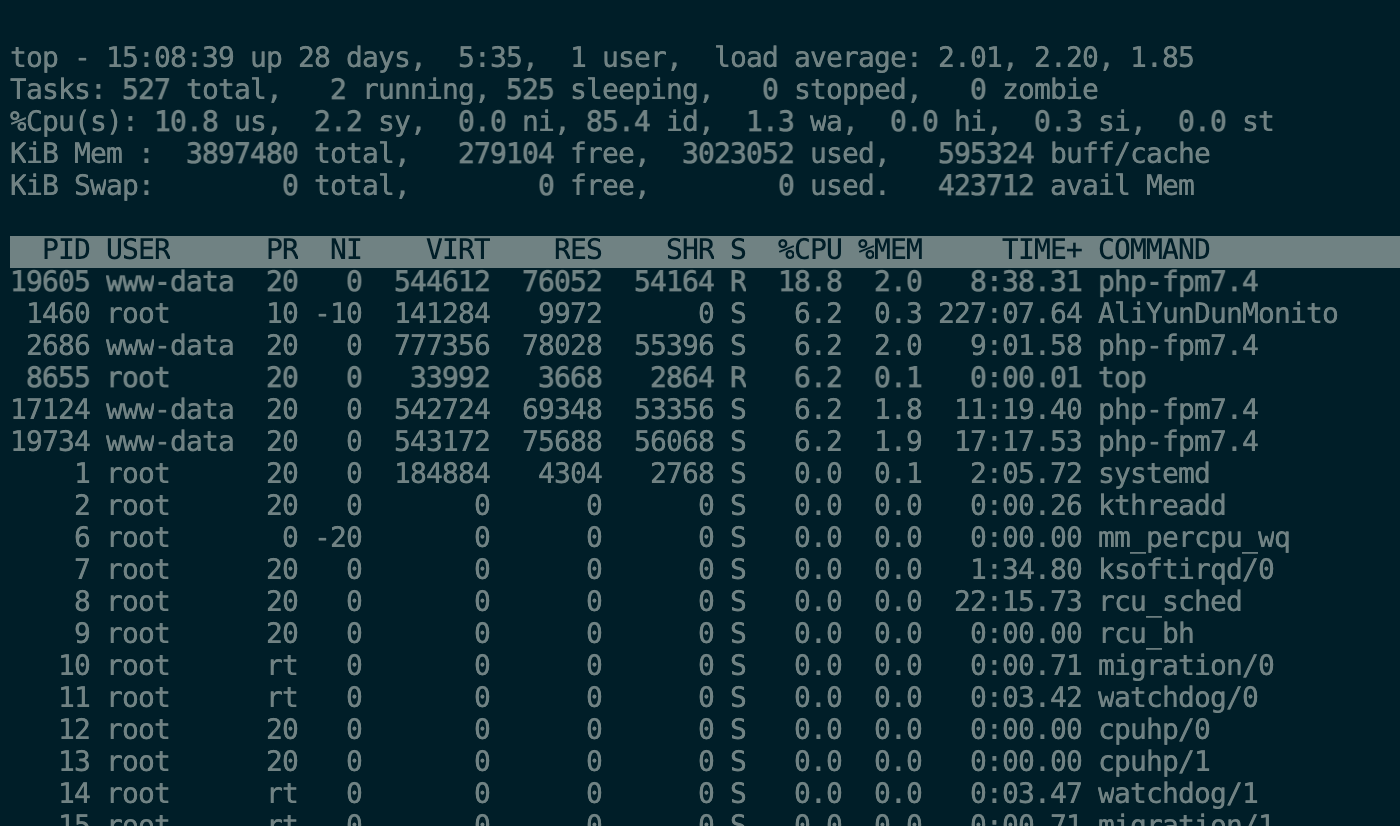
Overall system information:
- uptime: System uptime and average load.
- tasks: Number of currently running processes and threads.
- CPU: Overall CPU usage and per-core usage.
- Memory: Overall memory usage, available memory, and cache.
Process information:
- PID: Process identifier.
- USER: Username of the user running the process.
- PR (Priority): Process priority.
- NI (Nice value): Process priority adjustment value.
- VIRT (Virtual Memory): Size of virtual memory used by the process.
- RES (Resident Memory): Size of physical memory actually used by the process.
- SHR (Shared Memory): Size of memory shared by the process.
- %CPU: CPU usage of the process.
- %MEM: Memory usage of the process.
- TIME+: Accumulated CPU time of the process.
Functions and interactive operations:
- Key commands: While top is running, you can use some key commands to operate, such as pressing "k" to terminate a process, pressing "h" to display help information, etc.
- Sorting: Processes can be sorted by CPU usage, memory usage, process ID, etc.
- Refresh rate: You can set the refresh rate of top to view system information dynamically.
Examples
Display process information
# top
Display full command
# top -c
Display program information in batch mode
# top -b
Display program information in cumulative mode
# top -S
Set the number of information updates
top -n 2

//表示更新两次后终止更新显示
Set the information update time
# top -d 3

//表示更新周期为3秒
Display specified process information
# top -p 139

//显示进程号为139的进程信息,CPU、内存占用率等
Exit after displaying updates ten times
top -n 10
The user will not be able to use interactive commands to control processes.
top -sOther Extensions