JSP Server Response
The Response object mainly sends the results processed by the JSP container back to the client. You can use the response variable to set the HTTP status and send data to the client, such as Cookies, HTTP header information, etc.
A typical response looks like this:
HTTP/1.1 200 OK
Content-Type: text/html
Header2: ...
...
HeaderN: ...
  (空行)
<!doctype ...>
<html>
<head>...</head>
<body>
...
</body>
</html>
The status line contains HTTP version information, such as HTTP/1.1, a status code, such as 200, and a very short message corresponding to the status code, such as OK.
The following table summarizes the most useful parts of the HTTP/1.1 response headers; you will often encounter them in network programming:
| Response Header | Description |
|---|---|
| Allow | Specifies the request methods supported by the server (GET, POST, etc.) |
| Cache-Control | Specifies the circumstances under which the response document can be safely cached. Typical values arepublic,privateorno-cacheetc. Public means the document can be cached, Private means the document serves only a single user and can only use a private cache. No-cache means the document is not cached. |
| Connection | Tells the browser whether to use a persistent HTTP connection.closeValueTells the browser not to use a persistent HTTP connection, while keep-alive means using a persistent connection. |
| Content-Disposition | Asks the browser to prompt the user to store the response on disk under the given name. |
| Content-Encoding | Specifies the encoding rules for the page during transmission. |
| Content-Language | Indicates the language used by the document, such as en, en-us, ru, etc. |
| Content-Length | Indicates the number of bytes in the response. It is only useful when the browser uses a persistent (keep-alive) HTTP connection. |
| Content-Type | Indicates the MIME type used by the document. |
| Expires | Indicates when the document expires and should be removed from the cache. |
| Last-Modified | Indicates the last modified time of the document. The client can cache the document and provide aIf-Modified-Sincerequest header. |
| Location | Within 300 seconds, contains the response address for a status code; the browser will automatically reconnect and retrieve the new document. |
| Refresh | Indicates how often the browser should request an updated page. |
| Retry-After | Used with 503 (Service Unavailable) to tell the user how long until the request will be responded to. |
| Set-Cookie | Indicates the cookie corresponding to the current page. |
HttpServletResponse Class
The response object is an instance of the javax.servlet.http.HttpServletResponse class. Just as the server creates a request object, it also creates a client response.
The response object defines the interface for handling and creating HTTP headers. By using this object, developers can add new cookies or timestamps, as well as HTTP status codes, etc.
The following table lists the methods used to set HTTP response headers, which are provided by the HttpServletResponse class:
| S.N. | Method & Description |
|---|---|
| 1 | String encodeRedirectURL(String url)Encodes the URL used by the sendRedirect() method. |
| 2 | String encodeURL(String url)Encodes the URL and returns the URL containing the Session ID. |
| 3 | boolean containsHeader(String name)Returns whether the specified response header exists. |
| 4 | boolean isCommitted()Returns whether the response has been committed to the client. |
| 5 | void addCookie(Cookie cookie)Adds the specified cookie to the response. |
| 6 | void addDateHeader(String name, long date)Adds a response header with the specified name and date value. |
| 7 | void addHeader(String name, String value)Adds a response header with the specified name and value. |
| 8 | void addIntHeader(String name, int value)Adds a response header with the specified name and int value. |
| 9 | void flushBuffer()Writes any buffered content to the client. |
| 10 | void reset()Clears any data in the buffer, including status codes and various response headers. |
| 11 | void resetBuffer()Clears the basic buffered data, excluding response headers and status codes. |
| 12 | void sendError(int sc)Sends an error response to the client using the specified status code, then clears the buffer. |
| 13 | void sendError(int sc, String msg)Sends an error response to the client using the specified status code and message. |
| 14 | void sendRedirect(String location)Sends a temporary redirect response to the client using the specified URL. |
| 15 | void setBufferSize(int size)Sets the buffer size of the response body. |
| 16 | void setCharacterEncoding(String charset)Specifies the character encoding of the response (MIME charset), such as UTF-8. |
| 17 | void setContentLength(int len)Specifies the length of the response content in HTTP servlets. This method is used to set the HTTP Content-Length header. |
| 18 | void setContentType(String type)Sets the content type of the response, if the response has not yet been committed. |
| 19 | void setDateHeader(String name, long date)Sets the response header name and date using the specified name and date. |
| 20 | void setHeader(String name, String value)Sets the response header name and content using the specified name and value. |
| 21 | void setIntHeader(String name, int value)Sets an int value to the name header. |
| 22 | void setLocale(Locale loc)Sets the locale of the response, if the response has not yet been committed. |
| 23 | void setStatus(int sc)Sets the status code of the response. |
HTTP Response Header Program Example
The following example uses the setIntHeader() method and the setRefreshHeader() method to simulate a digital clock:
<%@ page language="java" contentType="text/html; charset=UTF-8"
    pageEncoding="UTF-8"%>
<%@ page import="java.io.*,java.util.*" %>
<!DOCTYPE html>
<html>
<head>
<meta charset="utf-8">
<title>Example(example.com)</title>
</head>
<body>
<h2>自动刷新实例</h2>
<%
   // 设置每隔5秒自动刷新
   response.setIntHeader("Refresh", 5);
   // 获取当前时间
   Calendar calendar = new GregorianCalendar();
   String am_pm;
   int hour = calendar.get(Calendar.HOUR);
   int minute = calendar.get(Calendar.MINUTE);
   int second = calendar.get(Calendar.SECOND);
   if(calendar.get(Calendar.AM_PM) == 0)
      am_pm = "AM";
   else
      am_pm = "PM";
   String CT = hour+":"+ minute +":"+ second +" "+ am_pm;
   out.println("当前时间: " + CT + "\n");
%>
</body>
</html>
Save the above code as main.jsp, then access it through a browser. It will display the current system time every 5 seconds.
We can look at the following GIF demo:
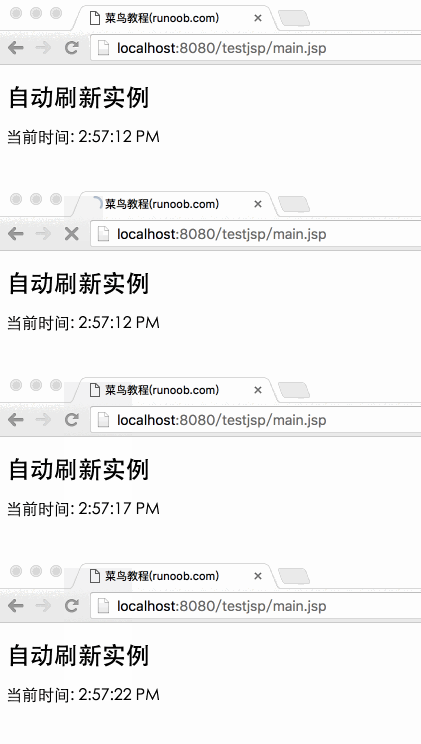
You can also modify the above code yourself and try using other methods to gain a deeper understanding.
Other Extensions