JSP Life Cycle
The key to understanding the underlying functionality of JSP is to understand the life cycle they follow.
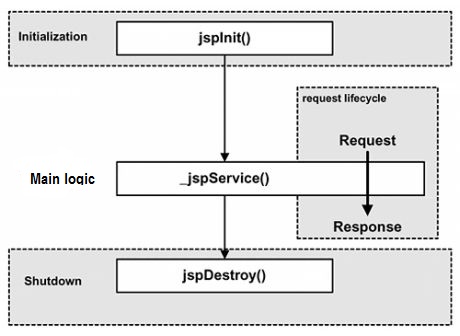
The JSP life cycle is the entire process from creation to destruction, similar to the servlet life cycle, with the difference being that the JSP life cycle also includes compiling the JSP file into a servlet.
The following are the stages that the JSP life cycle goes through:
- Compilation stage:
The servlet container compiles the servlet source file and generates the servlet class.
- Initialization stage:
Load the servlet class corresponding to the JSP, create its instance, and call its initialization method.
- Execution stage:
Call the service method of the servlet instance corresponding to the JSP.
- Destruction stage:
Call the destroy method of the servlet instance corresponding to the JSP, then destroy the servlet instance.
Obviously, the four main stages of the JSP life cycle are very similar to the servlet life cycle. The diagram is shown below:
JSP Compilation
When the browser requests a JSP page, the JSP engine first checks whether the file needs to be compiled. If the file has never been compiled, or has been changed since the last compilation, then this JSP file is compiled.
The compilation process includes three steps:
- Parse the JSP file.
- Convert the JSP file into a servlet.
- Compile the servlet.
JSP Initialization
After the container loads the JSP file, it will call the jspInit() method before providing any services to requests. If you need to perform custom JSP initialization tasks, simply override the jspInit() method, like this:
public void jspInit(){
  // 初始化代码
}
Generally speaking, the program is initialized only once, and the same is true for servlets. Usually you can initialize database connections, open files, and create query tables in the jspInit() method.
JSP Execution
This stage describes all request-related interaction behaviors in the JSP life cycle until it is destroyed.
After the JSP page completes initialization, the JSP engine will call the _jspService() method.
The _jspService() method requires an HttpServletRequest object and an HttpServletResponse object as its parameters, like this:
void _jspService(HttpServletRequest request,
                 HttpServletResponse response)
{
   // 服务端处理代码
}
The _jspService() method is called once per request and is responsible for generating the corresponding response. It is also responsible for generating responses for all 7 HTTP methods, such as GET, POST, DELETE, etc.
JSP Cleanup
The destruction stage of the JSP life cycle describes everything that happens when a JSP page is removed from the container.
The jspDestroy() method is the JSP equivalent of the destroy method in servlets. Override the jspDestroy() method when you need to perform any cleanup work, such as releasing database connections or closing files, etc.
The format of the jspDestroy() method is as follows:
public void jspDestroy()
{
   // 清理代码
}
Example
A code example of the JSP life cycle is shown below:
<%@ page language="java" contentType="text/html; charset=UTF-8"
    pageEncoding="UTF-8"%>
<html>
<head>
<title>life.jsp</title>
</head>
<body>

<%!
  private int initVar=0;
  private int serviceVar=0;
  private int destroyVar=0;
%>

<%!
  public void jspInit(){
    initVar++;
    System.out.println("jspInit(): JSP被初始化了"+initVar+"次");
  }
  public void jspDestroy(){
    destroyVar++;
    System.out.println("jspDestroy(): JSP被销毁了"+destroyVar+"次");
  }
%>

<%
  serviceVar++;
  System.out.println("_jspService(): JSP共响应了"+serviceVar+"次请求");

  String content1="初始化次数 : "+initVar;
  String content2="响应客户请求次数 : "+serviceVar;
  String content3="销毁次数 : "+destroyVar;
%>
<h1>Example JSP 测试实例</h1>
<p><%=content1 %></p>
<p><%=content2 %></p>
<p><%=content3 %></p>

</body>
</html>
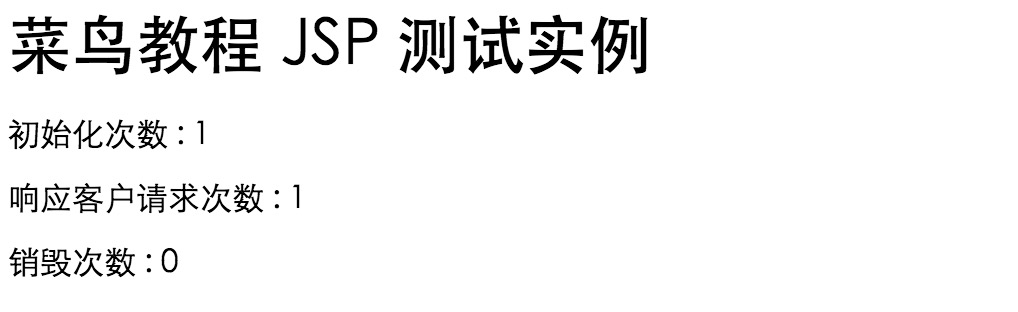
Open the page in a browser, and the output is: