JSP Cookie Handling
Cookies are text files stored on the client machine, and they store a lot of tracking information. Based on Servlet technology, JSP can obviously provide support for HTTP cookies.
There are usually three steps to identify returning visitors:
- The server script sends a series of cookies to the browser. For example, name, age, ID number, etc.
- The browser stores this information on the local machine for future use.
- The next time the browser sends any request to the server, it will also send these cookie information to the server, and then the server uses this information to identify the user or do some other things.
This chapter will teach you how to set or reset cookies, as well as how to access and delete them.
JSP Cookie handling requires encoding and decoding Chinese characters, as follows:
String   str   =   java.net.URLEncoder.encode("中文", "UTF-8");            //编码
String   str   =   java.net.URLDecoder.decode("编码后的字符串","UTF-8");   // 解码
Cookie Anatomy
Cookies are usually set in HTTP headers (although JavaScript can set cookies directly in the browser). In JSP, setting a cookie requires sending the following header to the server:
HTTP/1.1 200 OK
Date: Fri, 04 Feb 2015 21:03:38 GMT
Server: Apache/1.3.9 (UNIX) PHP/4.0b3
Set-Cookie: name=example; expires=Friday, 04-Feb-17 22:03:38 GMT;
                 path=/; domain=example.com
Connection: close
Content-Type: text/html
As you can see, the Set-Cookie header contains a key-value pair, a GMT (Greenwich Mean Time) time, a path, and a domain. The key-value pair will be URL-encoded. The validity field is an instruction that tells the browser when to clear the cookie.
If the browser is configured to store cookies, it will save this information until expiration. If any page visited by the user matches the path and domain in the cookie, the browser will send the cookie back to the server. The header on the browser side looks like this:
GET / HTTP/1.0
Connection: Keep-Alive
User-Agent: Mozilla/4.6 (X11; I; Linux 2.2.6-15apmac ppc)
Host: zink.demon.co.uk:1126
Accept: image/gif, */*
Accept-Encoding: gzip
Accept-Language: en
Accept-Charset: iso-8859-1,*,utf-8
Cookie: name=xyz
JSP scripts access these cookies through the getCookies() method of the request object, which returns an array of Cookie objects.
Servlet Cookie Methods
The following table lists the commonly used methods in the Cookie object:
| No. | Method & Description |
|---|---|
| 1 | public void setDomain(String pattern) |
Setting Cookies with JSP
Setting cookies with JSP involves three steps:
(1) Create a Cookie object:Call the Cookie constructor, using a cookie name and value as parameters; both are strings.
Cookie cookie = new Cookie("key","value");
Be sure to remember that neither the name nor the value can contain spaces or the following characters:
[ ] ( ) = , " / ? @ : ;
(2) Set the validity period:Call the setMaxAge() function to indicate how long (in seconds) the cookie is valid. The following operation sets the validity period to 24 hours.
cookie.setMaxAge(60*60*24);
(3) Send the cookie to the HTTP response header:Call the response.addCookie() function to add the cookie to the HTTP response header.
response.addCookie(cookie);
Example Demo
The main.jsp file code is as follows:
<%@ page language="java" contentType="text/html; charset=UTF-8"
    pageEncoding="UTF-8"%>
<%@ page import="java.net.*" %>
<%
   // 编码,解决中文乱码
   String str = URLEncoder.encode(request.getParameter("name"),"utf-8");
   // 设置 name 和 url cookie
   Cookie name = new Cookie("name",
           str);
   Cookie url = new Cookie("url",
              request.getParameter("url"));

   // 设置cookie过期时间为24小时。
   name.setMaxAge(60*60*24);
   url.setMaxAge(60*60*24);

   // 在响应头部添加cookie
   response.addCookie( name );
   response.addCookie( url );
%>
<html>
<head>
<title>设置 Cookie</title>
</head>
<body>

<h1>设置 Cookie</h1>

<ul>
<li><p><b>网站名:</b>
   <%= request.getParameter("name")%>
</p></li>
<li><p><b>网址:</b>
   <%= request.getParameter("url")%>
</p></li>
</ul>
</body>
</html>
The following is a simple HTML form that submits client data to the main.jsp file via the GET method and sets cookies:
<!DOCTYPE html>
<html>
<head>
<meta charset="utf-8">
<title>Example(example.com)</title>
</head>
<body>

<form action="main.jsp" method=GET>
站点名: <input type="text" name="name">
<br />
网址: <input type="text" name="url" />
<input type="submit" value="提交" />
</form>

</body>
</html>
Save the above HTML code to a test.htm file.
Place this file in the WebContent directory of the current JSP project (the same directory as main.jsp).
Submit the form data to the main.jsp file by visiting http://localhost:8080/testjsp/test.html. The demo GIF is shown below:
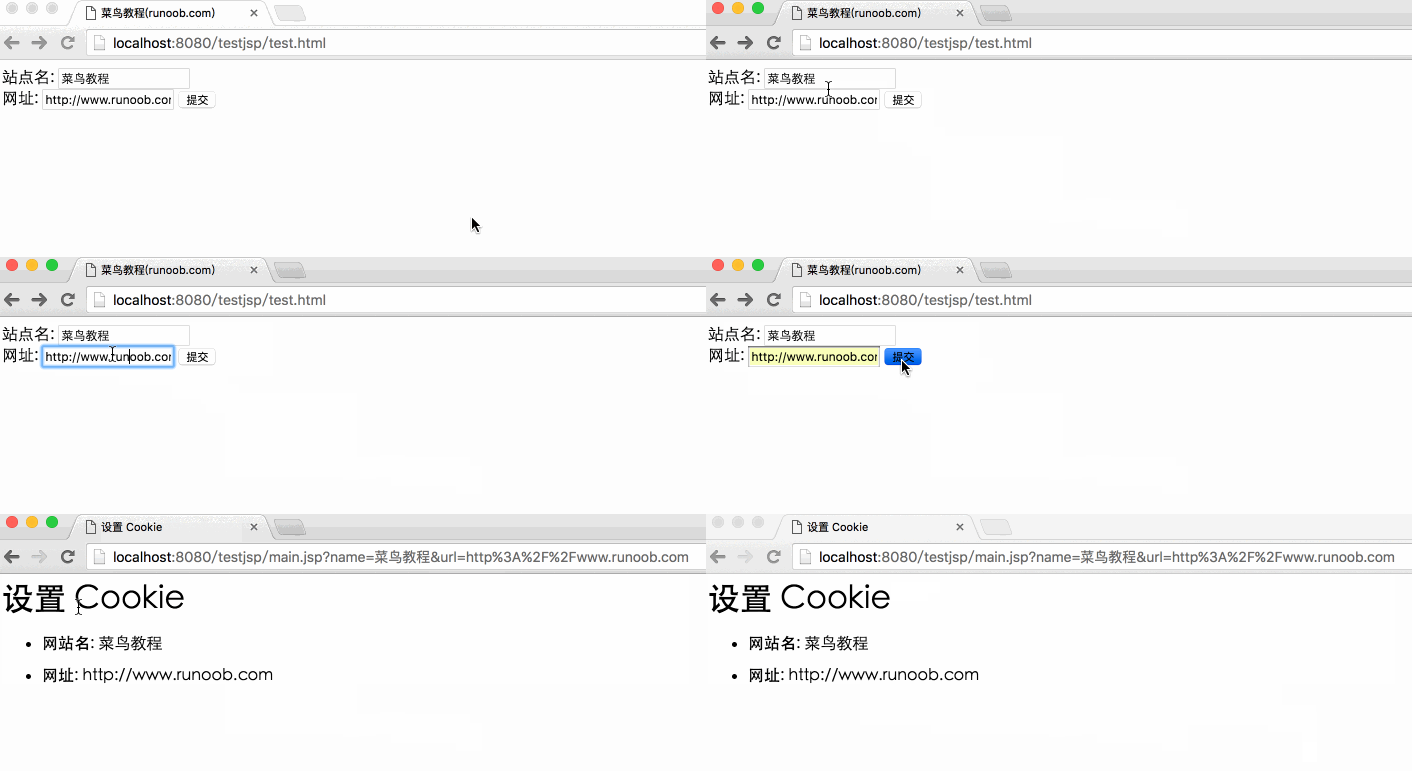
Try entering "Site Name" and "URL", then click the submit button. It will display "Site Name" and "URL" on your screen, and set two cookies, "Site Name" and "URL".
Reading Cookies with JSP
To read cookies, you need to call the request.getCookies() method to obtain an array of javax.servlet.http.Cookie objects, then iterate through the array and use the getName() and getValue() methods to get the name and value of each cookie.
Let's read the cookies from the previous example. The following is the cookie.jsp file code:
<%@ page language="java" contentType="text/html; charset=UTF-8"
    pageEncoding="UTF-8"%>
<%@ page import="java.net.*" %>
<!DOCTYPE html>
<html>
<head>
<meta http-equiv="Content-Type" content="text/html; charset=UTF-8">
<title>获取 Cookie</title>
</head>
<body>
<%
   Cookie cookie = null;
   Cookie[] cookies = null;
   // 获取 cookies 的数据,是一个数组
   cookies = request.getCookies();
   if( cookies != null ){
      out.println("<h2> 查找 Cookie 名与值</h2>");
      for (int i = 0; i < cookies.length; i++){
         cookie = cookies[i];

         out.print("参数名 : " + cookie.getName());
         out.print("<br>");
         out.print("参数值: " + URLDecoder.decode(cookie.getValue(), "utf-8") +" <br>");
         out.print("------------------------------------<br>");
      }
  }else{
      out.println("<h2>没有发现 Cookie</h2>");
  }
%>
</body>
</html>
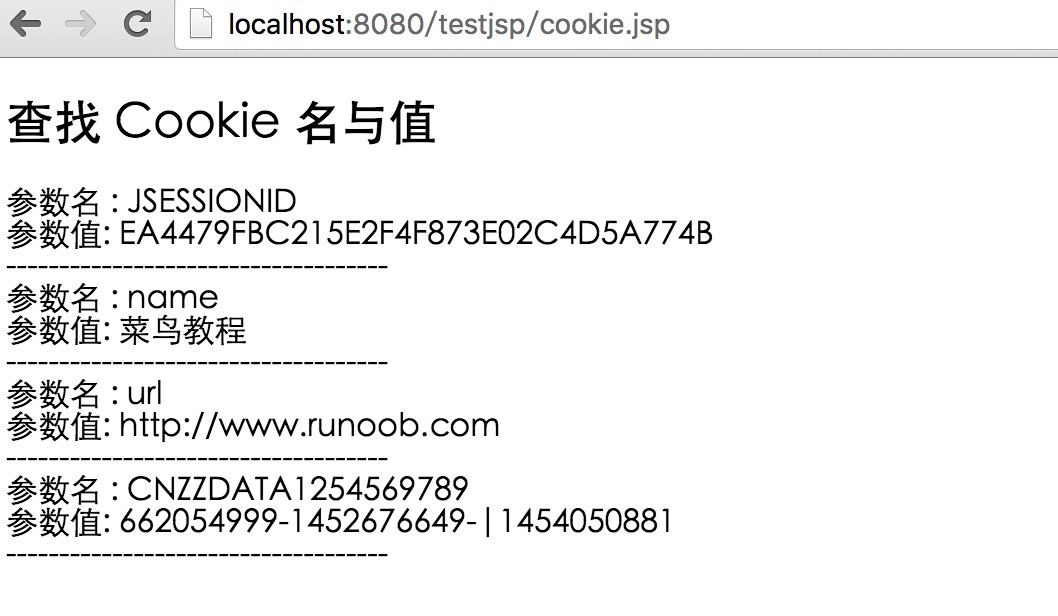
After accessing via browser, the output is:
Deleting Cookies with JSP
Deleting cookies is very simple. If you want to delete a cookie, just follow the steps below:
- Obtain an existing cookie and store it in a Cookie object.
- Set the cookie's validity period to 0.
- Re-add this cookie to the response header.
Example Demo
The following program deletes a cookie named "name". When you run cookie.jsp for the second time, name will be null.
<%@ page language="java" contentType="text/html; charset=UTF-8"
    pageEncoding="UTF-8"%>
<%@ page import="java.net.*" %>
<!DOCTYPE html>
<html>
<head>
<meta http-equiv="Content-Type" content="text/html; charset=UTF-8">
<title>获取 Cookie</title>
</head>
<body>
<%
   Cookie cookie = null;
   Cookie[] cookies = null;
   // 获取当前域名下的cookies,是一个数组
   cookies = request.getCookies();
   if( cookies != null ){
      out.println("<h2> 查找 Cookie 名与值</h2>");
      for (int i = 0; i < cookies.length; i++){
         cookie = cookies[i];
         if((cookie.getName( )).compareTo("name") == 0 ){
            cookie.setMaxAge(0);
            response.addCookie(cookie);
            out.print("删除 Cookie: " +
            cookie.getName( ) + "<br/>");
         }
         out.print("参数名 : " + cookie.getName());
         out.print("<br>");
         out.print("参数值: " + URLDecoder.decode(cookie.getValue(), "utf-8") +" <br>");
         out.print("------------------------------------<br>");
      }
  }else{
      out.println("<h2>没有发现 Cookie</h2>");
  }
%>
</body>
</html>
After accessing via browser, the output is:
Visit againhttp://localhost:8080/testjsp/cookie.jsp, you will get the following result:
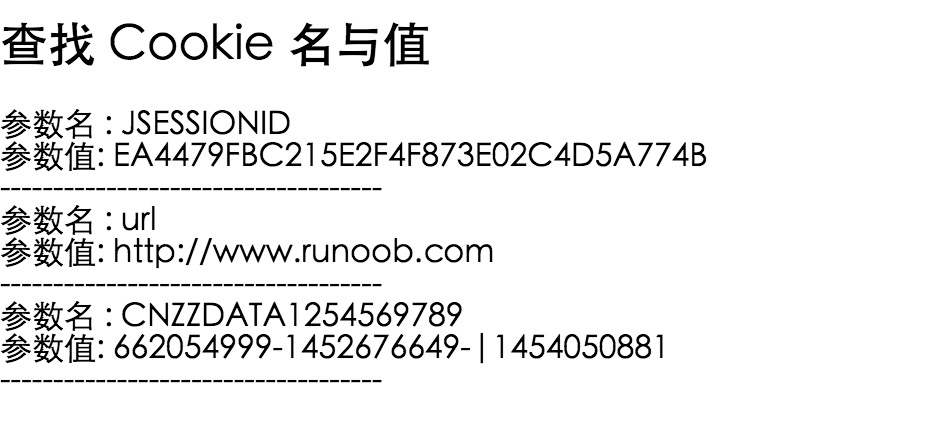
You can see that the cookie named "name" is gone.
You can also manually delete cookies in the browser. In IE, click the Tools menu item, then select Internet Options, and click Delete Cookies to delete all cookies.
Other Extensions