Android Fragment
Fragments are part of an activity, making the activity more modular in design. We can think of a fragment as a sub-activity.
Below are important points about fragments:
- A fragment has its own layout, its own behavior, and its own lifecycle callbacks.
- While the activity is running, you can add or remove fragments in the activity.
- You can combine multiple fragments in a single activity to build a multi-pane UI.
- A fragment can be used in multiple activities.
- The lifecycle of a fragment is closely related to its host activity. This means that when the activity is paused, all fragments in the activity are stopped.
- A fragment can implement behavior without having user interface components.
- Fragments were added to the Android API in Android API version 11.
Create a fragment by extending the Fragment class. You can do this by using the
Before the introduction of fragments, we had a limitation because only a single activity could be displayed on the screen at any given time. We were unable to split the device screen and independently control different parts. With the introduction of fragments, we gained greater flexibility, and the limitation of having only a single activity on the screen at one time was removed. Now we can have a single activity, but each activity is composed of multiple fragments, each with its own layout, events, and complete lifecycle.
Below is a typical example demonstrating how two UI modules defined by fragments can be combined in an activity designed for tablets, and separated in an activity designed for handheld devices.
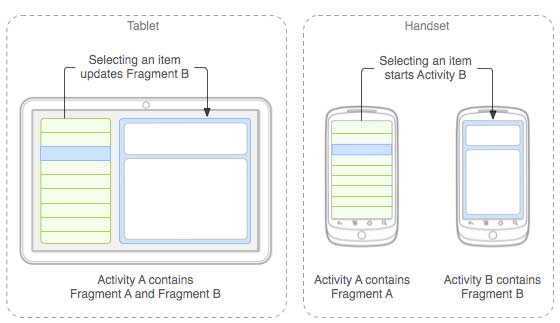
When running on a tablet-sized device, this application can embed two fragments in Activity A. On a phone screen, because there is not enough space, Activity A contains only the fragment with the article list. When the user clicks an article, it starts Activity B, which contains the second fragment, to read the article.
Fragment Lifecycle
Android fragments have their own lifecycle, very similar to Android activities. Below is a brief introduction to the different stages of the lifecycle.
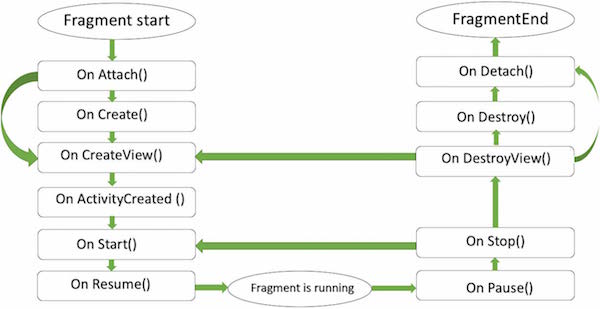
The following is a list of methods you can override in the Fragment class:
- onAttach(): The fragment instance is associated with an activity instance. The fragment and activity are not yet fully initialized. Usually, you obtain a reference to the activity in this method, which will be used in the fragment's future initialization work.
- onCreate(): The system calls this method when the fragment is created. You need to initialize some necessary components of the fragment. These components need to be retained when the fragment is paused or stopped, so that they can be restored.
- onCreateView(): The system calls this method when the fragment is about to draw its user interface for the first time. To draw the fragment's UI, you must return a View component representing the root layout of the fragment from this method. If the fragment does not provide a user interface, return null directly.
- onActivityCreated: This method is called after the onCreateView() method when the host activity is created. The activity and fragment instances, along with the activity's view hierarchy, are created. At this point, views can be accessed through the findViewById() method. In this method, you can instantiate objects that require a Context object.
- onStart(): This method is called when the fragment becomes visible.
- onResume(): This method is called when the fragment becomes interactive.
- onPause(): The system calls this method when it first indicates that the user is about to leave the fragment. Usually, here you need to commit any persistent changes that go beyond the user's session.
- onStop(): Called when the fragment is about to be stopped.
- onDestroyView(): After this method is called, the fragment is about to be destroyed.
- onDestroy(): This method is used to clean up the fragment's state. However, it is not guaranteed to be called on the Android platform.
How to Use Fragments?
Here are the simple steps to create a fragment.
- First, decide how many fragments are needed in the activity. For example, we need to use two fragments to handle both landscape and portrait modes of the device.
- Next, based on the number of fragments, create a class that extends the Fragment class. The Fragment class contains the callback methods mentioned above. Override any methods according to your needs.
- For each fragment, you need to create layouts in XML files. These files contain the layouts of the defined fragments.
- Finally, modify the activity file based on requirements to define the actual fragment replacement logic.
Fragment Types
Basic fragments can be divided into the following three types:
- Single-frame Fragment- Single-frame fragments are used by handheld devices such as mobile phones. A fragment is displayed like a video.
- List Fragment- A fragment that contains a special list view is called a list fragment.
- Fragment Transition- Used with fragment transactions. You can move from one fragment to another.