Simulation Control: $finish, $stop
| System Task | Call Format | Task Description |
|---|---|---|
| Exit simulation | $finish( type ) ; | End the simulation. The parameter type selects whether to print information when exiting the simulation. type=0: Exit directly without printing type=1: Print the simulation time and the line information of the statement location type=2: Print the simulation time, location, memory, and CPU time usage |
| Pause simulation | $stop( type ) ; | Pause the simulation. The usage format is the same as $finish. |
Both $finish and $stop have the function of stopping the simulation, but they are still different.
$finish ends the current simulation. $stop pauses the current simulation. After the simulation is paused, it can be continued through the Verilog simulation tool or the command line, but after the simulation is ended, it cannot be continued no matter what. $stop is similar to the breakpoint debugging function in C language.
The following simulation illustrates the printed information corresponding to the type parameter.
Example
forever begin
#100;
if ($time >= 10000) $finish(0) ;
//if ($time >= 10000) $finish(1) ;
//if ($time >= 10000) $finish(2) ;
end
end
$finish(0), no information is printed when the simulation exits.
$finish(1), when the simulation exits, it prints the simulation time and the line information where $finish is located, as shown below.
The time precision of module test is ns, but the simulator time precision is ps, so the printed time information differs by a factor of 1000.

$finish(2), when the simulation exits, it not only prints the simulation time and line information, but also prints the PC usage time and memory usage, as shown below.

Time Format: $printtimescale, $timeformat
| System Task | Call Format and Description | |
|---|---|---|
| Print time Unit and precision | $printtimescale( hierarchy ) ; | |
| This system task prints the timescale information in the following format: TimeScale of ( hierarchy ) is 1 ( unit ) / 1 ( precision ) hierarchy is the module access level, can be omitted. In this case, it prints the timescale information of the current module. | ||
| Set time Unit and precision | $timeformat(unit_num, precision_num, suffix_string, min_field_width) | |
| unit_num, sets the time unit, defaults to `timescale precision_num, sets the number of significant decimal digits in the time unit, defaults to 0 suffix_string, sets the time suffix information, such as "ns", defaults to empty min_field_width, sets the number of character digits occupied by the time information, defaults to 20 |
When display tasks (such as $display, $monitor, etc.) and file write tasks (such as $display, etc.) use the format "%t" for data output, $timeformat can specify the output format of the time unit information.
In $timeformat, unit_num uses a signed number to specify the time unit. The corresponding relationship is shown in the following table:
| unit_num | Time unit | unit_num | Time unit |
|---|---|---|---|
| 0 | 1 s | -8 | 10 ns |
| -1 | 100 ms | -9 | 1 ns |
| -2 | 10 ms | -10 | 100 ps |
| -3 | 1 ms | -11 | 10 ps |
| -4 | 100 us | -12 | 1 ps |
| -5 | 10 us | -13 | 100 fs |
| -6 | 1 us | -14 | 10 fs |
| -7 | 100 ns | -15 | 1 fs |
Use the following code to perform a simple simulation of the 2 system tasks of the time scale.
Example
initial begin
# 10 ;
//ps precision, 5 significant digits in the decimal part, unit suffix displayed as "my-ps", occupying 15 character positions
$timeformat(-12, 5, " my-ps", 15) ;
end
initial begin
# 5 ;
$printtimescale() ;
$display("Time before resetup: %t", $time);
# 10 ;
$printtimescale() ;
$display("Time after resetup: %t", $time);
end
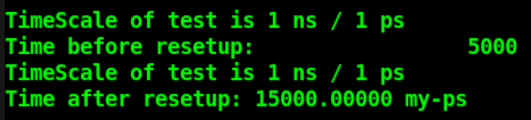
The simulation log is shown below.
From the figure, the display format of time before and after the $timeformat setting can be compared.
In addition, during this process the timescale remains unchanged; $timeformat only changes the display format of the time.
Simulation Time: $time, $stime, $realtime
| System task call | Description |
|---|---|
| $time | Returns a 64-bit integer time value |
| $stime | Returns a 32-bit integer time value |
| $realtime | Returns a real time value, which can be a floating-point number |
The simulation code is as follows:
Example
#10;
$display("$time output1: %t", $time);
$display("$stime output1: %t", $stime);
$display("$realtime output1: %t", $realtime);
#3.2;
$display("$time output2: %t", $time);
$display("$stime output2: %t", $stime);
$display("$realtime output2: %t", $realtime);
#5.6;
$display("$time output2: %t", $time);
$display("$stime output2: %t", $stime);
$display("$realtime output2: %t", $realtime);
end
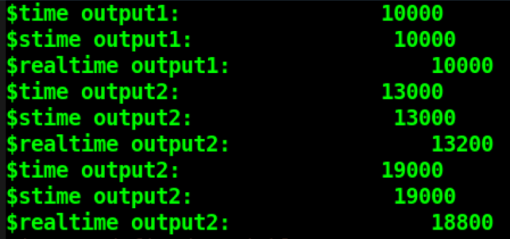
The simulation log is shown below.
Since the simulation time is short, there is no difference between $time and $stime.
However, $realtime accurately reads the simulation time according to the current time precision, while $time and $stime round the current time according to the time precision.
Command-line Argument Passing: $test$plusargs, $value$plusargs
Verilog also provides the interactive tasks $test$plusargs and $value$plusargs. During simulation, parameters can be passed via command-line arguments, providing great convenience for simulation debugging.
| System task | Call format | Task description |
|---|---|---|
| String argument passing | $test$plusargs( str ) ; | During simulation, if the string data passed via the command line matches str, the return value is 1, otherwise it is 0. |
| Numeric argument passing | $value$plusargs( str, var ) ; | During simulation, if the string data passed via the command line matches str, the return value is 1, otherwise it is 0. The type of the var variable passed to the module needs to be specified inside str. Refer to the display task $display for the format. |
When using $test$plusargs( str ), simply add "+str " to the simulation command line.
When using $value$plusargs( str, var ), the type of the value when passing the parameter needs to be specified inside str. When passing parameters on the command line, the value does not need any radix specification; just keep the value in the corresponding radix. The format of the command-line parameters needs to follow the format declared by str in $value$plusargs.
The following simulation illustrates this:
Example
if ($test$plusargs("DISPLAY_CTRL")) begin
$display("Display simulation information!!!");
end
end
reg [1:0] display_sel ;
initial begin
if ($value$plusargs("INFO_SEL=%b", display_sel)) begin
$display("Parameter transfer succeeds!!!");
end
else begin
display_sel = 2'b0 ;
end
end
initial begin
#1 ;
if (display_sel == 2'b01)
$display("You have selected Example!!!");
else if (display_sel == 2'b10)
$display("You have selected Verilog!!!");
else if (display_sel == 2'b11)
$display("You have selected Me!!!");
else
$display("What do you really what???");
end
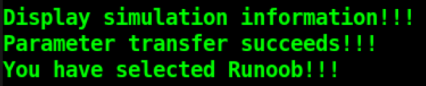
Add to the simulation command line: +DISPLAY_CTRL +INFO_SEL=01
The simulation log is as follows. From this, it can be seen that both the string parameter and the binary parameter are passed correctly.
Source Code Download for This Chapter
Download