Keywords: $display, $write, $strobe, $monitor
In Verilog, the following 4 system tasks are mainly used to display (print) debugging information: $display, $write, $strobe, $monitor.
$display
$display is used in a very similar way to the printf function in C. It can directly print strings, and can also specify the format of variables in the string to print relevant variables. For example:
$display("This is a test.");   //直接打印字符串
$display("This is a test number: %b.", num); //打印变量 num 为二进制格式

If the display format of the variable is not specified, the variable value will be displayed according to its position in the string, which is equivalent to participating in string concatenation. For example:
$display("This is a test number: ", num, "!!!");

If no format is specified, $display defaults to decimal display. $displayb, $displayo, and $displayh display in binary, octal, and hexadecimal formats respectively. Similarly, there are also $writeb, $writeo, $writeh, $strobeb, etc.
The following table shows common format specifications.
| %h or %H | Hexadecimal format output | %c or %C | ASCII code format output |
| %d or %D | Decimal format output | %e or %E | Exponential format output |
| %o or %O | Octal format output | %f or %F | Floating-point (real type) format output |
| %b or %B | Binary format output | %t or %T | Current time format output |
| %s or %S | String format output | %m or %M | Current hierarchical access path output |
Escape characters can also be used to display special characters, for example:
| \n | Newline character | %% | Percent sign "%" |
| \t | Tab character (Tab key) | \0 | Character represented by octal |
| \\ | Backslash "\" character | \0x | Character represented by hexadecimal |
| \" | Double quotation mark |
$write
$write is used in exactly the same way as $display, except that the former does not automatically add a newline after displaying information each time, while the latter does. When no newline is needed after output, the display task $write can be used.
$write("This is a test");
$write("number: %b", num);
$write("!!!\n");

$strobe
$strobe is a strobe display task. $strobe is used in the same way as $display, but the timing of printing information differs from $display.
When many statements are executed at the same time as the $display task, the execution order of these statements and $display is uncertain, and generally follows the sequential structure of the program.
$strobe, on the other hand, executes the display task only after other statements have completed execution. For example:
Example
initial begin
a = 1 ;
#1 ;
a <= a + 1 ;
//first display
$display("$display excuting result: %d.", a);
$strobe("$strobe excuting result: %d.", a);
#1 ;
$display();
//second display
$display("$display excuting result: %d.", a);
$strobe("$strobe excuting result: %d.", a);
end
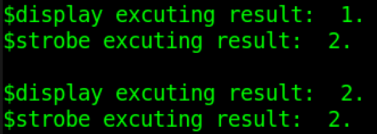
The execution result is shown below.
When the first display task is executed, the non-blocking assignment and $display execute at the same time. $display shows the variable value before the assignment, while $strobe shows the variable value after the assignment. This precisely reflects the strobe display characteristic of $strobe.
Let's look at another example:
Example
initial begin
for (i=0; i<4; i=i+1) begin
$display("Run times of $display: %d.", i);
$strobe("Run times of $strobe: %d.", i);
end
end
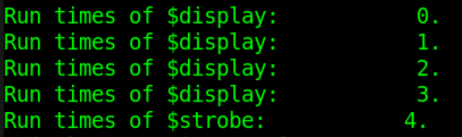
$display performs the display operation 4 times according to the program structure. Since this loop statement executes at time 0, the variable value displayed by $strobe is the result of the variable at the end of the loop, that is, $strobe is executed only after exiting the loop with i=4. This reflects the time-display characteristic of the display task $strobe.
$monitor
$monitor is a monitoring task used for continuous monitoring of variables. As long as a variable changes, $monitor prints and displays the corresponding information.
For example:
Example
initial begin
cnt = 3 ;
forever begin
# 5 ;
if (cnt<7) cnt = cnt + 1 ;
end
end
initial begin
$monitor("Counter change to value %d at the time %t.", cnt, $time);
end

Source code download for this chapter
Download