TypeScript Array
An array object stores a series of values using a single variable name.
Arrays are very commonly used.
Suppose you have a set of data (e.g., website names), stored in separate variables as shown below:
If there are 10, 100 of them, this approach becomes very impractical. In such cases, we can use an array to solve it:
This looks much more concise.
The syntax for declaring an array in TypeScript is as follows:
var array_name[:datatype];        //声明
array_name = [val1,val2,valn..]   //初始化
Or directly initialize it at declaration:
var array_name[:datatype] = [val1,val2…valn]
If the array is declared without a type, it is considered to be of type `any`. During initialization, the array's type is inferred based on the type of the first element.
Examples
Create an array of type number:
var numlist:number[] = [2,4,6,8]
The entire array structure is as follows:
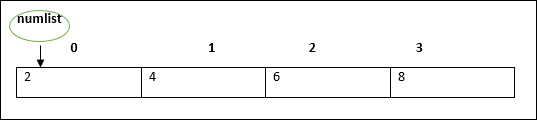
The first index value is 0, and we can access array elements based on the index value:
TypeScript
Compile the above code to get the following JavaScript code:
JavaScript
The output is:
Google
Example
In the following example, we initialize directly at declaration:
TypeScript
Compile the above code to get the following JavaScript code:
JavaScript
The output is:
1
2
3
4
Array Object
We can also create arrays using the Array object.
The constructor of the Array object accepts the following two values:
- A numeric value representing the size of the array.
- An initialized array list, with elements separated by commas.
Example
Specify the initial size of the array:
TypeScript
Compile the above code to get the following JavaScript code:
JavaScript
The output is:
0
2
4
6
In the following example, we initialize the array elements directly:
TypeScript
Compile the above code to get the following JavaScript code:
JavaScript
The output is:
Google
Example
Taobao
Facebook
Array Destructuring
We can also assign array elements to variables, as shown below:
TypeScript
Compile the above code to get the following JavaScript code:
JavaScript
The output is:
12
13
Array Iteration
We can use a for statement to loop through and output each element of the array:
TypeScript
Compile the above code to get the following JavaScript code:
JavaScript
The output is:
1001
1002
1003
1004
Multidimensional Arrays
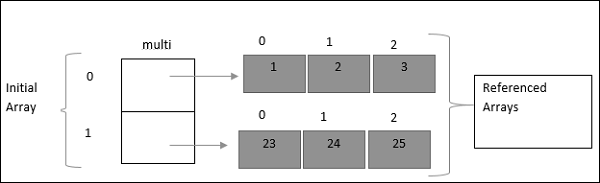
The elements of an array can be another array, thus forming a multidimensional array (Multi-dimensional Array).
The simplest multidimensional array is a two-dimensional array, defined as follows:
var arr_name:datatype[][]=[ [val1,val2,val3],[v1,v2,v3] ]
Example
Define a two-dimensional array, where each dimension's array has three elements.
TypeScript
Compile the above code to get the following JavaScript code:
JavaScript
The output is:
1
2
3
23
24
25
Using Arrays in Functions
Passing as Parameters to Functions
TypeScript
Compile the above code to get the following JavaScript code:
JavaScript
The output is:
Google
Example
Taobao
Facebook
As the Return Value of a Function
TypeScript
Compile the above code to get the following JavaScript code:
JavaScript
The output is:
Google
Example
Taobao
Facebook
Array Methods
The following table lists some commonly used array methods:
| No. | Method & Description | Example |
|---|---|---|
| 1. | concat()
Joins two or more arrays and returns the result. |
var alpha = ["a", "b", "c"];
var numeric = [1, 2, 3];

var alphaNumeric = alpha.concat(numeric);
console.log("alphaNumeric : " + alphaNumeric );    // a,b,c,1,2,3
|
| 2. | every()
Checks whether every element in the array meets the condition. |
function isBigEnough(element, index, array) {
        return (element >= 10);
}

var passed = [12, 5, 8, 130, 44].every(isBigEnough);
console.log("Test Value : " + passed ); // false
|
| 3. | filter()
Checks the elements and returns an array of all elements that meet the condition. |
function isBigEnough(element, index, array) {
   return (element >= 10);
}

var passed = [12, 5, 8, 130, 44].filter(isBigEnough);
console.log("Test Value : " + passed ); // 12,130,44
|
| 4. | forEach()
Executes a callback function once for each element of the array. |
let num = [7, 8, 9];
num.forEach(function (value) {
    console.log(value);
});
Compile to JavaScript code:
var num = [7, 8, 9];
num.forEach(function (value) {
    console.log(value);  // 7   8   9
});
|
| 5. | indexOf()
Searches for an element in the array and returns its position. If not found, returns -1, indicating that the item does not exist. |
var index = [12, 5, 8, 130, 44].indexOf(8);
console.log("index is : " + index );  // 2
|
| 6. | join()
Puts all elements of the array into a string. |
var arr = new Array("Google","Example","Taobao");

var str = arr.join();
console.log("str : " + str );  // Google,Example,Taobao

var str = arr.join(", ");
console.log("str : " + str );  // Google, Example, Taobao

var str = arr.join(" + ");
console.log("str : " + str );  // Google + Example + Taobao
|
| 7. | lastIndexOf()
Returns the last position of a specified string value, searching backward from a specified position within the string. |
var index = [12, 5, 8, 130, 44].lastIndexOf(8);
console.log("index is : " + index );  // 2
|
| 8. | map()
Processes each element of the array through a specified function and returns the processed array. |
var numbers = [1, 4, 9];
var roots = numbers.map(Math.sqrt);
console.log("roots is : " + roots );  // 1,2,3
|
| 9. | pop()
Removes the last element of the array and returns the removed element. |
var numbers = [1, 4, 9];

var element = numbers.pop();
console.log("element is : " + element );  // 9

var element = numbers.pop();
console.log("element is : " + element );  // 4
|
| 10. | push()
Adds one or more elements to the end of the array and returns the new length. |
var numbers = new Array(1, 4, 9);
var length = numbers.push(10);
console.log("new numbers is : " + numbers );  // 1,4,9,10
length = numbers.push(20);
console.log("new numbers is : " + numbers );  // 1,4,9,10,20
|
| 11. | reduce()
Computes array elements as a single value (from left to right). |
var total = [0, 1, 2, 3].reduce(function(a, b){ return a + b; });
console.log("total is : " + total );  // 6
|
| 12. | reduceRight()
Computes array elements as a single value (from right to left). |
var total = [0, 1, 2, 3].reduceRight(function(a, b){ return a + b; });
console.log("total is : " + total );  // 6
|
| 13. | reverse()
Reverses the order of the elements in the array. |
var arr = [0, 1, 2, 3].reverse();
console.log("Reversed array is : " + arr );  // 3,2,1,0
|
| 14. | shift()
Removes and returns the first element of the array. |
var arr = [10, 1, 2, 3].shift();
console.log("Shifted value is : " + arr );  // 10
|
| 15. | slice()
Selects a part of the array and returns a new array. |
var arr = ["orange", "mango", "banana", "sugar", "tea"];
console.log("arr.slice( 1, 2) : " + arr.slice( 1, 2) );  // mango
console.log("arr.slice( 1, 3) : " + arr.slice( 1, 3) );  // mango,banana
|
| 16. | some()
Checks whether any element in the array meets the specified condition. |
function isBigEnough(element, index, array) {
   return (element >= 10);

}

var retval = [2, 5, 8, 1, 4].some(isBigEnough);
console.log("Returned value is : " + retval );  // false

var retval = [12, 5, 8, 1, 4].some(isBigEnough);
console.log("Returned value is : " + retval );  // true
|
| 17. | sort()
Sorts the elements of the array. |
var arr = new Array("orange", "mango", "banana", "sugar");
var sorted = arr.sort();
console.log("Returned string is : " + sorted );  // banana,mango,orange,sugar
|
| 18. | splice()
Adds or removes elements from the array. |
var arr = ["orange", "mango", "banana", "sugar", "tea"];
var removed = arr.splice(2, 0, "water");
console.log("After adding 1: " + arr );    // orange,mango,water,banana,sugar,tea
console.log("removed is: " + removed);

removed = arr.splice(3, 1);
console.log("After removing 1: " + arr );  // orange,mango,water,sugar,tea
console.log("removed is: " + removed);  // banana
|
| 19. | toString()
Converts the array to a string and returns the result. |
var arr = new Array("orange", "mango", "banana", "sugar");
var str = arr.toString();
console.log("Returned string is : " + str );  // orange,mango,banana,sugar
|
| 20. | unshift()
Adds one or more elements to the beginning of the array and returns the new length. |
var arr = new Array("orange", "mango", "banana", "sugar");
var length = arr.unshift("water");
console.log("Returned array is : " + arr );  // water,orange,mango,banana,sugar
console.log("Length of the array is : " + length ); // 5
|