TypeScript Basic Syntax
A TypeScript program consists of the following parts:
- Modules
- Functions
- Variables
- Statements and Expressions
- Comments
First TypeScript Program
We can use the following TypeScript program to output "Hello World":
The above code is first compiled via thetsccommand:
tsc Example.ts
The following js code is obtained:
Example.js file code:
Finally, we use the node command to execute this js code.
$ node Example.js
Hello World
The whole process is shown in the following figure:

We can compile multiple ts files at the same time:
tsc file1.ts file2.ts file3.ts
The commonly used compilation parameters of tsc are shown in the following table:
| No. | Compilation parameter description |
|---|---|
| 1. | --help Display help information |
| 2. | --module Load extension modules |
| 3. | --target Set ECMA version |
| 4. | --declaration Additionally generate a file with the .d.ts extension. tsc ts-hw.ts --declaration The above command will generate two files: ts-hw.d.ts and ts-hw.js. |
| 5. | --removeComments Remove comments from files |
| 6. | --out Compile multiple files and merge them into one output file |
| 7. | --sourcemap Generate a sourcemap (.map) file. A sourcemap is an information file that stores the mapping of corresponding positions between source code and compiled code. |
| 8. | --module noImplicitAny Report an error when there is an implicit any type on expressions and declarations. |
| 9. | --watch Run the compiler in watch mode. It will watch the output files and recompile when they change. |
TypeScript Reserved Keywords
The TypeScript reserved keywords are shown in the following table:
| Keyword | Description |
|---|---|
abstract | Used to define abstract classes or abstract methods. |
any | Represents the any type, disabling type checking. |
as | Type assertion, used to convert one type to another. |
await | Used in async functions to pause code execution until the Promise resolves. |
boolean | Represents the boolean type. |
break | Exits a loop or a switch statement. |
case | Used for branches in a switch statement. |
catch | Used to catch exceptions. |
class | Used to define a class. |
const | Defines a constant variable. |
continue | Skips the current loop iteration and continues with the next one. |
debugger | Starts the debugger and pauses code execution. |
declare | Declares a variable or module, usually used in type declaration files. |
default | Defines the default branch of a switch statement. |
delete | Deletes an object's property or an array's element. |
do | Used indo...whileloops. |
else | Defines the else part in a conditional statement. |
enum | Defines an enum type. |
export | Used to export variables, functions, or classes from a module. |
extends | Used for class inheritance, indicating that a class inherits from another class. |
false | Boolean valuefalse。 |
finally | Definestry...catchthe final execution code block in the statement. |
for | Used inforloops. |
from | Used in module import statements to specify the source of the module. |
function | Defines a function. |
get | Used for an object's getter method. |
if | Used for conditional judgment. |
implements | Used for a class to implement an interface. |
import | Used to import content from a module. |
in | Used to check whether an object contains a specified property, or used infor...inloops. |
infer | Used to infer types in conditional types. |
instanceof | Checks whether an object is an instance of the specified class. |
interface | Used to define an interface. |
let | Defines a block-scoped variable. |
module | Defines a module (used in earlier versions of TypeScript). |
namespace | Defines a namespace (used in earlier versions of TypeScript). |
new | Creates an instance of a class. |
null | Represents a null value. |
number | Represents the number type. |
object | Represents a non-primitive type. |
of | Used infor...ofloops. |
package | Used in the module system to identify packages. |
private | Used as an access modifier for class members, indicating private. |
protected | Used as an access modifier for class members, indicating protected. |
public | Used as an access modifier for class members, indicating public. |
readonly | Indicates a read-only property. |
require | Used to import CommonJS modules. |
return | Exits a function and can return a value. |
set | Used for an object's setter method. |
string | Represents the string type. |
super | Used to call a parent class's method or constructor. |
switch | Used in switch statements. |
symbol | Represents the symbol type. |
this | Refers to the instance of the current class or object. |
throw | Throws an exception. |
try | Used in exception handling statementstry...catch。 |
true | Boolean valuetrue。 |
type | Used to define a type alias. |
typeof | Gets the type of a variable or expression. |
undefined | Represents an undefined value. |
unique | Used forsymbolthe unique identifier of the type. |
var | Used to declare variables (no longer recommended). |
void | Represents the type with no return value. |
while | Used inwhileloops. |
with | Used to create a scope in which references to the object can be omitted (not recommended). |
yield | Used in generator functions to pause and resume the execution of the generator. |
Whitespace and Line Breaks
TypeScript ignores spaces, tabs, and line breaks that appear in a program.
Spaces and tabs are usually used to indent code, making it easier to read and understand.
TypeScript is Case-Sensitive
TypeScript distinguishes between uppercase and lowercase characters.
Semicolons are Optional
Each line of instructions is a statement. You can use semicolons or not. Semicolons are optional in TypeScript, but they are recommended.
The following code is all valid:
console.log("Example")
console.log("Google");
If statements are written on the same line, semicolons must be used to separate them, otherwise an error will be reported, for example:
console.log("Example");console.log("Google");
TypeScript Comments
Commenting is a good habit. Although many programmers hate comments, it is still recommended that you write textual explanations in each piece of code.
Comments can improve the readability of a program.
Comments can contain some information about the program, such as the author of the code, descriptions of functions, etc.
The compiler will ignore comments.
TypeScript supports two types of comments
Single-line comments ( // )− The text after // is comment content.
Multi-line comments (/* */)− This type of comment can span multiple lines.
Comment examples:
// This is a single-line comment

/*
 This is a multi-line comment
 This is a multi-line comment
 This is a multi-line comment
*/
TypeScript and Object-Oriented Programming
Object-oriented programming is a method of understanding and abstracting the real world.
TypeScript is an object-oriented programming language.
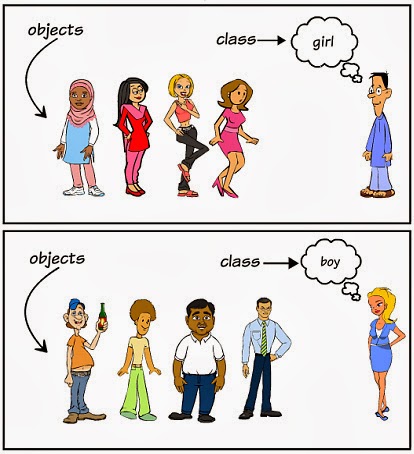
Object-oriented programming mainly has two concepts: objects and classes.
- Object: An object is an instance of a class (object does not mean finding a girlfriend), it has state and behavior. For example, a dog is an object. Its states include: color, name, breed; its behaviors include: wagging tail, barking, eating, etc.
- Class: A class is a template that describes the behavior and state of a class of objects.
- Method: A method is the implementation steps of the operations of a class.
In the figure below,girl、boyis the class, and each specific person is an object of that class:
TypeScript object-oriented programming example:
The above example defines a class Site, which has a method name(). This method outputs the string Example in the terminal.
The `new` keyword creates an object of the class, and this object calls the method name().
The generated JavaScript code after compilation is as follows:
Executing the above JavaScript code produces the following output:
ExampleOther Extensions