Writing Your First Swagger Document
Swagger (OpenAPI) is a specification and toolset for describing, generating, and visualizing RESTful web services.
Below I will detail how to write your first Swagger document from scratch.
Swagger documents mainly use YAML or JSON format and define various aspects of the API, including:
- Basic API information (title, version, etc.)
- Available paths and operations
- Input parameters and output responses
- Authentication methods
- Data model definitions
Creation Steps
1. Create the Basic File Structure
First, create a file namedswagger.yamlorswagger.jsonfile. This tutorial uses YAML format as an example because it is easier to read and write.
Example
openapi: 3.0.0
info:
title:My First API
description:This is a simple API example document
version: 1.0.0
contact:
name:API Support Team
email: support@example.com
url: https://www.example.com/support
servers:
- url: https://api.example.com/v1
description:Production environment
- url: https://dev-api.example.com/v1
description:Development environment
info:
title:My First API
description:This is a simple API example document
version: 1.0.0
contact:
name:API Support Team
email: support@example.com
url: https://www.example.com/support
servers:
- url: https://api.example.com/v1
description:Production environment
- url: https://dev-api.example.com/v1
description:Development environment
2. Add Basic Document Information
Example
openapi: 3.0.0
info:
title:My First API
description:This is a simple API example document
version: 1.0.0
contact:
name:API Support Team
email: support@example.com
url: https://www.example.com/support
servers:
- url: https://api.example.com/v1
description:Production environment
- url: https://dev-api.example.com/v1
description:Development environment
info:
title:My First API
description:This is a simple API example document
version: 1.0.0
contact:
name:API Support Team
email: support@example.com
url: https://www.example.com/support
servers:
- url: https://api.example.com/v1
description:Production environment
- url: https://dev-api.example.com/v1
description:Development environment
3. Define Paths and Operations
Paths define the endpoints that the API can access, and operations define the HTTP methods (GET, POST, PUT, DELETE, etc.) that can be performed on these endpoints.
Example
paths:
/users:
get:
summary:Get list of all users
description:Returns all user information in the system
operationId: getUsers
parameters:
- name: limit
in: query
description:Maximum number of returned results
required: false
schema:
type: integer
format: int32
minimum: 1
maximum: 100
default: 20
responses:
'200':
description:Successfully get user list
content:
application/json:
schema:
type: array
items:
$ref: '#/components/schemas/User'
'400':
description:Invalid request
content:
application/json:
schema:
$ref: '#/components/schemas/Error'
post:
summary:Create a new user
description:Create a new user in the system
operationId: createUser
requestBody:
description:User information
required: true
content:
application/json:
schema:
$ref: '#/components/schemas/NewUser'
responses:
'201':
description:User created successfully
content:
application/json:
schema:
$ref: '#/components/schemas/User'
'400':
description:Invalid request
content:
application/json:
schema:
$ref: '#/components/schemas/Error'
/users:
get:
summary:Get list of all users
description:Returns all user information in the system
operationId: getUsers
parameters:
- name: limit
in: query
description:Maximum number of returned results
required: false
schema:
type: integer
format: int32
minimum: 1
maximum: 100
default: 20
responses:
'200':
description:Successfully get user list
content:
application/json:
schema:
type: array
items:
$ref: '#/components/schemas/User'
'400':
description:Invalid request
content:
application/json:
schema:
$ref: '#/components/schemas/Error'
post:
summary:Create a new user
description:Create a new user in the system
operationId: createUser
requestBody:
description:User information
required: true
content:
application/json:
schema:
$ref: '#/components/schemas/NewUser'
responses:
'201':
description:User created successfully
content:
application/json:
schema:
$ref: '#/components/schemas/User'
'400':
description:Invalid request
content:
application/json:
schema:
$ref: '#/components/schemas/Error'
4. Define Components and Models
IncomponentsThe section defines reusable models:
Example
components:
schemas:
User:
type: object
properties:
id:
type: integer
format: int64
description:User unique identifier
username:
type: string
description:Username
email:
type: string
format: email
description:User email
status:
type: string
enum: [active, inactive, banned]
description:User status
createdAt:
type: string
format: date-time
description:Creation time
required:
- id
- username
- email
- status
NewUser:
type: object
properties:
username:
type: string
description:Username
email:
type: string
format: email
description:User email
password:
type: string
format: password
description:User password
minLength: 8
required:
- username
- email
- password
Error:
type: object
properties:
code:
type: integer
format: int32
message:
type: string
required:
- code
- message
schemas:
User:
type: object
properties:
id:
type: integer
format: int64
description:User unique identifier
username:
type: string
description:Username
email:
type: string
format: email
description:User email
status:
type: string
enum: [active, inactive, banned]
description:User status
createdAt:
type: string
format: date-time
description:Creation time
required:
- id
- username
- status
NewUser:
type: object
properties:
username:
type: string
description:Username
email:
type: string
format: email
description:User email
password:
type: string
format: password
description:User password
minLength: 8
required:
- username
- password
Error:
type: object
properties:
code:
type: integer
format: int32
message:
type: string
required:
- code
- message
5. Add Security Definitions
Define the API's security requirements:
Example
security:
- bearerAuth: []
components:
securitySchemes:
bearerAuth:
type: http
scheme: bearer
bearerFormat: JWT
- bearerAuth: []
components:
securitySchemes:
bearerAuth:
type: http
scheme: bearer
bearerFormat: JWT
6. Complete Document Example
Combine all the sections above and you get a complete Swagger document.
Example
info:
title:My First API
description:This is a simple API example document
version: 1.0.0
contact:
name:API Support Team
email: support@example.com
url: https://www.example.com/support
servers:
- url: https://api.example.com/v1
description:Production environment
- url: https://dev-api.example.com/v1
description:Development environment
paths:
/users:
get:
summary:Get list of all users
description:Returns all user information in the system
operationId: getUsers
parameters:
- name: limit
in: query
description:Maximum number of returned results
required: false
schema:
type: integer
format: int32
minimum: 1
maximum: 100
default: 20
responses:
'200':
description:Successfully get user list
content:
application/json:
schema:
type: array
items:
$ref: '#/components/schemas/User'
'400':
description:Invalid request
content:
application/json:
schema:
$ref: '#/components/schemas/Error'
post:
summary:Create a new user
description:Create a new user in the system
operationId: createUser
requestBody:
description:User information
required: true
content:
application/json:
schema:
$ref: '#/components/schemas/NewUser'
responses:
'201':
description:User created successfully
content:
application/json:
schema:
$ref: '#/components/schemas/User'
'400':
description:Invalid request
content:
application/json:
schema:
$ref: '#/components/schemas/Error'
components:
schemas:
User:
type: object
properties:
id:
type: integer
format: int64
description:User unique identifier
username:
type: string
description:Username
email:
type: string
format: email
description:User email
status:
type: string
enum: [active, inactive, banned]
description:User status
createdAt:
type: string
format: date-time
description:Creation time
required:
- id
- username
- status
NewUser:
type: object
properties:
username:
type: string
description:Username
email:
type: string
format: email
description:User email
password:
type: string
format: password
description:User password
minLength: 8
required:
- username
- password
Error:
type: object
properties:
code:
type: integer
format: int32
message:
type: string
required:
- code
- message
securitySchemes:
bearerAuth:
type: http
scheme: bearer
bearerFormat: JWT
security:
- bearerAuth: []
7. Use Swagger Tools
There are multiple ways to visualize and test your Swagger document:
- Swagger UI: an interactive documentation page
- Swagger Editor: an online editor that can preview the document in real time
- Swagger Codegen: a tool for generating client code
8. Test Your Document Online
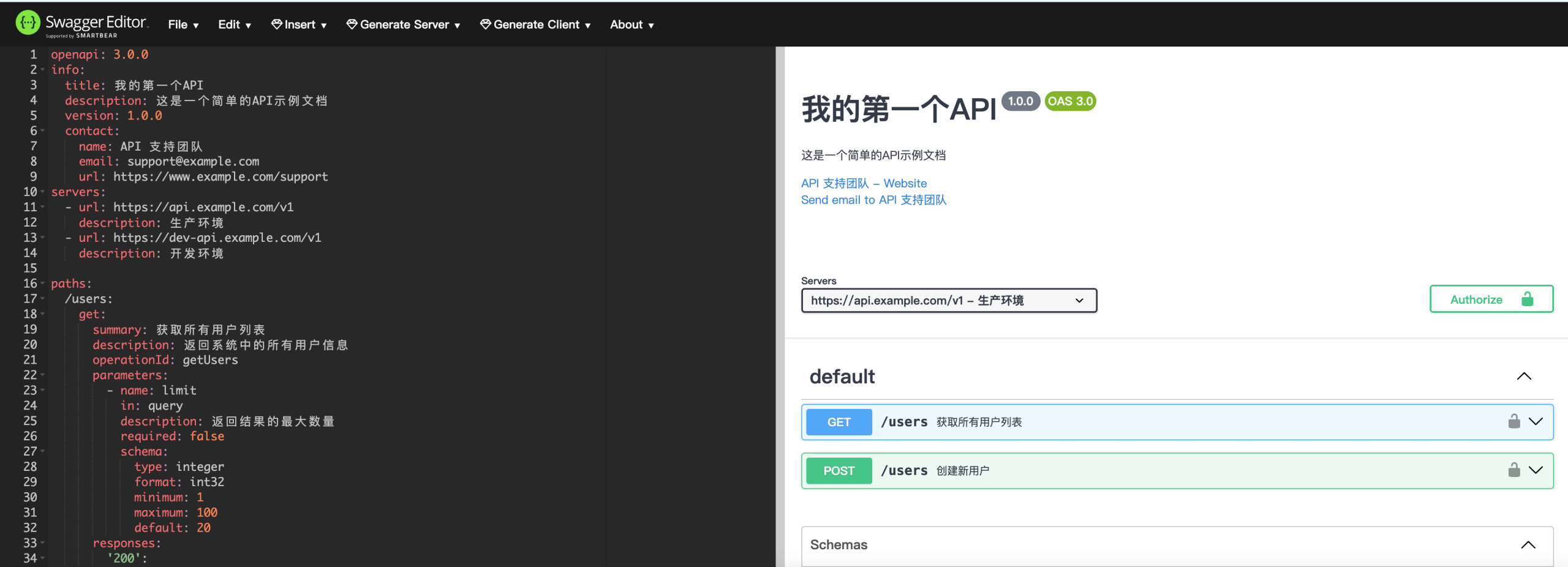
You can useSwagger Editorto test your document online. Simply copy and paste your YAML or JSON into the editor, and the right panel will display a visual API document.
9. Best Practices
- Use meaningful operation IDs
- Provide detailed descriptions for each endpoint
- Ensure all parameters have descriptions
- Document all possible response status codes
- Use model references to reduce duplication
- Keep the document up to date
- Add example requests and responses for each endpoint
10. Common Parameter Locations
Swagger defines several parameter locations:
path: parameters in the URL path, such as/users/{id}query: URL query parameters, such as/users?limit=10header: HTTP header parameterscookie: Cookie parametersbody: request body parameters (in OpenAPI 3.0, requestBody is used instead)
11. Extend Your Document
As your API evolves, continue to extend your Swagger document:
- Add more endpoints
- Define additional models
- Add more detailed descriptions
- Add request and response examples
12. Real-world Development Integration
In real-world development, you can:
- Integrate Swagger into your code
- Use auto-generation tools
- Generate documentation from code comments
- Embed Swagger UI into your application