Swagger Documentation Example
The following is a complete Swagger document example, which is a detailed specification of a user management system API.
This document describes the API of a user management system, including basic user information, authentication services, data models, etc.
This API follows the RESTful style and uses JSON format for data exchange.
You can use Swagger Editor to test your document online. Online address:https://editor.swagger.io/. Simply copy and paste your YAML or JSON into the editor, and the right panel will display the visualized API documentation.
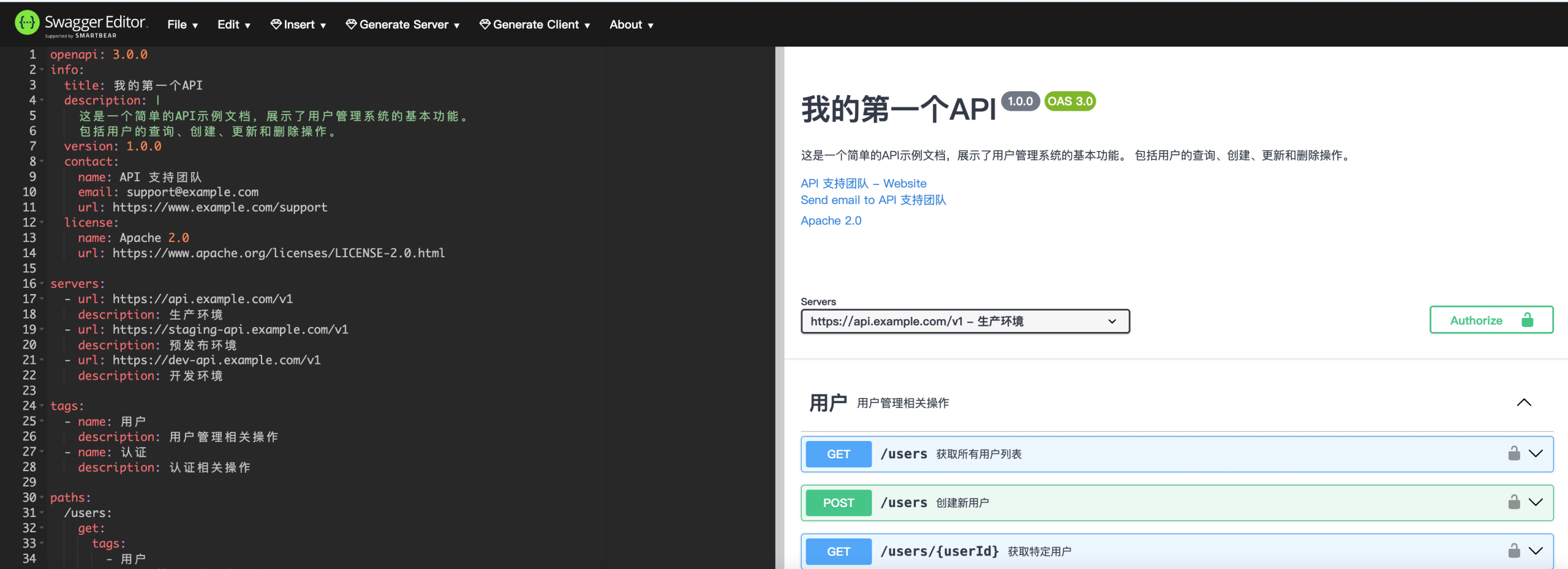
Example
info:
title:My First API
description: |
This is a simple API example document that demonstrates the basic functions of a user management system.
Including user query, creation, update, and deletion operations.
version: 1.0.0
contact:
name:API Support Team
email: support@example.com
url: https://www.example.com/support
license:
name: Apache 2.0
url: https://www.apache.org/licenses/LICENSE-2.0.html
servers:
- url: https://api.example.com/v1
description:Production Environment
- url: https://staging-api.example.com/v1
description:Staging Environment
- url: https://dev-api.example.com/v1
description:Development Environment
tags:
- name:User
description:Operations related to user management
- name:Authentication
description:Operations related to authentication
paths:
/users:
get:
tags:
-User
summary:Get the list of all users
description:Returns all user information in the system, supporting pagination and filtering
operationId: getUsers
parameters:
- name: limit
in: query
description:Maximum number of results to return
required: false
schema:
type: integer
format: int32
minimum: 1
maximum: 100
default: 20
- name: offset
in: query
description:Pagination offset
required: false
schema:
type: integer
format: int32
minimum: 0
default: 0
- name: status
in: query
description:Filter by user status
required: false
schema:
type: string
enum: [active, inactive, banned]
responses:
'200':
description:Successfully retrieved user list
content:
application/json:
schema:
type: object
properties:
total:
type: integer
description:Total number of users
users:
type: array
items:
$ref: '#/components/schemas/User'
example:
total: 2
users:
- id: 1
username: "john_doe"
email: "john@example.com"
status: "active"
createdAt: "2023-05-01T12:00:00Z"
- id: 2
username: "jane_smith"
email: "jane@example.com"
status: "active"
createdAt: "2023-05-02T14:30:00Z"
'400':
description:Invalid request
content:
application/json:
schema:
$ref: '#/components/schemas/Error'
'401':
$ref: '#/components/responses/UnauthorizedError'
security:
- bearerAuth: []
post:
tags:
-User
summary:Create a new user
description:Create a new user in the system
operationId: createUser
requestBody:
description:User information
required: true
content:
application/json:
schema:
$ref: '#/components/schemas/NewUser'
example:
username: "new_user"
email: "new_user@example.com"
password: "securePassword123"
responses:
'201':
description:User created successfully
content:
application/json:
schema:
$ref: '#/components/schemas/User'
example:
id: 3
username: "new_user"
email: "new_user@example.com"
status: "active"
createdAt: "2023-05-10T09:15:00Z"
'400':
description:Invalid request
content:
application/json:
schema:
$ref: '#/components/schemas/Error'
example:
code: 400
message: "Invalid email format"
'409':
description:Resource conflict
content:
application/json:
schema:
$ref: '#/components/schemas/Error'
example:
code: 409
message: "Username already exists"
'401':
$ref: '#/components/responses/UnauthorizedError'
security:
- bearerAuth: []
/users/{userId}:
parameters:
- name: userId
in: path
description:User ID
required: true
schema:
type: integer
format: int64
get:
tags:
-User
summary:Get a specific user
description:Get detailed information of a specific user by ID
operationId: getUserById
responses:
'200':
description:Successfully retrieved user information
content:
application/json:
schema:
$ref: '#/components/schemas/UserDetail'
example:
id: 1
username: "john_doe"
email: "john@example.com"
firstName: "John"
lastName: "Doe"
phone: "+1234567890"
status: "active"
createdAt: "2023-05-01T12:00:00Z"
lastLogin: "2023-05-10T08:30:00Z"
'404':
description:User not found
content:
application/json:
schema:
$ref: '#/components/schemas/Error'
example:
code: 404
message: "User not found"
'401':
$ref: '#/components/responses/UnauthorizedError'
security:
- bearerAuth: []
put:
tags:
-User
summary:Update user information
description:Update information of a specific user
operationId: updateUser
requestBody:
description:Updated user information
required: true
content:
application/json:
schema:
$ref: '#/components/schemas/UpdateUser'
example:
firstName: "Jonathan"
lastName: "Doe"
phone: "+1987654321"
responses:
'200':
description:User information updated successfully
content:
application/json:
schema:
$ref: '#/components/schemas/UserDetail'
'400':
description:Invalid request
content:
application/json:
schema:
$ref: '#/components/schemas/Error'
'404':
description:User not found
content:
application/json:
schema:
$ref: '#/components/schemas/Error'
'401':
$ref: '#/components/responses/UnauthorizedError'
security:
- bearerAuth: []
delete:
tags:
-User
summary:Delete user
description:Delete a specific user from the system
operationId: deleteUser
responses:
'204':
description:User deleted successfully
'404':
description:User not found
content:
application/json:
schema:
$ref: '#/components/schemas/Error'
'401':
$ref: '#/components/responses/UnauthorizedError'
security:
- bearerAuth: []
/auth/login:
post:
tags:
-Authentication
summary:User login
description:User logs in and gets an access token
operationId: login
requestBody:
description:Login credentials
required: true
content:
application/json:
schema:
type: object
properties:
username:
type: string
description:Username
password:
type: string
format: password
description:Password
required:
- username
- password
example:
username: "john_doe"
password: "password123"
responses:
'200':
description:Login successful
content:
application/json:
schema:
type: object
properties:
accessToken:
type: string
description:JWT access token
tokenType:
type: string
description:Token type
expiresIn:
type: integer
description:Token expiration time (seconds)
example:
accessToken: "eyJhbGciOiJIUzI1NiIsInR5cCI6IkpXVCJ9..."
tokenType: "Bearer"
expiresIn: 3600
'401':
description:Login failed
content:
application/json:
schema:
$ref: '#/components/schemas/Error'
example:
code: 401
message: "Incorrect username or password"
/auth/register:
post:
tags:
-Authentication
summary:User registration
description:Register a new user and get an access token
operationId: register
requestBody:
description:Registration information
required: true
content:
application/json:
schema:
$ref: '#/components/schemas/NewUser'
responses:
'201':
description:Registration successful
content:
application/json:
schema:
type: object
properties:
user:
$ref: '#/components/schemas/User'
accessToken:
type: string
description:JWT access token
example:
user:
id: 3
username: "new_user"
email: "new_user@example.com"
status: "active"
createdAt: "2023-05-10T09:15:00Z"
accessToken: "eyJhbGciOiJIUzI1NiIsInR5cCI6IkpXVCJ9..."
'400':
description:Invalid request
content:
application/json:
schema:
$ref: '#/components/schemas/Error'
'409':
description:User already exists
content:
application/json:
schema:
$ref: '#/components/schemas/Error'
components:
schemas:
User:
type: object
properties:
id:
type: integer
format: int64
description:User unique identifier
username:
type: string
description:Username
email:
type: string
format: email
description:User email
status:
type: string
enum: [active, inactive, banned]
description:User status
createdAt:
type: string
format: date-time
description:Creation time
required:
- id
- username
- status
UserDetail:
allOf:
- $ref: '#/components/schemas/User'
- type: object
properties:
firstName:
type: string
description:First name
lastName:
type: string
description:Last name
phone:
type: string
description:Phone number
lastLogin:
type: string
format: date-time
description:Last login time
NewUser:
type: object
properties:
username:
type: string
description:Username
minLength: 3
maxLength: 50
email:
type: string
format: email
description:User email
password:
type: string
format: password
description:User password
minLength: 8
maxLength: 100
firstName:
type: string
description:First name
lastName:
type: string
description:Last name
phone:
type: string
description:Phone number
required:
- username
- password
UpdateUser:
type: object
properties:
email:
type: string
format: email
description:User email
firstName:
type: string
description:First name
lastName:
type: string
description:Last name
phone:
type: string
description:Phone number
password:
type: string
format: password
description:New password (if changing)
minLength: 8
maxLength: 100
Error:
type: object
properties:
code:
type: integer
format: int32
description:Error code
message:
type: string
description:Error message
required:
- code
- message
responses:
UnauthorizedError:
description:Access token is missing or invalid
content:
application/json:
schema:
$ref: '#/components/schemas/Error'
example:
code: 401
message: "Unauthorized access"
securitySchemes:
bearerAuth:
type: http
scheme: bearer
bearerFormat: JWT
description:Authenticate using JWT Bearer Token
security:
- bearerAuth: []
The following are the main components of the document:
1. Basic Information Section
- API title and description: Basic functions of the user management system
- Version information:1.0.0
- Contact information: Contact information of the API support team
- License:Apache 2.0
2. Server Configuration
- Production Environment
- Staging Environment
- Development Environment
3. API Tag Classification
- User-related operations
- Authentication-related operations
4. Paths and Operations
This API includes the following endpoints:
User Management
GET /users- Get list of all users (supports pagination and filtering)POST /users- Create a new userGET /users/{userId}- Get details of a specific userPUT /users/{userId}- Update user informationDELETE /users/{userId}- Delete user
Authentication Service
POST /auth/login- User loginPOST /auth/register- User registration
5. Data Models
User- Basic user informationUserDetail- Detailed user informationNewUser- Request body for creating a userUpdateUser- Request body for updating a userError- Error response
6. Security Definitions
Use JWT Bearer Token for API authentication.
This document follows the OpenAPI 3.0.0 specification and includes complete request parameters, response status codes, data model definitions, and example values. You can copy this YAML document to Swagger Editor to see the visualization, or integrate it into your project.
This document can serve as a foundation for your RESTful API development and can be further extended and improved as the project grows.
Other Extensions