Python3 Conditional Control
Python conditional statements determine which code block to execute based on the execution result (True or False) of one or more statements.
The execution process of conditional statements can be briefly understood through the following diagram:
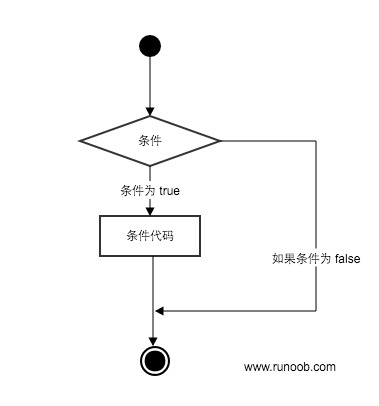
Code execution process:
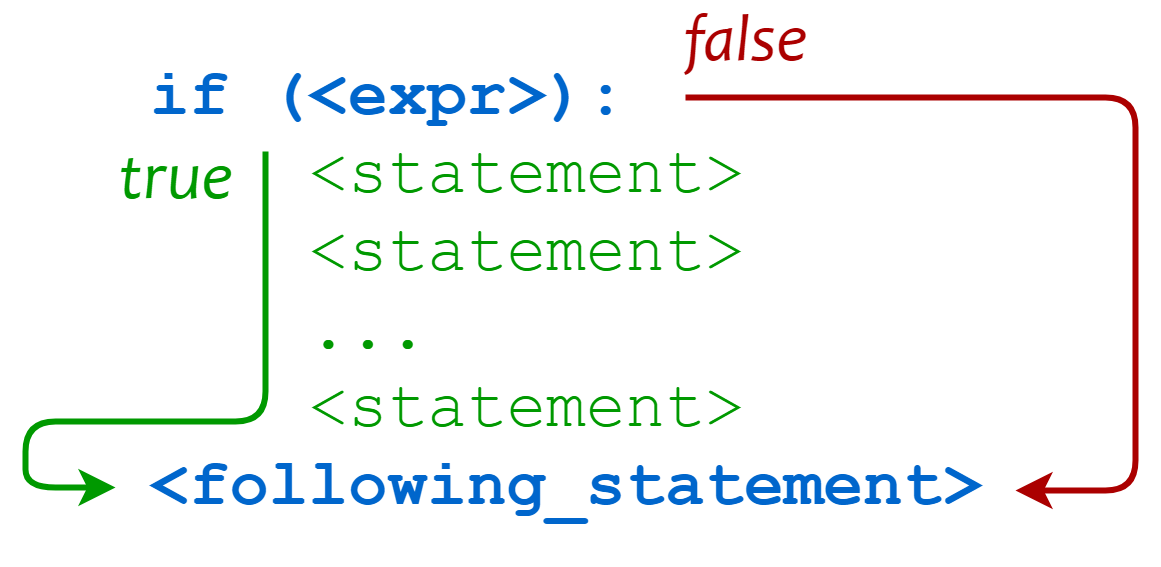
Conditional Judgment Keywords
| Keyword / Function | Description | Example |
|---|---|---|
if |
Conditional judgment statement, executes the code block when the condition is True | if x > 0: |
elif |
Multi-condition judgment branch (else if) | elif x == 0: |
else |
Executed when all conditions are not satisfied | else: |
pass |
Empty statement, used as a placeholder to ensure complete syntax | if x > 0: pass |
match |
Structured pattern matching (Python 3.10+, similar to switch) | match x: case 1: ... |
if Statement
The general form of an if statement in Python is as follows:
- If "condition_1" is True, the "statement_block_1" block statement will be executed
- If "condition_1" is False, "condition_2" will be evaluated
- If "condition_2" is True, the "statement_block_2" block statement will be executed
- If "condition_2" is False, the "statement_block_3" block statement will be executed
In Python,elifis used instead ofelse if, so the keywords of the if statement are:if – elif – else。
Note:
- 1. A colon must be used after each condition:, indicating that the following is the statement block to be executed when the condition is met.
- 2. Use indentation to divide statement blocks. Statements with the same number of indents together form a statement block.
- 3. There is noswitch...casestatement in Python, but in version 3.10, thematch...casestatement was added, with similar functionality. See below for details.
Gif demo:

Example
The following is a simple if example:
Example
After executing the above code, the output is:
1 - if 表达式条件为 true
100
Good bye!
From the result, it can be seen that because variable var2 is 0, the statement inside the corresponding if was not executed.
The following example demonstrates the calculation and judgment of a dog's age:
Example
Save the above script in the dog.py file and execute the script:
$ python3 dog.py
请输入你家狗狗的年龄: 1

相当于 14 岁的人。
点击 enter 键退出
The following are commonly used operators in if:
| Operator | Description |
|---|---|
< |
Less than |
<= |
Less than or equal to |
> |
Greater than |
>= |
Greater than or equal to |
== |
Equal to, compares whether two values are equal |
!= |
Not equal to |
Example
The output of the above example:
False
False
The high_low.py file demonstrates numeric comparison operations:
Example
After executing the above script, the example output is as follows:
$ python3 high_low.py
数字猜谜游戏!
请输入你猜的数字:1
猜的数字小了...
请输入你猜的数字:9
猜的数字大了...
请输入你猜的数字:7
恭喜,你猜对了!
if Nesting
In nested if statements, you can place an if...elif...else structure inside another if...elif...else structure.
if 表达式1:
    语句
    if 表达式2:
        语句
    elif 表达式3:
        语句
    else:
        语句
elif 表达式4:
    语句
else:
    语句
Example
Save the above program to the test_if.py file. After execution, the output is:
$ python3 test.py
输入一个数字:6
你输入的数字可以整除 2 和 3
match...case
Python 3.10 added match...caseconditional judgment, so there is no need to use a series ofif-elseto judge anymore.
The object after match will be matched in turn with the content after case. If the match is successful, the matched expression is executed; otherwise, it is skipped directly._It can match anything.
SVG: match...case execution flowchartThe syntax format is as follows:
match subject:
    case <pattern_1>:
        <action_1>
    case <pattern_2>:
        <action_2>
    case <pattern_3>:
        <action_3>
    case _:
        <action_wildcard>
case _:Similar todefault:in C and Java, when other cases cannot match, this one matches, ensuring that a match always succeeds.
Example
match status:
case 400:
return "Bad request"
case 404:
return "Not found"
case 418:
return "I'm a teapot"
case _:
return "Something's wrong with the internet"
print(http_error(400))
print(http_error(404))
print(http_error(418))
print(http_error(500))
The above is an example that outputs HTTP status codes. The output results for multiple status codes are:
Bad request
Not found
I'm a teapot
Something's wrong with the internet
A case can also set multiple matching conditions, separated by|, for example:
...
    case 401|403|404:
        return "Not allowed"
SVG: | multi-condition matching diagram
Example
match status:
case 200:
return "OK - request successful"
case 301 | 302:
return "Redirect - redirection"
case 401 | 403 | 404:
return "Not allowed - no permission or not found"
case 500 | 502 | 503:
return "Server Error - server error"
case _:
return "Unknown status - unknown status code"
for code in [200, 301, 403, 500, 418]:
print(f"Status code {code}: {check_permission(code)}")
match...caseFor more content, refer to:Python match-case statement
Other extensions