Python3 Dictionary
A dictionary is another kind of mutable container model that can store objects of any type.
Each key-value pair of a dictionarykey=>valuepair is separated by a colon:separated, and each pair is separated by a comma (,) separated, the entire dictionary is enclosed in curly braces{}, the format is as follows:
d = {key1 : value1, key2 : value2, key3 : value3 }
Note:dictAs Python keywords and built-in functions, variable names are not recommended to be nameddict。
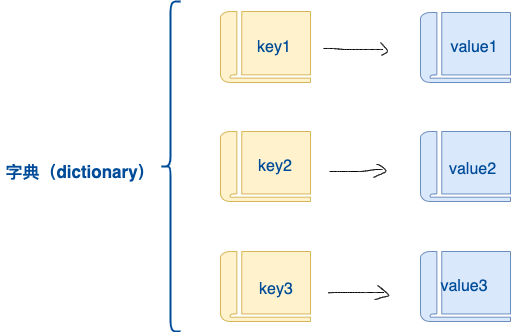
Keys must be unique, but values need not be.
Values can take any data type, but keys must be immutable, such as strings or numbers.
A simple dictionary example:
tinydict = {'name': 'example', 'likes': 123, 'url': 'www.example.com'}
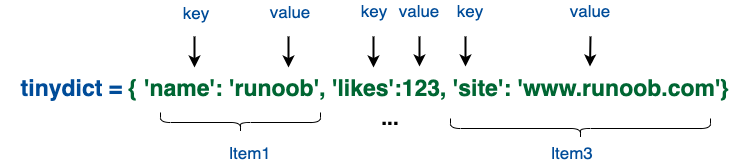
You can also create a dictionary like this:
tinydict1 = { 'abc': 456 }
tinydict2 = { 'abc': 123, 98.6: 37 }
Create an empty dictionary
Use curly braces{ }to create an empty dictionary:
Example
emptyDict = {}
# Print the dictionary
print(emptyDict)
# Check the number of dictionary items
print("Length:", len(emptyDict))
# Check the type
print(type(emptyDict))
The above example outputs:
{}
Length: 0
<class 'dict'>
Use the built-in functiondict()to create a dictionary:
Example
# Print the dictionary
print(emptyDict)
# Check the number of dictionary items
print("Length:",len(emptyDict))
# Check the type
print(type(emptyDict))
The above example outputs:
{}
Length: 0
<class 'dict'>
Access values in a dictionary
Put the corresponding key inside square brackets, as in the example below:
Example
The above example outputs:
tinydict['Name']:  Example
tinydict['Age']:  7
If you access data with a key that does not exist in the dictionary, an error will be output as follows:
Example
The above example outputs:
Traceback (most recent call last):
  File "test.py", line 5, in <module>
    print ("tinydict['Alice']: ", tinydict['Alice'])
KeyError: 'Alice'
Modify dictionary
The way to add new content to a dictionary is to add new key/value pairs, or modify or delete existing key/value pairs, as in the following example:
Example
tinydict['Age']:  8
tinydict['School']:  Example
Delete dictionary elements
You can delete a single element or clear the dictionary; clearing only requires one operation.
Explicitly delete a dictionary using the del command, as in the following example:
Example
But this will raise an exception, because the dictionary no longer exists after the del operation:
Traceback (most recent call last):
  File "/example-test/test.py", line 9, in <module>
    print ("tinydict['Age']: ", tinydict['Age'])
NameError: name 'tinydict' is not defined
Note:The del() method will also be discussed later.
Characteristics of dictionary keys
Dictionary values can be any Python object, either standard objects or user-defined objects, but keys cannot.
Two important points need to be remembered:
1) The same key is not allowed to appear twice. When creating, if the same key is assigned twice, the later value will be remembered, as in the following example:
Example
The above example outputs:
tinydict['Name']: 小Example
2) Keys must be immutable, so numbers, strings, or tuples can be used, but lists cannot, as in the following example:
Example
The above example outputs:
Traceback (most recent call last):
  File "test.py", line 3, in <module>
    tinydict = {['Name']: 'Example', 'Age': 7}
TypeError: unhashable type: 'list'
Dictionary built-in functions & methods
Python dictionaries contain the following built-in functions:
| No. | Function and description | Example |
|---|---|---|
| 1 | len(dict) Count the number of dictionary elements, i.e., the total number of keys. |
>>> tinydict = {'Name': 'Example', 'Age': 7, 'Class': 'First'}
>>> len(tinydict)
3
|
| 2 | str(dict) Output the dictionary, a printable string representation. |
>>> tinydict = {'Name': 'Example', 'Age': 7, 'Class': 'First'}
>>> str(tinydict)
"{'Name': 'Example', 'Class': 'First', 'Age': 7}"
|
| 3 | type(variable) Return the type of the input variable. If the variable is a dictionary, return the dictionary type. |
>>> tinydict = {'Name': 'Example', 'Age': 7, 'Class': 'First'}
>>> type(tinydict)
<class 'dict'>
|
Python dictionaries contain the following built-in methods:
| No. | Function and description |
|---|---|
| 1 | dict.clear() Delete all elements in the dictionary |
| 2 | dict.copy() Return a shallow copy of a dictionary |
| 3 | dict.fromkeys() Create a new dictionary, using elements in the sequence seq as the keys of the dictionary, and val as the initial value corresponding to all keys of the dictionary |
| 4 | dict.get(key, default=None) Return the value of the specified key. If the key is not in the dictionary, return the default value set by default. |
| 5 | key in dict Return true if the key is in the dictionary dict, otherwise return false. |
| 6 | dict.items() Return a view object as a list |
| 7 | dict.keys() Return a view object |
| 8 | dict.setdefault(key, default=None) Similar to get(), but if the key does not exist in the dictionary, the key will be added and its value set to default. |
| 9 | dict.update(dict2) Update the key/value pairs of dictionary dict2 into dict. |
| 10 | dict.values() Return a view object |
| 11 | dict.pop(key[,default]) Delete the value corresponding to the key in the dictionary and return the deleted value. |
| 12 | dict.popitem() Return and delete the last key-value pair in the dictionary. |