Python Variable Types
Variables are values stored in memory, which means that when a variable is created, a space is allocated in memory.
Based on the variable's data type, the interpreter allocates specified memory and decides what data can be stored in that memory.
Therefore, variables can have different data types, and these variables can store integers, decimals, or characters.
Variable Assignment
Variable assignment in Python does not require a type declaration.
Every variable created in memory includes information such as the variable's identifier, name, and data.
Every variable must be assigned a value before it is used; the variable is created only after the assignment.
The equals sign=is used to assign a value to a variable.
The equals sign=The left side of the operator is a variable name, and the equals sign=The right side of the operator is the value stored in the variable. For example:
Example (Python 2.0+)
Run example »
In the above example, 100, 1000.0, and "John" are assigned to the variables counter, miles, and name, respectively.
Executing the above program will output the following result:
100
1000.0
John
Multiple Variable Assignment
Python allows you to assign values to multiple variables at the same time. For example:
a = b = c = 1
In the above example, an integer object with a value of 1 is created, and three variables are assigned to the same memory space.
You can also assign multiple variables to multiple objects. For example:
a, b, c = 1, 2, "john"
In the above example, two integer objects 1 and 2 are assigned to variables a and b, respectively, and the string object "john" is assigned to variable c.
Standard Data Types
Data stored in memory can be of many types.
For example, a person's age can be stored as a number, and his or her name can be stored as characters.
Python defines several standard types for storing various kinds of data.
Python has five standard data types:
- Numbers
- String
- List
- Tuple
- Dictionary
Python Numbers
The number data type is used to store numeric values.
They are an immutable data type, which means that changing a number data type will allocate a new object.
When you specify a value, a Number object is created:
var1 = 1
var2 = 10
You can also use the del statement to delete references to some objects.
The syntax of the del statement is:
del var1[,var2[,var3[....,varN]]]
You can delete references to a single object or multiple objects by using the del statement. For example:
del var
del var_a, var_b
Python supports four different number types:
- int (signed integer)
- long (long integer, which can also represent octal and hexadecimal)
- float (floating-point)
- complex (complex number)
Some examples of numeric types:
| int | long | float | complex |
|---|---|---|---|
| 10 | 51924361L | 0.0 | 3.14j |
| 100 | -0x19323L | 15.20 | 45.j |
| -786 | 0122L | -21.9 | 9.322e-36j |
| 080 | 0xDEFABCECBDAECBFBAEl | 32.3e+18 | .876j |
| -0490 | 535633629843L | -90. | -.6545+0J |
| -0x260 | -052318172735L | -32.54e100 | 3e+26J |
| 0x69 | -4721885298529L | 70.2E-12 | 4.53e-7j |
- Long integers can also use lowercase l, but it is still recommended to use uppercase L to avoid confusion with the number 1. Python uses L to display long integers.
- Python also supports complex numbers, which consist of a real part and an imaginary part. They can be represented as a + bj or complex(a,b). Both the real part a and the imaginary part b of a complex number are floating-point types.
Note:The long type only exists in Python 2.X versions. In versions after 2.2, int data is automatically converted to long when it overflows. In Python 3.X versions, the long type has been removed and replaced by int.
Python Strings
A string (String) is a sequence of characters composed of numbers, letters, and underscores.
Generally written as:
s = "a1a2···an" # n>=0
It is a data type used to represent text in programming languages.
Python's string list has two indexing orders:
- Indexing from left to right starts at 0 by default, and the maximum range is the string length minus 1.
- Indexing from right to left starts at -1 by default, and the maximum range is the beginning of the string.
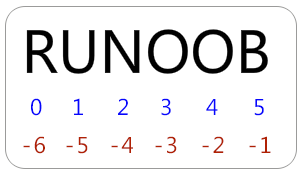
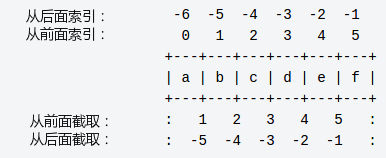
If you want to extract a substring from a string, you can use[head index:tail index]to slice the corresponding string, where the index starts from 0 and can be positive or negative. An empty index means it reaches the beginning or end.
[head index:tail index]The extracted substring includes the character at the head index but does not include the character at the tail index.
For example:
>>> s = 'abcdef'
>>> s[1:5]
'bcde'
When using a colon-separated string, Python returns a new object. The result contains a continuous range identified by this pair of offsets; the left start includes the lower boundary.
The above result includess[1]the value b, and the maximum range obtained does not includethe tail index, that is,s[5]the value f.
The plus sign (+) is the string concatenation operator, and the asterisk (*) is the repetition operation. See the example below:
Example (Python 2.0+)
The above example produces the following output:
Hello World!
H
llo
llo World!
Hello World!Hello World!
Hello World!TEST
Python Lists
List is the most frequently used data type in Python.
A list can implement most collection-like data structures. It supports characters, numbers, strings, and can even contain lists (i.e., nesting).
A list is marked with[ ], and it is Python's most versatile composite data type.
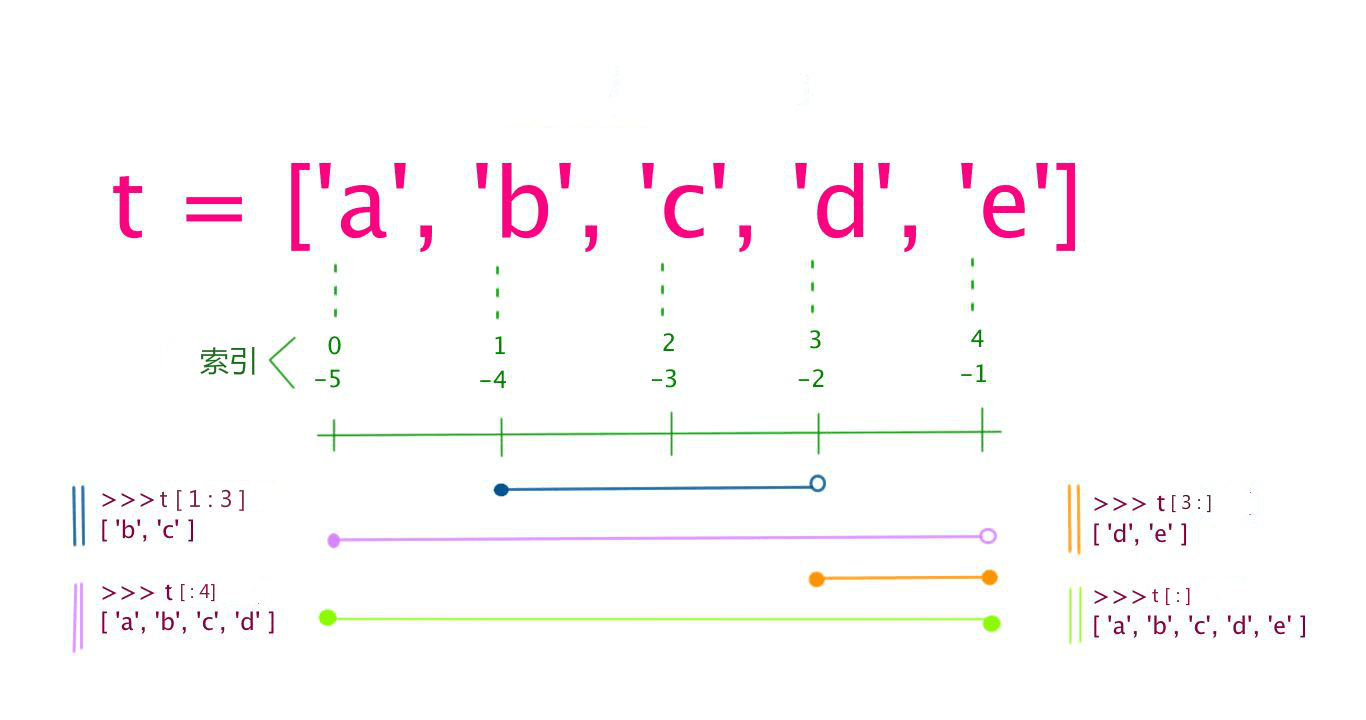
Slicing of values in a list can also use the variable[head index:tail index]to slice the corresponding list. Indexing from left to right starts at 0 by default, and from right to left starts at -1 by default. An empty index means it reaches the beginning or end.
The plus sign+is the list concatenation operator, and the asterisk*is the repetition operation. See the example below:
Example (Python 2.0+)
The above example produces the following output:
['example', 786, 2.23, 'john', 70.2]
example
[786, 2.23]
[2.23, 'john', 70.2]
[123, 'john', 123, 'john']
['example', 786, 2.23, 'john', 70.2, 123, 'john']
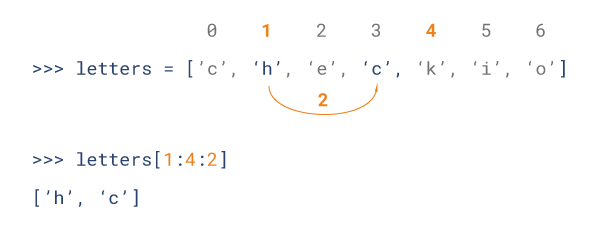
Python list slicing can accept a third parameter, which acts as the step size for slicing. The following example slices a string from index 1 to index 4 with a step size of 2 (skipping one position):
Python Tuples
Tuples are another data type, similar to List.
Tuples are marked with(). Internal elements are separated by commas. However, a tuple cannot be assigned again; it is equivalent to a read-only list.
Example (Python 2.0+)
The above example produces the following output:
('example', 786, 2.23, 'john', 70.2)
example
(786, 2.23)
(2.23, 'john', 70.2)
(123, 'john', 123, 'john')
('example', 786, 2.23, 'john', 70.2, 123, 'john')
The following operations on tuples are invalid because tuples do not allow updates, while lists allow updates:
Example (Python 2.0+)
Tuples do not allow updates, so the above code will cause an error. The result is as follows:
Traceback (most recent call last):
  File "test.py", line 6, in <module>
    tuple[2] = 1000    # 元组中是非法应用
TypeError: 'tuple' object does not support item assignment
Python Dictionary
Dictionary is the most flexible built-in data structure type in Python besides lists. Lists are ordered collections of objects, while dictionaries are unordered collections of objects.
The difference between the two is that elements in a dictionary are accessed by key, not by offset.
Dictionaries are identified with "{ }". A dictionary consists of indices (keys) and their corresponding values.
Example (Python 2.0+)
The output result is:
This is one
This is two
{'dept': 'sales', 'code': 6734, 'name': 'example'}
['dept', 'code', 'name']
['sales', 6734, 'example']
Python Data Type Conversion
Sometimes we need to convert built-in data types. To convert data types, you just need to use the data type as the function name.
The following built-in functions can perform conversions between data types. These functions return a new object representing the converted value.
| Function | Description |
|---|---|
|
Convert x to an integer. |
|
|
Convert x to a long integer. |
|
|
Convert x to a floating-point number. |
|
|
Create a complex number. |
|
|
Convert object x to a string. |
|
|
Convert object x to an expression string. |
|
|
Used to evaluate a valid Python expression in a string and return an object. |
|
|
Convert sequence s to a tuple. |
|
|
Convert sequence s to a list. |
|
|
Convert to a mutable set. |
|
|
Create a dictionary. d must be a sequence of (key, value) tuples. |
|
|
Convert to an immutable set. |
|
|
Convert an integer to a character. |
|
|
Convert an integer to a Unicode character. |
|
|
Convert a character to its integer value. |
|
|
Convert an integer to a hexadecimal string. |
|
|
Convert an integer to an octal string. |