Python Tkinter Label Widget
 Python GUI Programming
The Python Tkinter Label widget displays text and images in a specified window.
The Label widget displays text and images in a specified window.
If you need to display one or more lines of text that the user cannot modify, you can use theLabelwidget.
Syntax
The syntax format is as follows:
w = Label ( master, option, ... )
master: The parent container of the frame.
options: Optional items, i.e., the configurable properties of the label. These options can be set in key-value form, separated by commas.
| No. | Option & Description |
|---|---|
| 1 | anchor The position of text or image in the background content area, default is center. Optional values are (n, s, w, e, ne, nw, sw, se, center). eswn are the initials of the English words for east, south, west, north, meaning: up is north, down is south, left is west, right is east. |
| 2 | bg The background color of the label |
| 4 | bd The border width of the label, default is 2 pixels |
| 4 | bitmap Specify the bitmap on the label. If an image is specified, this option is ignored. |
5 | cursor The shape of the cursor when the mouse moves over the label. It can be set to arrow, circle, cross, plus, etc. |
6 | font Set the font. |
7 | fg Set the foreground color. |
| 8 | height The height of the label, default value is 0. |
| 9 | image Set the label image. |
| 10 | justify Define the alignment. Optional values: LEFT, RIGHT, CENTER. Default is CENTER. |
| 11 | padx X-axis spacing, in pixels, default 1. |
| 12 | pady Y-axis spacing, in pixels, default 1. |
| 13 | relief Border style. Options: FLAT, SUNKEN, RAISED, GROOVE, RIDGE. Default is FLAT. |
| 14 | text Set the text, can contain newline characters (\n). |
| 15 | textvariable The label displays a Tkinter variable, StringVar. If the variable is modified, the label text will update automatically. |
| 16 | underline Set underline. Default is -1. If set to 1, the underline starts from the second character. |
| 17 | width Set the label width. Default value is 0, automatically calculated, in pixels. |
| 10 | wraplength Set how many lines the label text is displayed in. Default is 0. |
Example
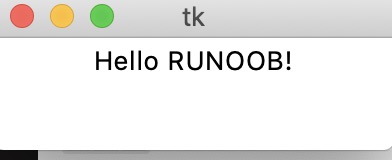
The test output is as follows:
 Other Extensions