Playwright Introduction
Playwright is an open-source web automation testing framework developed by Microsoft, used for end-to-end testing across three major browser engines: Chromium, Firefox, and WebKit.
In simple terms, it is a tool that helps you control the browser programmatically. We can think of it as a virtual user that can perform various operations on web pages just like a human, such as clicking buttons, filling out forms, navigating to different pages, taking screenshots, and saving web content.
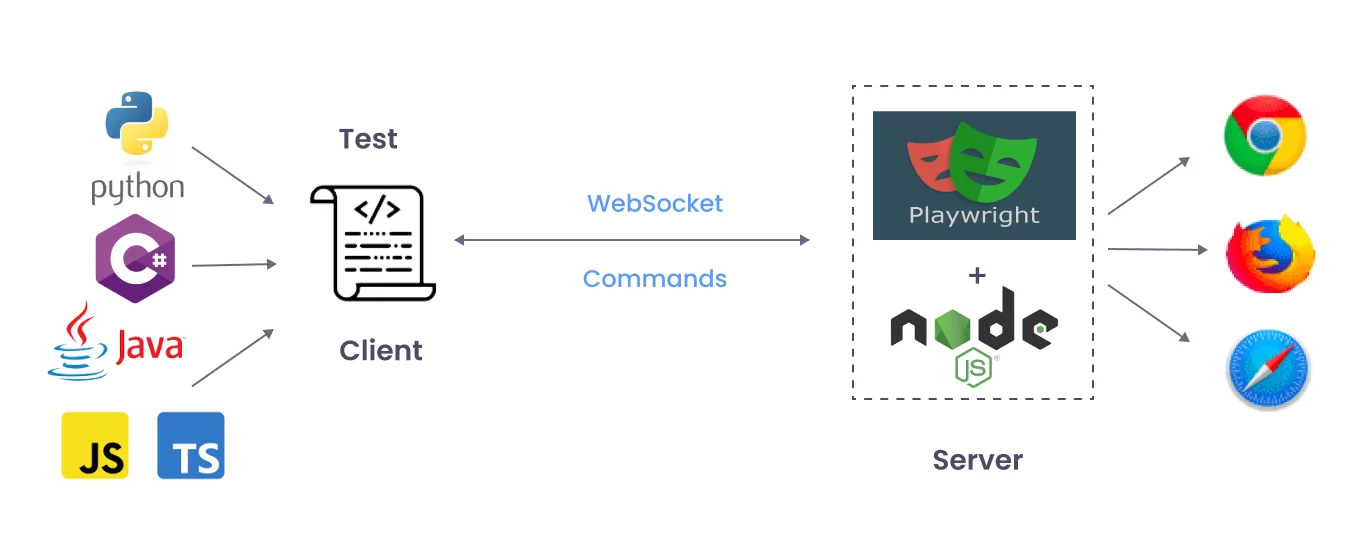
Playwright is Microsoft's open-source modern browser automation framework. With a small amount of code, it can automatically perform human browser operations in Chromium (Chrome/Edge), Firefox, and WebKit (Safari engine): opening web pages, clicking, typing, dragging, uploading files, taking screenshots/PDFs, recording logs and replaying. The most common use is end-to-end (E2E) testing, and it can also be used for lightweight crawling and process automation.
Playwright provides multi-language SDKs for JS/TS, Python, Java, and .NET, among which JS/TS + Playwright Test is the most mainstream combination.
Supported Browsers
| Browser | Rendering Engine | Platform Support |
|---|---|---|
| Chromium | Blink (same as Chrome) | Windows / macOS / Linux |
| Firefox | Gecko | Windows / macOS / Linux |
| WebKit | WebKit (same as Safari) | Windows / macOS / Linux |
Playwright uses official browser test versions (Chromium instead of Google Chrome, WebKit instead of Safari), but its behavior is highly consistent with the official versions.
Main Application Scenarios of Playwright
Playwright is not only used for testing; its powerful features make it highly useful in many fields:
- End-to-End (E2E) Testing:This is the primary application of Playwright. It can simulate real user scenarios and test whether the entire flow of your website works correctly from start to finish.
- Web Crawling and Data Scraping:If you want to automatically extract data from web pages, Playwright can help you do it easily. It can render JavaScript-dynamically-loaded content, making it more powerful than traditional crawler tools.
- Web Automation:Any repetitive web operations, such as automatic check-in, batch file downloading, filling out reports, etc., can be automated with Playwright.
- Generating Screenshots and PDFs:You can use Playwright to take screenshots of web pages or save web page content as PDF files.
What Can Playwright Do?
To summarize in one sentence:As long as a human can click in the browser, Playwright can almost automate it.。
Specific capabilities include:
- Multi-browser support: One piece of code can run on Chromium (Chrome/Edge), Firefox, and WebKit (Safari) simultaneously.
- Cross-platform running: Supports Windows, Linux, and macOS.
- Cross-language invocation: Not only supports JavaScript/TypeScript, but also Python, C#, and Java.
- Modern web support: Stable handling of single-page applications (SPA), dynamic loading, iframes, and multi-tab pages.
For example:
You want to test a "login" feature.
- Manual testing: Open the browser each time → enter the account and password → click login → check the page.
- Playwright testing: Write a script that automatically completes the above actions and can be repeated hundreds of times with ease.
Playwright vs Other Testing Tools
Playwright vs Puppeteer
| Comparison Dimension | Playwright | Puppeteer |
|---|---|---|
| Browser Support | Chromium + Firefox + WebKit | Only Chromium / Firefox (limited) |
| Test Runner | Built-in complete Test Runner | No built-in, requires Jest/Mocha |
| Automatic Waiting | Fully built-in | Manual handling required |
| Test Isolation | Native support for Browser Context | Needs to be managed yourself |
| Mobile Emulation | Full device emulation | Basic device emulation |
| Maintainer | Microsoft |
Puppeteer is suitable for simple browser automation scripts.
Playwright surpasses it comprehensively in feature completeness and testing experience, making it the first choice for testing scenarios.
Playwright vs Cypress
| Comparison Dimension | Playwright | Cypress |
|---|---|---|
| Architecture | Out-of-process execution, full control of the browser | Runs inside the browser (sandbox-restricted) |
| Multi-tab / Multi-window | Fully supported | Not supported |
| Multi-browser | Chromium + Firefox + WebKit | Only Chromium family + experimental Firefox/WebKit |
| iframe Support | Native support | Limited |
| Parallel Execution | Native support, no extra configuration required | Requires paid Dashboard |
| Network Interception | Complete request/response interception and modification | Can only stub or spy |
| Execution Speed | Generally faster | Generally slower (in-browser execution overhead) |
Cypress has an excellent developer experience and a friendly debugging interface.
If you need multi-browser support, multi-tab operations, or parallel execution of large test suites, Playwright is more suitable.
Playwright vs Selenium
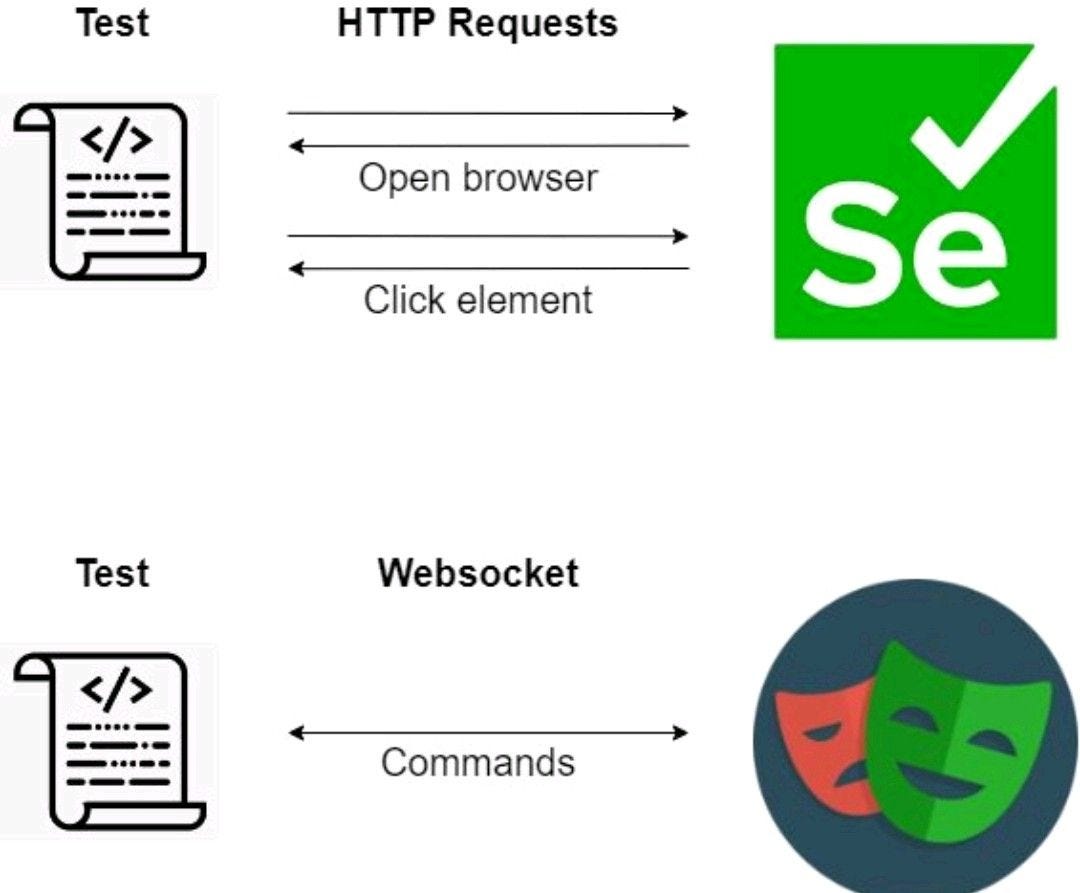
When it comes to browser automation, the first thing many people think of isSelenium. So what's the difference between Playwright and it?
| Feature | Selenium | Playwright |
|---|---|---|
| Release Time | 2004, with a long history | 2020, a rising star |
| Browser Support | Chrome, Firefox, Safari, IE, etc. | Chromium, Firefox, WebKit (full coverage of modern browsers) |
| API Design | Early interfaces are numerous and somewhat complex | API is simple and modern, with a low learning cost |
| Execution Speed | Slower, often faces waiting problems | Faster, fewer timeouts |
| Special Features | Relatively powerful, mature ecosystem | Native support for screenshots, video recording, and mocking network requests |
One-sentence comparison:
- Selenium is more like a "veteran all-rounder", with a long history and a huge ecosystem.
- Playwright is more like a "young powerhouse", fast, supports modern web features, and has a friendlier API.
What Scenarios Is It Suitable For?
Playwright is not only for testing, but can also be used in many scenarios:
- Front-end testing: Automatically test whether buttons, forms, navigation, etc. on web pages work properly.
- Regression testing: Before new features go live, run the entire site's test cases to ensure old features don't break.
- Data collection (crawling): Scrape dynamic web pages (such as data that requires scrolling to see).
- Web page screenshots & PDF: Generate screenshots or PDFs for pages (such as generating reports).
- Process automation: Automate repetitive operations (such as automatic login, batch form filling).
Why Learn Playwright?
- Beginner-friendly: easy to install, and you can get it running with a few lines of code.
- Intuitive API: using
page.click()、page.fill()you can complete web operations. - Learn it and you can earn money: it's used in front-end development, test engineering, and even some part-time data collection jobs.
- Active community: Playwright updates quickly, documentation is clear, and solutions are easy to find when you run into problems.
In one sentence:
Playwright = a "smart robot" that automatically opens web pages, clicks buttons, fills in forms, and takes screenshots for you. It can be used for testing, as a web scraper, and for building small automation tools.
Why Choose Playwright?
For beginners, Playwright has several very appealing features:
- Auto-waiting:This is one of Playwright's most powerful features. When writing automation scripts, you often need to wait for an element to load or become visible. Playwright has a built-in smart auto-waiting mechanism thatautomatically waitsfor the element to become available, without requiring you to manually add tedious
sleeporwaitfunctions. This makes your code cleaner and more stable. - Fast and reliable:Playwright is very fast because it communicates directly with the browser rather than through an intermediate protocol. This direct connection ensures the stability and reliability of operations.
- Powerful API:Playwright's API is very user-friendly. It provides a rich set of methods that let you easily handle various complex web interactions, such as handling pop-ups, uploading files, managing new tabs, and more.
- Built-in test framework:The Playwright team also provides a powerful test runner
@playwright/test. This framework comes with assertion libraries, test report generators, parallel execution, and other advanced features, making it very convenient to write and manage test cases.
Playwright's core advantage lies in its cross-browser support.It can simultaneously controlChromium(Google Chrome and Microsoft Edge),FirefoxandWebKit(Safari's engine) — these three major browsers. This means you only need to write one set of code to run your automation scripts on all these browsers, greatly reducing repetitive work.
Four Core Features of Playwright
1. True Cross-Browser Support
Playwright is the only testing framework that simultaneously supports the three major browser engines: Chromium, Firefox, and WebKit.
Each browser has a dedicated driver layer (Chromium uses CDP, Firefox uses the Juggler protocol, WebKit uses Playwright's custom protocol), ensuring the stability and consistency of underlying operations.
2. Automatic Waiting Mechanism
Before performing each action, Playwright automatically waits for the element to become actionable (attached to the DOM, visible, stable, receiving events, and enabled).
Assertions also automatically retry until the condition is met or it times out.
This fundamentally solves the most commonunstable test (flaky test)problem in traditional testing.
3. Test Isolation
Playwright introducesBrowser Contextthe concept of browser context, where each test runs in an independent browser context (equivalent to a brand-new browser profile).
Each context has its own independent localStorage, sessionStorage, and cookies, so tests do not affect one another.
Creating a context has extremely low overhead (millisecond-level), far faster than launching a new browser instance each time.
4. Multi-Language Support
Playwright provides APIs in four languages: JavaScript/TypeScript, Python, Java, and .NET. All languages share the same design philosophy and features.
| Language | Installation command | Use cases |
|---|---|---|
| JavaScript / TypeScript | npm init playwright@latest | Front-end teams, Node.js projects |
| Python | pip install playwright | Python ecosystem, AI/ML projects |
| Java | Maven/Gradle dependency | Enterprise Java projects |
| .NET | NuGet package | Microsoft tech stack |
Playwright Product Matrix
Playwright isn't a single tool; it's a platform with multiple components:
| Product | Purpose | Installation method |
|---|---|---|
| Playwright Test | Complete end-to-end testing framework | npm init playwright@latest |
| Playwright Library | Browser automation script library | npm i playwright |
| Playwright MCP | AI Agent browser control (MCP protocol) | npx @playwright/mcp@latest |
| Playwright CLI | Coding Agent command-line tool | npm i -g @playwright/cli@latest |
| VS Code extension | In-editor test debugging and recording | VS Code Marketplace |