MySQL UNION Operator
This tutorial introduces the MySQLUNIONoperator syntax and examples.
Description
The MySQL UNION operator is used to combine the results of two or more SELECT statements into one result set, and remove duplicate rows.
The UNION operator must consist of two or more SELECT statements, and the number of columns and the data types in corresponding positions of each SELECT statement must be the same.
Syntax
The syntax format of the MySQL UNION operator is:
SELECT column1, column2, ...
FROM table1
WHERE condition1
UNION
SELECT column1, column2, ...
FROM table2
WHERE condition2
[ORDER BY column1, column2, ...];
Parameter description:
column1,column2, ... are the names of the columns you want to select. If you use*means selecting all columns.table1,table2, ... are the names of the tables from which you want to query data.condition1,condition2, ... are theSELECTfilter conditions for each statement, and are optional.ORDER BYThe clause is an optional clause used to specify the sort order of the combined result set.
Examples
1. Basic UNION operation:
SELECT city FROM customers
UNION
SELECT city FROM suppliers
ORDER BY city;
The above SQL statement will select unique values of all cities from the Customers table and the Suppliers table, and sort them in ascending order by city name.
2. UNION with filter conditions:
SELECT product_name FROM products WHERE category = 'Electronics'
UNION
SELECT product_name FROM products WHERE category = 'Clothing'
ORDER BY product_name;
The above SQL statement will select product names from the Electronics and Clothing categories, and sort them in ascending order by product name.
3. The number of columns and data types in UNION operations must be the same:
SELECT first_name, last_name FROM employees
UNION
SELECT department_name, NULL FROM departments
ORDER BY first_name;
The returned result includes first_name and last_name from the employees table, as well as department_name and NULL from the departments table. All results are sorted by the first_name column.
4. Using UNION ALL does not remove duplicate rows:
SELECT city FROM customers
UNION ALL
SELECT city FROM suppliers
ORDER BY city;
The above SQL statement uses UNION ALL to combine all cities from the Customers table and the Suppliers table, without removing duplicate rows.
The UNION operator removes duplicate rows when merging result sets, while UNION ALL does not remove duplicate rows. Therefore, UNION ALL may have better performance, but if you really want to remove duplicate rows, you can use UNION.
Demo Database
In this tutorial, we will use the EXAMPLE sample database.
Below is the data selected from the "Websites" table:
mysql> SELECT * FROM Websites;
+----+--------------+---------------------------+-------+---------+
| id | name         | url                       | alexa | country |
+----+--------------+---------------------------+-------+---------+
| 1  | Google       | https://www.google.cm/    | 1     | USA     |
| 2  | 淘宝          | https://www.taobao.com/   | 13    | CN      |
| 3  | Example      | http://www.example.com/    | 4689  | CN      |
| 4  | 微博          | http://weibo.com/         | 20    | CN      |
| 5  | Facebook     | https://www.facebook.com/ | 3     | USA     |
| 7  | stackoverflow | http://stackoverflow.com/ |   0 | IND     |
+----+---------------+---------------------------+-------+---------+
Below is the data from the "apps" app:
mysql> SELECT * FROM apps;
+----+------------+-------------------------+---------+
| id | app_name   | url                     | country |
+----+------------+-------------------------+---------+
|  1 | QQ APP     | http://im.qq.com/       | CN      |
|  2 | 微博 APP | http://weibo.com/       | CN      |
|  3 | 淘宝 APP | https://www.taobao.com/ | CN      |
+----+------------+-------------------------+---------+
3 rows in set (0.00 sec)
SQL UNION Example
The following SQL statement selects alldistinctcountry (only distinct values):
Example
UNION
SELECT country FROM apps
ORDER BY country;
Executing the above SQL outputs the following results:
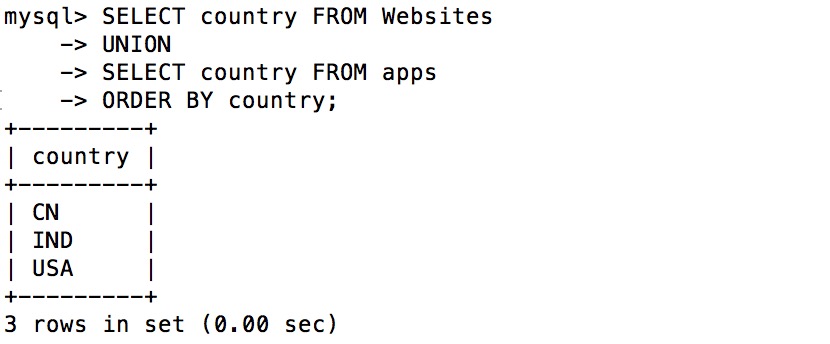
Note:UNION cannot be used to list all countries from both tables. If some websites and apps come from the same country, each country will only be listed once. UNION only selects distinct values. Please use UNION ALL to select duplicate values!
SQL UNION ALL Example
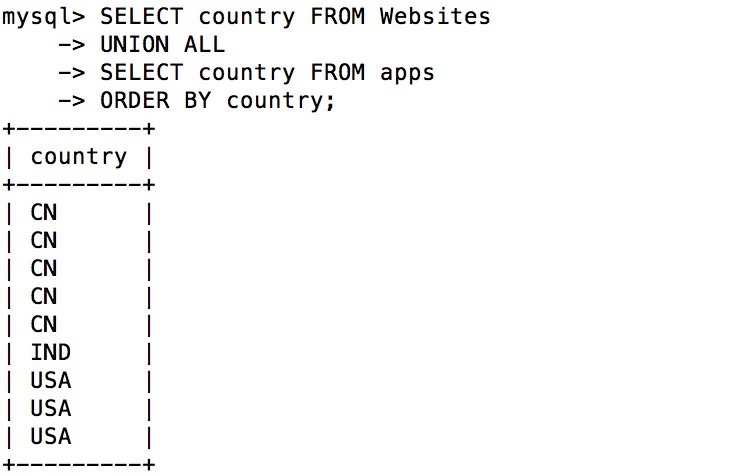
The following SQL statement uses UNION ALL to select from the "Websites" and "apps" tablesallcountry (including duplicate values):
Example
UNION ALL
SELECT country FROM apps
ORDER BY country;
Executing the above SQL outputs the following results:
SQL UNION ALL with WHERE
The following SQL statement uses UNION ALL to select from the "Websites" and "apps" tablesalldata for China (CN) (including duplicate values):
Example
WHERE country='CN'
UNION ALL
SELECT country, app_name FROM apps
WHERE country='CN'
ORDER BY country;
Executing the above SQL outputs the following results: