MySQL ORDER BY (Sorting) Statement
We know that from a MySQL table, we use theSELECTstatement to read data.
If we need to sort the read data, we can use MySQL'sORDER BYclause to specify which field and in what way to sort, and then return the search results.
MySQL ORDER BY (Sorting)The statement can sort by the values of one or more columns in ascending (ASC) or descending (DESC) order.
Syntax
The following is a SELECT statement using theORDER BYclause to sort the query data and then return the data:
SELECT column1, column2, ...
FROM table_name
ORDER BY column1 [ASC | DESC], column2 [ASC | DESC], ...;
Parameter description:
column1,column2, ... are the names of the columns you want to select. If you use*it means to select all columns.table_nameis the name of the table you want to query data from.ORDER BY column1 [ASC | DESC], column2 [ASC | DESC], ...is the clause used to specify the sort order.ASCmeans ascending order (default),DESCmeans descending order.
More notes:
- You can use any field as the sorting condition to return the sorted query results.
- You can set multiple fields for sorting.
- You can use the ASC or DESC keyword to set whether the query results are sorted in ascending or descending order. By default, it is sorted in ascending order.
- You can add a WHERE...LIKE clause to set conditions.
Examples
The following are some examples of using the ORDER BY clause.
1. Single-column sorting:
SELECT * FROM products
ORDER BY product_name ASC;
The above SQL statement will select all products from the products table and sort them by product name in ascending order (ASC).
2. Multi-column sorting:
SELECT * FROM employees
ORDER BY department_id ASC, hire_date DESC;
The above SQL statement will select all employees from the employees table, first sort by department ID in ascending order (ASC), and then sort by hire date in descending order (DESC) within the same department.
3. Using numbers to indicate column positions:
SELECT first_name, last_name, salary
FROM employees
ORDER BY 3 DESC, 1 ASC;
The above SQL statement will select the name and salary columns from the employees table, sort by the third column (salary) in descending order (DESC), and then sort by the first column (first_name) in ascending order (ASC).
4. Sorting using expressions:
SELECT product_name, price * discount_rate AS discounted_price
FROM products
ORDER BY discounted_price DESC;
The above SQL statement will select the product name and the discounted price calculated based on the discount rate from the products table, and sort by the discounted price in descending order (DESC).
5. Starting from MySQL 8.0.16, you can use NULLS FIRST or NULLS LAST to handle NULL values:
SELECT product_name, price
FROM products
ORDER BY price DESC NULLS LAST;
The above SQL statement will select the product name and price from the products table, and sort by price in descending order (DESC), placing NULL values last.
Conversely, if you want NULL values to be placed first, you can write it like this:
SELECT product_name, price
FROM products
ORDER BY price DESC NULLS FIRST;
The ORDER BY clause is a powerful tool that can sort query results according to different business needs. In practical applications, pay attention to selecting appropriate columns and sort order to achieve the expected sorting effect.
Using the ORDER BY Clause in the Command Prompt
The following will use the ORDER BY clause in a SELECT statement to read data from the MySQL table example_tbl:
Example
Try the following example. The results will be sorted in ascending and descending order.
SQL Sorting
Read all data from the example_tbl table and sort in ascending order by the submission_date field.
Using the ORDER BY Clause in PHP Scripts
You can use the PHP function mysqli_query() and the same SELECT command with the ORDER BY clause to fetch data.
This function is used to execute the SQL command, and then output all queried data using the PHP function mysqli_fetch_array().
Example
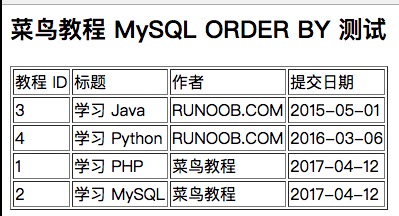
Try the following example. The queried data is returned sorted in descending order by the submission_date field.
MySQL ORDER BY Test:
The output result is shown in the figure below: