MySQL Query Data
MySQL Database UsageSELECTstatement to query data.
You can usemysql>query data in the database from the command prompt window, or query data through PHP scripts.
Syntax
The following is the general SELECT syntax for querying data in the MySQL database:
SELECT column1, column2, ...
FROM table_name
[WHERE condition]
[ORDER BY column_name [ASC | DESC]]
[LIMIT number];
Parameter description:
column1,column2, ... are the names of the columns you want to select. If you use*means selecting all columns.table_nameis the name of the table from which you want to query data.WHERE conditionis an optional clause used to specify filter conditions, returning only rows that meet the conditions.ORDER BY column_name [ASC | DESC]is an optional clause used to specify the sort order of the result set; the default is ascending (ASC).LIMIT numberis an optional clause used to limit the number of rows returned.
Simple application examples of the MySQL SELECT statement:
Example
SELECT * FROM users;
-- Select all rows of specific columns
SELECT username, email FROM users;
-- Add a WHERE clause to select rows that meet the condition
SELECT * FROM users WHERE is_active = TRUE;
-- Add an ORDER BY clause to sort by a column in ascending order
SELECT * FROM users ORDER BY birthdate;
-- Add an ORDER BY clause to sort by a column in descending order
SELECT * FROM users ORDER BY birthdate DESC;
-- Add a LIMIT clause to limit the number of rows returned
SELECT * FROM users LIMIT 10;
The SELECT statement can be flexible; we can combine and use these clauses according to actual needs, for example using WHERE and ORDER BY clauses together, or using LIMIT to control the number of rows returned.
InWHEREIn the clause, you can use various conditional operators (such as=, <, >, <=, >=, !=), logical operators (such asAND, OR, NOT), and wildcards (such as%), etc.
The following are some advanced SELECT statement examples:
Example
SELECT * FROM users WHERE username LIKE 'j%' AND is_active = TRUE;
-- Use OR operator
SELECT * FROM users WHERE is_active = TRUE OR birthdate < '1990-01-01';
-- Use IN clause
SELECT * FROM users WHERE birthdate IN ('1990-01-01', '1992-03-15', '1993-05-03');
Fetch Data via Command Prompt
In the following example, we will use the SQL SELECT command to fetch data from the MySQL data table example_tbl:
Example
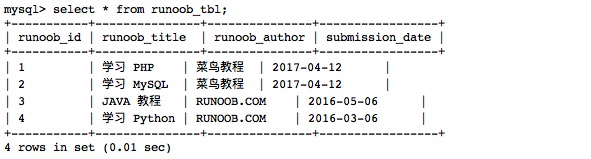
The following example will return all records from the data table example_tbl:
Read data table:
Output result:
Fetch Data Using PHP Scripts
Use the PHP function'smysqli_query()andSQL SELECTcommand to fetch data.
This function is used to execute SQL commands, and then through the PHP functionmysqli_fetch_array() to use or output all queried data.
mysqli_fetch_array() The function fetches a row from the result set as an associative array, a numeric array, or both. Returns an array generated from the row fetched from the result set, or false if there are no more rows.
The following example reads all records from the data table example_tbl.
Example
Try the following example to display all records of the data table example_tbl.
Fetch data using the mysqli_fetch_array MYSQLI_ASSOC parameter:
The output result is as follows:
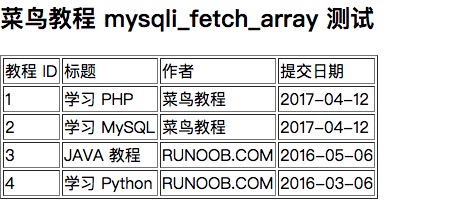
In the above example, each read record row is assigned to the variable $row, and then each value is printed.
Note:Remember that if you need to use variables in a string, place the variables in curly braces.
In the above example, the second parameter of the PHP mysqli_fetch_array() function isMYSQLI_ASSOC, setting this parameter causes the query result to return an associative array, and you can use field names as array indexes.
PHP provides another functionmysqli_fetch_assoc(), which fetches a row from the result set as an associative array. Returns an associative array generated from the row fetched from the result set, or false if there are no more rows.
Example
Try the following example, which uses themysqli_fetch_assoc()function to output all records of the data table example_tbl:
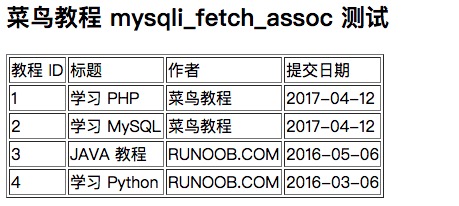
Fetch data using mysqli_fetch_assoc:
The output result is as follows:
You can also use the constant MYSQLI_NUM as the second parameter of the PHP mysqli_fetch_array() function to return a numeric array.
Example
The following example uses the MYSQLI_NUM parameter to display all records of the data table example_tbl:
Fetch data using the mysqli_fetch_array MYSQLI_NUM parameter:
The output result is as follows:
The output results of the above three examples are all the same.
Memory Release
After we execute the SELECT statement, it is a good habit to release the cursor memory.
Memory release can be achieved by using the PHP function mysqli_free_result().
The following example demonstrates how to use this function.
Example
Try the following example:
Release memory using mysqli_free_result:
The output result is as follows: