Julia Dictionaries and Sets
In the previous chapters, we learned aboutJulia ArraysandJulia Tuples。
Arrays are a type of collection. In addition, Julia has other types of collections, such as dictionaries and sets (unordered collection lists).
Dictionary
A dictionary is a mutable container model that can store objects of any type.
Each key-value in the dictionarykey=>valuepair is separated by=>a colon, and each key-value pair is separated by a comma,and the entire dictionary is enclosed in curly braces{}as follows:
Create Dictionary
The syntax for creating a dictionary is as follows:Dict("key1" => value1, "key2" => value2,,…, "keyn" => valuen)
The following example creates a simple dictionary, where key A corresponds to value 1, and key B corresponds to value 2:
Dict("A"=>1, "B"=>2)
Example
Dict{String, Int64} with 2 entries:
"B" => 2
"A" => 1
julia>
Use a for loop to create a dictionary:
Example
Dict{String, Float64} with 73 entries:
"285" => -0.965926
"310" => -0.766044
"245" => -0.906308
"320" => -0.642788
"350" => -0.173648
"20" => 0.34202
"65" => 0.906308
"325" => -0.573576
"155" => 0.422618
"80" => 0.984808
"335" => -0.422618
"125" => 0.819152
"360" => 0.0
"75" => 0.965926
"110" => 0.939693
"185" => -0.0871557
"70" => 0.939693
"50" => 0.766044
"190" => -0.173648
⋮ => ⋮
Key
Keys in a dictionary are unique. If we assign a value to an existing key, we do not create a new one, but modify the existing key.
Find a Key
We can use the haskey() function to check whether the dictionary contains the specified key:
Example
Dict{String, Int64} with 2 entries:
"B" => 2
"A" => 1
julia> haskey(first_dict, "A")
false
julia> haskey(D, "A")
true
julia> haskey(D, "Z")
false
You can also use thein()function to check whether the dictionary contains thekey/valuepair:
Example
Dict{String, Int64} with 2 entries:
"B" => 2
"A" => 1
julia> in(("A" => 1), D)
true
julia> in(("X" => 220), first_dict)
false
Add a Key/Value Pair
We can add a new key/value pair to an existing dictionary as follows:
Example
Dict{String, Int64} with 2 entries:
"B" => 2
"A" => 1
julia> D["C"] = 3
3
julia> D
Dict{String, Int64} with 3 entries:
"B" => 2
"A" => 1
"C" => 3
Delete a Key/Value Pair
We can use thedelete!()function to delete a key from an existing dictionary:
Example
Dict{String, Int64} with 2 entries:
"B" => 2
"A" => 1
Get All Keys in a Dictionary
We can use thekeys()function to get all keys in the dictionary:
Example
KeySet for a Dict{String, Int64} with 2 entries. Keys:
"B"
"A"
julia>
Value
Each key in a dictionary has a corresponding value.
View All Values of a Dictionary
We can use thevalues()to view all values in the dictionary:
Example
Dict{String, Int64} with 2 entries:
"B" => 2
"A" => 1
julia> values(D)
ValueIterator for a Dict{String, Int64} with 2 entries. Values:
2
1
julia>
Dictionary as an Iterable
We can treat a dictionary as an iterable to view key/value pairs:
Example
Dict{String, Int64} with 2 entries:
"B" => 2
"A" => 1
julia> for kv in D
println(kv)
end
"B" => 2
"A" => 1
In the example,kvis a tuple containing each key/value pair.
Dictionary Sorting
Dictionaries are unordered, but we can use the sort() function to sort a dictionary:
Example
Dict{String, Int64} with 6 entries:
"S" => 220
"U" => 400
"T" => 350
"W" => 670
"V" => 575
"R" => 100
julia> for key in sort(collect(keys(example_dict)))
println("$key => $(example_dict[key])")
end
R => 100
S => 220
T => 350
U => 400
V => 575
W => 670
We can use the SortedDict data type from the DataStructures.ji package to keep a dictionary always sorted.
To use the DataStructures package, you need to install it first. You can add SortedDict in the Pkg mode of the REPL using the add command.
In the REPL, enter the symbol]to enterpkgmode.
Enter pkg Mode
Syntax format for adding a package:
add 包名
After we add the DataStructures package below, the following examples can run normally:
(@v1.7) pkg> add DataStructuresFor unregistered packages, you can directly specify a URL:
add https://github.com/fredrikekre/ImportMacros.jl
Local packages:
add 本地路径/包名.jl
Example
julia> example_dict = DataStructures.SortedDict("S" => 220, "T" => 350, "U" => 400, "V" => 575, "W" => 670)
DataStructures.SortedDict{String, Int64, Base.Order.ForwardOrdering} with 5 entries:
"S" => 220
"T" => 350
"U" => 400
"V" => 575
"W" => 670
julia> example_dict["R"] = 100
100
julia> example_dict
DataStructures.SortedDict{String, Int64, Base.Order.ForwardOrdering} with 6 entries:
"R" => 100
"S" => 220
"T" => 350
"U" => 400
"V" => 575
"W" => 670
Set
A Julia Set is a collection of objects without duplicates; all elements are unique.The following are the differences between a set and other types of collections:
- Elements in a set are unique
- The order of elements in a set is not important
Sets are used to create lists without duplicates.
Create a Set
With the Set constructor, we can create a set as follows:
Example
Set{Any}()
julia> num_primes = Set{Int64}()
Set{Int64}()
julia> var_site = Set{String}(["Google","Example","Taobao"])
Set{String} with 3 elements:
"Google"
"Taobao"
"Example"
We can use thepush!()function to add set elements as follows:
Example
Set{String} with 4 elements:
"Google"
"Wiki"
"Taobao"
"Example"
We can use thein()function to check whether an element exists in the set:
Example
true
julia> in("Zhihu", var_site)
false
Common Operations
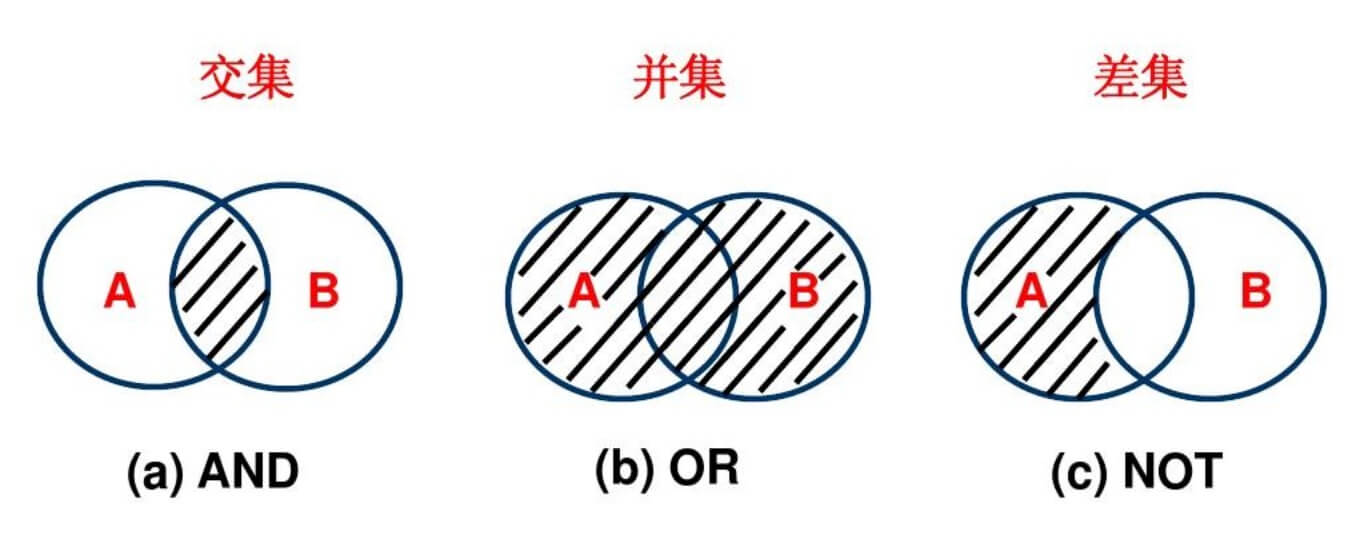
Union, intersection, and difference are some common operations we can perform on sets. The functions corresponding to these operations areunion()、intersect()andsetdiff()。
Union
For two sets A and B, the set formed by combining all their elements is called the union of set A and set B.Example
Set{String} with 4 elements:
"blue"
"green"
"black"
"red"
julia> B = Set(["red","orange","yellow","green","blue","indigo","violet"])
Set{String} with 7 elements:
"indigo"
"yellow"
"orange"
"blue"
"violet"
"green"
"red"
julia> union(A, B)
Set{String} with 8 elements:
"indigo"
"green"
"black"
"yellow"
"orange"
"blue"
"violet"
"red"
Intersection
The intersection of sets A and B is the set containing all elements that belong to both A and B, and no other elements.
Example
Set{String} with 3 elements:
"blue"
"green"
"red"
Difference
The difference of sets A and B is the set containing all elements that belong to A but not to B, that is, removing the elements that overlap between B and A.
Example
Set{String} with 1 element:
"black"
Examples of Common Functions for Dictionaries and Sets
In the following examples, functions commonly used in dictionaries are demonstrated, and they also apply to sets:
Create two dictionaries dict1 and dict2:
Example
Dict{Int64,String} with 2 entries:
100 => "X"
220 => "Y"
julia> dict2 = Dict(220 => "Y", 300 => "Z", 450 => "W")
Dict{Int64,String} with 3 entries:
450 => "W"
220 => "Y"
300 => "Z"
Dictionary union:
Example
4-element Array{Pair{Int64,String},1}:
100 => "X"
220 => "Y"
450 => "W"
300 => "Z"
Intersect
julia> intersect(dict1, dict2)
1-element Array{Pair{Int64,String},1}:
220 => "Y"
Dictionary difference:
Example
1-element Array{Pair{Int64,String},1}:
100 => "X"
Merge dictionaries:
Example
Dict{Int64,String} with 4 entries:
100 => "X"
450 => "W"
220 => "Y"
300 => "Z"
Find the minimum value in the dictionary:
Example
Dict{Int64,String} with 2 entries:
100 => "X"
220 => "Y"
julia> findmin(dict1)
("X", 100)