Julia Date and Time
Julia provides the following three functions to handle dates and times through the Dates module:
- Date: Indicates a date, accurate to the day, and only displays the date.
- DateTime: Indicates date and time, accurate to milliseconds.
- DateTime: Indicates the time of day, accurate to nanoseconds, representing a specific moment in the 24 hours of a day.
Before using it, we need to import the Dates module first:
import Dates
Date and DateTime types can be parsed from integers or Period types.
Period is based on date values and represents years, months, days, etc.:
Period
Year
Quarter
Month
Week
Day
Hour
Minute
Second
Millisecond
Microsecond
Nanosecond
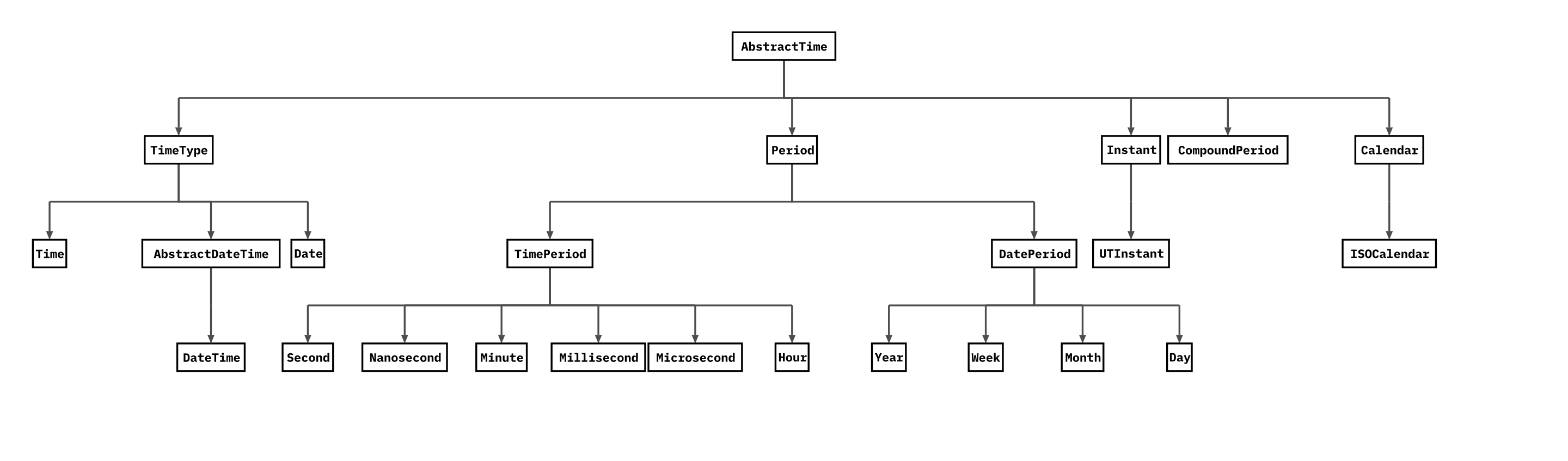
Both Date and DateTime are subtypes of the abstract type TimeType.
The following diagram shows the relationship between date types; click the image to enlarge it:
Example
julia> rightnow = Dates.Time(Dates.now()) # Time
08:41:15.917
julia> theday = Dates.Date(2022,5,6) # Date
2022-05-06
julia> today_date = Dates.today()
2022-05-11
julia> Dates.now(Dates.UTC)
2022-05-11T00:44:20.136
# Format time
julia> Dates.DateTime("20220429 120000", "yyyymmdd HHMMSS")
2022-04-29T12:00:00
julia> Dates.DateTime("19/04/2022 17:42", "dd/mm/yyyy HH:MM")
2022-04-19T17:42:00
The following table gives date format codes, through which we can format our dates:
| Character | Date/Time Element |
|---|---|
| Y | Represents the year, e.g.: yyyy => 1984, yy => 84 |
| m | Represents the month, e.g.: m => 7 or 07 |
| u | Represents the abbreviated month name, e.g.: Jun |
| U | Represents the full month name, e.g.: January |
| e | Represents the abbreviated day of the week, e.g.: Mon |
| E | Represents the full day of the week, e.g.: Monday |
| d | Represents the day, e.g.: 1 or 01 |
| H | Represents the hour, e.g.: HH => 00 |
| M | Represents the minute, e.g.: MM => 00 |
| S | Represents the second, e.g.: S => 00 |
| s | Represents the millisecond, e.g.: .000 |
Example
2022-09-27
julia> Dates.DateTime("Sun, 27 Sep 2022 10:25:10", "e, d u y H:M:S")
2022-09-27T10:25:10
Through the above examples, we created some date/time objects. Next, we can use these objects to obtain data (including year, month, day, minute, second, hour, etc.):
Example
2022-05-06
# Next, get the data in theday
julia> Dates.year(theday)
2022
julia> Dates.month(theday)
5
# Get the current time data
julia> rightnow = Dates.now()
2022-05-11T08:51:45.342
julia> Dates.minute(rightnow)
51
julia> Dates.hour(rightnow)
8
julia> Dates.second(rightnow)
45
# Get the month and day of the week
julia> Dates.dayofweek(theday)
5
julia> Dates.dayname(theday)
"Friday"
julia> Dates.yearmonthday(theday)
(2022, 5, 6)
julia> Dates.dayofweekofmonth(theday)
1
Date Arithmetic
We can perform arithmetic operations on date objects.
For example, we calculate the number of days between two dates:
Example
2022-01-17
julia> day2 = Dates.Date(2022,3,23)
2022-03-23
julia> day2 - day1
65 days
# Use different time units
julia> Dates.canonicalize(Dates.CompoundPeriod(day2 - day1))
9 weeks, 2 days
We can also add to dates, for example, calculate the date after 2 years and 6 months:
Example
2022-05-11T09:01:07.946
julia> rightnow + Dates.Year(20) + Dates.Month(6)
2042-11-11T09:01:07.946
# Date after 6 days
julia> rightnow + Dates.Day(6)
2022-05-17T09:01:07.946
Date Ranges
Julia can create dates for a specified interval using iterable range objects. In the example given below, we will create an iterator that generates the first day of each month.
Example
Dates.Date("2011-01-01"):Dates.Month(1):Dates.Date("2022-01-01")
In the range object above, we can find which ones are weekdays. Here we need to create an anonymous function for filter() that determines whether it is a weekday based on the given date:
Example
94-element Vector{Dates.Date}:
2011-02-01
2011-03-01
2011-04-01
2011-06-01
2011-07-01
2011-08-01
2011-09-01
2011-11-01
2011-12-01
2012-02-01
⋮
2021-02-01
2021-03-01
2021-04-01
2021-06-01
2021-07-01
2021-09-01
2021-10-01
2021-11-01
2021-12-01
Rounding Dates and Times
We often use round(), floor(), and ceil() functions to round parameters up or down. Similarly, these functions can also be used to round dates, so as to adjust dates forward or backward in time.
Example
2022-05-11T09:17:49.824
julia> Dates.format(round(Dates.DateTime(Dates.now()), Dates.Minute(15)), Dates.RFC1123Format)
"Wed, 11 May 2022 09:15:00"
ceil()The function will adjust the date/time forward, as shown below:
Example
2022-05-06
# Next month
julia> ceil(theday, Dates.Month)
2022-06-01
# Next year
julia> ceil(theday, Dates.Year)
2023-01-01
# Next week
julia> ceil(theday, Dates.Week)
2022-05-09
Repeating Dates
We can find repeating dates within a range, for example, every Sunday:
Example
julia> date_range = Dates.Date(2011,1,1):Dates.Month(1):Dates.Date(2022,1,1)
Dates.Date("2011-01-01"):Dates.Month(1):Dates.Date("2022-01-01")
# Use the filter() function to filter out every Sunday
julia> filter(d -> Dates.dayname(d) == "Sunday", date_range)
20-element Vector{Dates.Date}:
2011-05-01
2012-01-01
2012-04-01
2012-07-01
2013-09-01
2013-12-01
2014-06-01
2015-02-01
2015-03-01
2015-11-01
2016-05-01
2017-01-01
2017-10-01
2018-04-01
2018-07-01
2019-09-01
2019-12-01
2020-03-01
2020-11-01
2021-08-01
UNIX time, or POSIX time, is a time representation used by UNIX or UNIX-like systems: the total number of seconds from 0:00:00 on January 1, 1970 UTC to the present, ignoring leap seconds.
The time() function returns the Unix value:
Example
1.652232489777e9
The unix2datetime() function converts Unix time to a date/time object:
Example
2022-05-11T01:28:23.493
Current Time
DateTimes are measured in milliseconds; we can use the Dates.value function to get the time in milliseconds:
Example
2022-05-11T09:31:31.037
julia> Dates.value(moment)
63787944691037
julia> moment.instant
Dates.UTInstant{Millisecond}(Millisecond(63787944691037))
Time and Monitoring
Julia provides us with@elapsedmacro, which returns the time (in seconds) required to execute an expression.
Calculate the time required to execute the following code:
Example
for i in 1:n
x = sin(rand())
end
end
foo (generic function with 1 method)
julia> @elapsed foo(100000000)
1.360567967
julia> @time foo(100000000)
1.363258 seconds
More Examples
Example
2013-01-01T00:00:00
julia> DateTime(2013,7)
2013-07-01T00:00:00
julia> DateTime(2013,7,1)
2013-07-01T00:00:00
julia> DateTime(2013,7,1,12)
2013-07-01T12:00:00
julia> DateTime(2013,7,1,12,30)
2013-07-01T12:30:00
julia> DateTime(2013,7,1,12,30,59)
2013-07-01T12:30:59
julia> DateTime(2013,7,1,12,30,59,1)
2013-07-01T12:30:59.001
julia> Date(2013)
2013-01-01
julia> Date(2013,7)
2013-07-01
julia> Date(2013,7,1)
2013-07-01
julia> Date(Dates.Year(2013),Dates.Month(7),Dates.Day(1))
2013-07-01
julia> Date(Dates.Month(7),Dates.Year(2013))
2013-07-01