Angular 2 Architecture
Angular 2 applications are mainly composed of the following 8 parts:
- 1. Modules
- 2. Components
- 3. Templates
- 4. Metadata
- 5. Data Binding
- 6. Directives
- 7. Services
- 8. Dependency Injection
The following diagram shows how each part works together:
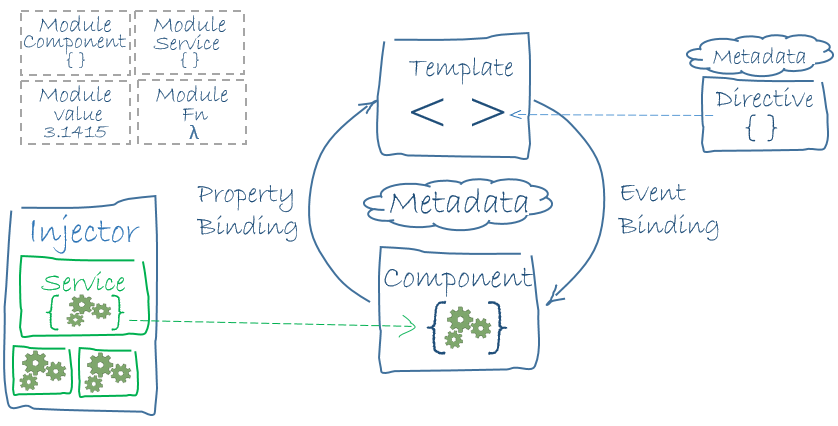
In the diagram, Templates are composed of HTML syntax extended by Angular; Component classes manage these templates; application logic is completed through Services; then services and components are packaged into modules; finally, the application is started by bootstrapping the root module.
Next, we will analyze the above 8 parts separately:
Modules
A module consists of a block of code that can be used to perform a simple task.
Angular applications are modular and have their own module system: NgModules.
Every Angular application should have at least one module (the root module), which can generally be named: AppModule.
An Angular module is a class with an @NgModule decorator, which receives a metadata object that describes the module's properties.
Several important properties are as follows:
declarations- View classes belong to this module. Angular has three types of view classes: components, directives, and pipes.
exports- A subset of declarations that can be used in component templates of other modules.
imports- Modules whose exported classes are needed in this module's component templates.
providers- Creators of services. This module adds them to the global service table, making them accessible from any part of the application.
bootstrap- The main view of the application, called the root component, which is the host of all other application views. Only the root module needs to set the bootstrap property.
The simplest root module:
app/app.module.ts file:
Next, we start the application by bootstrapping the root module. In the development process, AppModule is usually bootstrapped in the main.ts file, as follows:
app/main.ts file:
Components
A component is a control class for a template, used to handle the view part of the application and the logic of pages.
Components are the foundation and core of Angular applications and can be used throughout the entire application.
A component knows how to render itself and configure dependency injection.
Components interact with the view through an API composed of properties and methods.
There are three steps to create an Angular component:
- Import the Component decorator from @angular/core
- Create a normal class and decorate it with @Component
- In @Component, set selectorcustom tag, and templateTemplate
Templates
The default language of Angular templates is HTML.
We can tell Angular how to display a component by using templates to define the component's view. The following is a simple example:
<div>
网站地址 : {{site}}
</div>
In Angular, double curly braces are used by default as interpolation syntax, and the value between the curly braces is usually a variable name of a component property.
Metadata
Metadata tells Angular how to handle a class.
Consider the following situation: we have a component called Component, which is a class, until we tell Angular that this is a component.
You can attach metadata to this class to tell Angular that Component is a component.
In TypeScript, we use decorators to attach metadata.
Example
@Component({
   selector : 'mylist',
   template : '<h2>Example</h2>'
   directives : [ComponentDetails]
})
export class ListComponent{...}
The @Component decorator can accept a configuration object and marks the class that follows it as a component class.
Angular will create and display the component and its view based on this information.
Configuration items in @Component:
-
selector- A CSS selector that tells Angular to find a <mylist> tag in the parent HTML, then create the component and insert it into this tag.
templateUrl- The address of the component's HTML template.
directives- An array containing the components or directives that this template depends on.
providers- An array containing the dependency injection providers for the services that the component depends on.
Data binding
Data binding provides a simple and consistent way for applications to display data and interact with data. It is a mechanism for managing values within an application.
Through this mechanism, values can be retrieved and assigned from HTML, making data reading and writing, and data persistence operations simpler and faster.
As shown in the figure, there are four forms of data binding syntax. Each form has a direction—from the DOM, to the DOM, bidirectional—just as the arrows in the figure indicate.
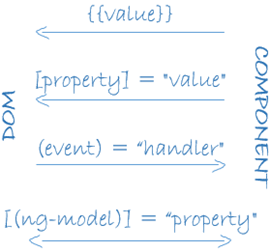
Interpolation: Display component values in HTML tags.
<h3>
{{title}}
<img src="{{ImageUrl}}.html">
</h3>
Property binding: Sets an element's property to the value of a component property.
<img [src]="userImageUrl">
Event binding: Triggered when a component method name is clicked.
<button (click)="onSave()">保存</button>
Two-way binding: Using the NgModel directive in Angular can make two-way binding more convenient.
<input [value]="currentUser.firstName"
       (input)="currentUser.firstName=$event.target.value" >
Directives
Angular templates are dynamic. When Angular renders them, it modifies the DOM according to directives.
A directive is a class with "directive metadata". In TypeScript, metadata is attached to the class via the @Directive decorator.
Angular includes the following three types of directives:
- Attribute directives: directives used in the form of element attributes.
- Structural directives: used to change the structure of the DOM tree.
- Components: as an important subclass of directives, components can essentially be seen as directives with templates.
<li *ngFor="let site of sites"></li>
<site-detail *ngIf="selectedSite"></site-detail>
*ngFor tells Angular to generate a <li> tag for each item in the sites list.
*ngIf means that the SiteDetail component will be included only when the selected item exists.
Services
A service in Angular2 is an independent module that encapsulates a specific function and can be used by others through injection.
Services come in many types, including: values, functions, and features required by the application.
For example, when duplicate code appears in multiple components, extract the duplicate code into a service to achieve code reuse.
Here are several common services:
- Logging service
- Data service
- Message bus
- Tax calculator
- Application configuration
The following example is a logging service used to record logs to the browser console:
export class Logger {
  log(msg: any)   { console.log(msg); }
  error(msg: any) { console.error(msg); }
  warn(msg: any)  { console.warn(msg); }
}
Dependency Injection
Inversion of Control (IoC) is a design principle in object-oriented programming that can be used to reduce coupling between computer code. The most common way is called Dependency Injection (DI), and another way is called "Dependency Lookup".
Through inversion of control, when an object is created, an external entity that regulates all objects in the system passes to it references to the objects it depends on. In other words, dependencies are injected into the object.
In traditional development patterns, the caller is responsible for managing the dependencies of all objects, and circular dependencies have always been a nightmare. But in the dependency injection pattern, this management responsibility is handed over to the injector, which is responsible for replacing dependent objects at software runtime rather than at compile time. This inversion of control and runtime injection is the essence of dependency injection.
Angular can determine which services a component needs by inspecting the parameter types of its constructor. For example, the constructor of the SiteListComponent component requires a SiteService:
constructor(private service: SiteService) { }
When Angular creates a component, it first finds an injector for the services required by the component.
An injector is a container that maintains service instances, storing instances that have been created previously.
If the container does not yet have the requested service instance, the injector creates a service instance, adds it to the container, and then returns the service to Angular.
When all services have been resolved and returned, Angular calls the component's constructor with these services as arguments. This is dependency injection.
Other extensions