OpenClaw Integration with WeChat
OpenClaw (formerly Clawdbot) is an open-source, local-first AI agent gateway that allows large language models to run 24/7 on your computer/server, with support for directly operating the computer, browsing the web, executing commands, and seamlessly integrating with chat platforms such as Feishu, Telegram, and Discord.
In this chapter, we will integrate OpenClaw with Feishu to implement automation scenarios such as message pushing, sending images, receiving files, approval interactions, and data synchronization.
If you haven't installed OpenClaw yet, you need to install it first:
Use the npm command to install globally:
npm install -g openclaw@latest --registry=https://registry.npmmirror.com
Or install using the pnpm command:
pnpm add -g openclaw@latest
For detailed OpenClaw installation, refer to:OpenClaw (Clawdbot) Tutorial。
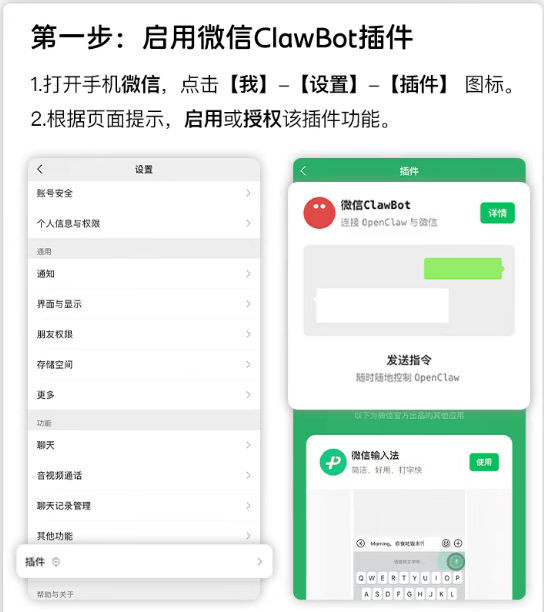
One-click integration for personal WeChat (ClawBot plugin, iOS 8.0.70+)
Prerequisites
- WeChat version: iOS 8.0.70 or above
- An OpenClaw instance deployed and running (either locally or on a server)
Steps
Open WeChat → Me → Settings → Plugins.
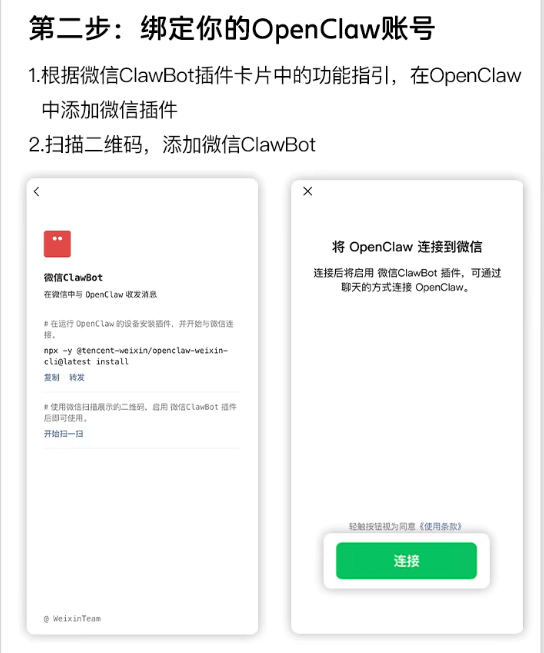
Find the "ClawBot" card, click to enter, and you can see the installation command prompt.

Copy the terminal installation command (or you can directly execute this step):
npx -y @tencent-weixin/openclaw-weixin-cli@latest install
Execute that command in the terminal of the device where OpenClaw is located:

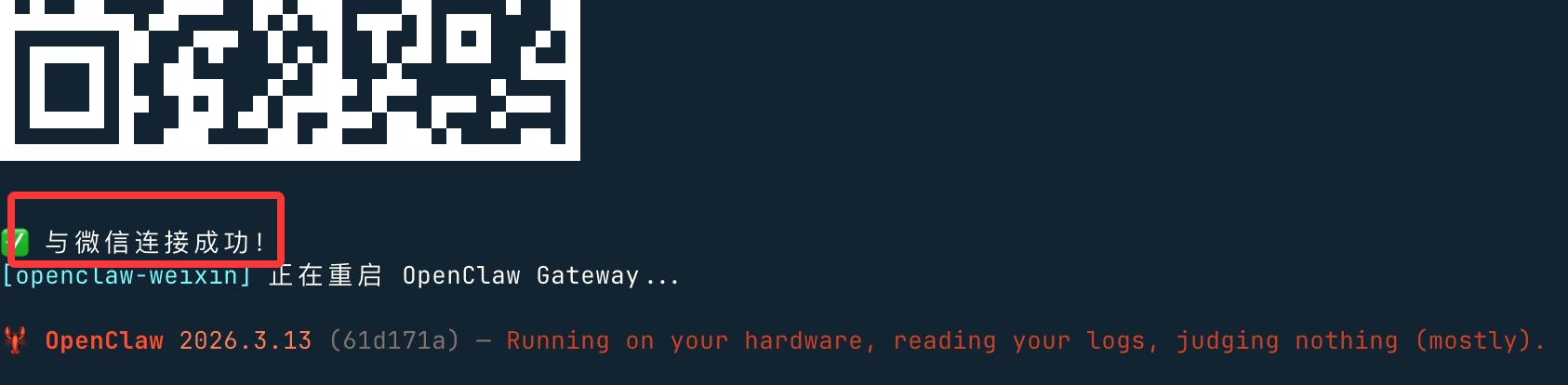
After the command is executed, a QR code will be generated. Use WeChat to scan and bind:
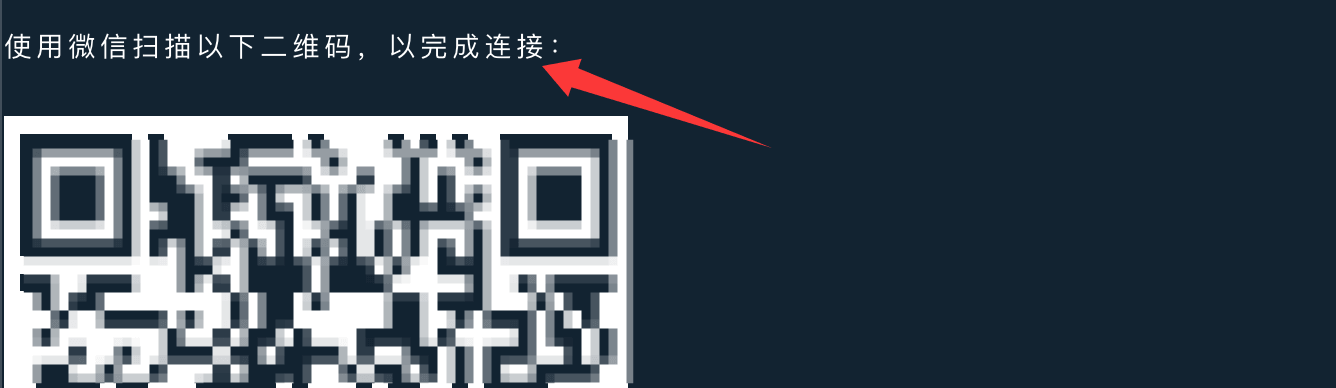
After successful scanning, it will show "connected successfully" and restart:
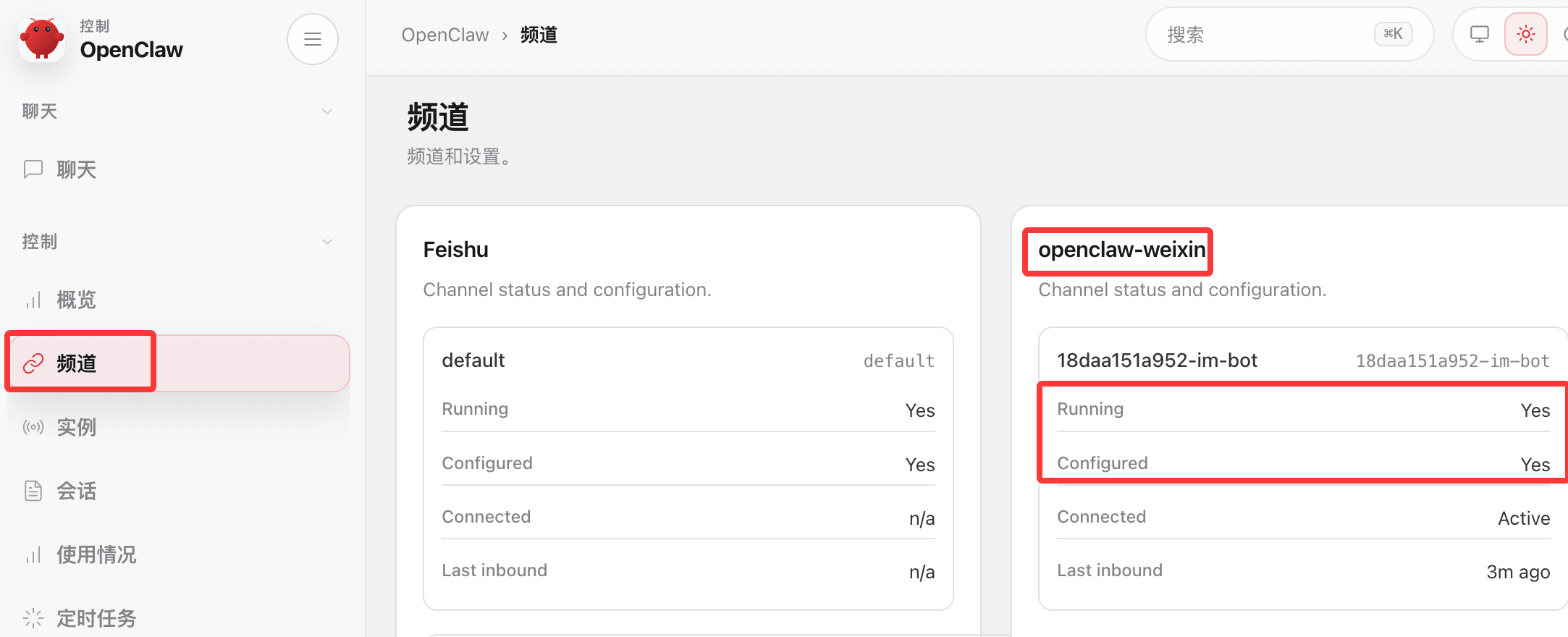
Access the OpenClaw backend, check the channels, and see that WeChat has been deployed:
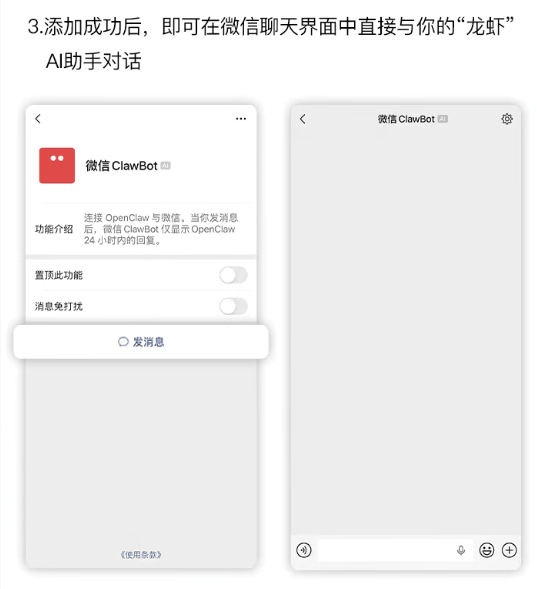
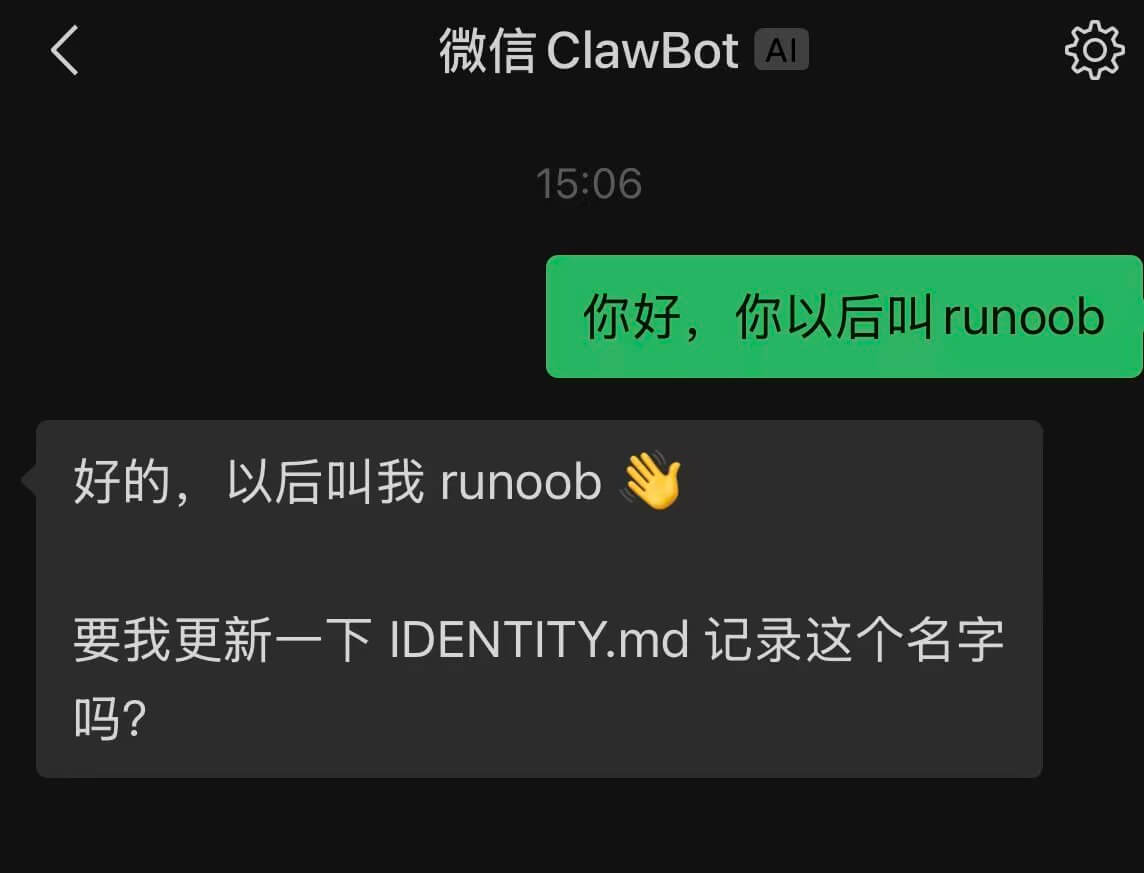
After successful binding, you can directly chat with OpenClaw in the WeChat chat window:
Issues for Windows users
If Windows users use npx, they may get an error:openclaw not foundThe reason is that npx uses the Linux "which" command to detect openclaw. Windows does not have "which", so it reports "openclaw not found".

The solution is to use openclaw's plugin command to install:
openclaw plugins install "@tencent-weixin/openclaw-weixin"
Enable plugin:
openclaw config set plugins.entries.openclaw-weixin.enabled true
QR code login:
openclaw channels login --channel openclaw-weixin
A QR code will appear in the terminal. Scan it with WeChat on your phone and confirm authorization.
If the plugin still fails to install, you can use the netizen@百里凌涵provided the script cli.mjs, and place it in the same directory as package.json and LICENSE files. The code is as follows; then execute the script to continue installation.
node ./cli.mjs install
cli.mjsFile content:
import { execSync, spawnSync } from "node:child_process";
const PLUGIN_SPEC = "@tencent-weixin/openclaw-weixin";
const CHANNEL_ID = "openclaw-weixin";
// ── helpers ──────────────────────────────────────────────────────────────────
function log(msg) {
console.log(`\x1b[36m[openclaw-weixin]\x1b[0m ${msg}`);
}
function error(msg) {
console.error(`\x1b[31m[openclaw-weixin]\x1b[0m ${msg}`);
}
function run(cmd, { silent = true } = {}) {
const stdio = silent ? ["pipe", "pipe", "pipe"] : "inherit";
const result = spawnSync(cmd, { shell: true, stdio });
if (result.status !== 0) {
const err = new Error(`Command failed with exit code ${result.status}: ${cmd}`);
err.stderr = silent ? (result.stderr || "").toString() : "";
throw err;
}
return silent ? (result.stdout || "").toString().trim() : "";
}
function which(bin) {
try {
return execSync(`which ${bin}`, { encoding: "utf-8", stdio: ["pipe", "pipe", "pipe"] }).trim();
} catch {
return null;
}
}
// ── commands ─────────────────────────────────────────────────────────────────
function install() {
// 1. Check openclaw is installed
//if (!which("openclaw")) {
// error("openclaw not found, please install first: ");
// console.log(" npm install -g openclaw");
// console.log(" See https://docs.openclaw.ai/install");
// process.exit(1);
//}
log("Found locally installed openclaw");
// 2. Install plugin via openclaw
log("Installing plugin...");
try {
const installOut = run(`openclaw plugins install "${PLUGIN_SPEC}"`);
if (installOut) log(installOut);
} catch (installErr) {
if (installErr.stderr && installErr.stderr.includes("already exists")) {
log("Detected local installation, updating...");
try {
const updateOut = run(`openclaw plugins update "${CHANNEL_ID}"`);
if (updateOut) log(updateOut);
} catch (updateErr) {
error("Plugin update failed, please run manually: ");
if (updateErr.stderr) console.error(updateErr.stderr);
console.log(` openclaw plugins update "${CHANNEL_ID}"`);
process.exit(1);
}
} else {
error("Plugin installation failed, please run manually: ");
if (installErr.stderr) console.error(installErr.stderr);
console.log(` openclaw plugins install "${PLUGIN_SPEC}"`);
process.exit(1);
}
}
// 3. Login (interactive QR scan)
log("Plugin ready, starting first connection...");
try {
run(`openclaw channels login --channel ${CHANNEL_ID}`, { silent: false });
} catch {
console.log();
error("First connection not completed. You can manually retry later: ");
console.log(` openclaw channels login --channel ${CHANNEL_ID}`);
}
// 4. Restart gateway so it picks up the new account
log("Restarting OpenClaw Gateway...");
try {
run(`openclaw gateway restart`, { silent: false });
} catch {
error("Restart failed. You can manually run: ");
console.log(` openclaw gateway restart`);
}
}
function help() {
console.log(`
Usage: npx -y @tencent-weixin/openclaw-weixin-cli <Command>
Command:
install Install WeChat plugin and scan QR code to connect
help Display help information
`);
}
// ── main ─────────────────────────────────────────────────────────────────────
const command = process.argv[2];
switch (command) {
case "install":
install();
break;
case "help":
case "--help":
case "-h":
help();
break;
default:
if (command) {
error(`Unknown command: ${command}`);
}
help();
process.exit(command ? 1 : 0);
}
package.json file:
package.json
"name": "@tencent-weixin/openclaw-weixin-cli",
"version": "1.0.2",
"description": "Lightweight installer for the OpenClaw Weixin channel plugin",
"license": "MIT",
"author": "Tencent",
"type": "module",
"bin": {
"weixin-installer": "./cli.mjs"
},
"files": [
"cli.mjs"
],
"engines": {
"node": ">=22"
}
}
LICENSE file code:
MIT License

Copyright (c) 2026 Tencent Inc.

Permission is hereby granted, free of charge, to any person obtaining a copy
of this software and associated documentation files (the "Software"), to deal
in the Software without restriction, including without limitation the rights
to use, copy, modify, merge, publish, distribute, sublicense, and/or sell
copies of the Software, and to permit persons to whom the Software is
furnished to do so, subject to the following conditions:

The above copyright notice and this permission notice shall be included in all
copies or substantial portions of the Software.

THE SOFTWARE IS PROVIDED "AS IS", WITHOUT WARRANTY OF ANY KIND, EXPRESS OR
IMPLIED, INCLUDING BUT NOT LIMITED TO THE WARRANTIES OF MERCHANTABILITY,
FITNESS FOR A PARTICULAR PURPOSE AND NONINFRINGEMENT. IN NO EVENT SHALL THE
AUTHORS OR COPYRIGHT HOLDERS BE LIABLE FOR ANY CLAIM, DAMAGES OR OTHER
LIABILITY, WHETHER IN AN ACTION OF CONTRACT, TORT OR OTHERWISE, ARISING FROM,
OUT OF OR IN CONNECTION WITH THE SOFTWARE OR THE USE OR OTHER DEALINGS IN THE
SOFTWARE.
Installation process