OpenClaw (Clawdbot) Tutorial
OpenClaw (formerly Clawdbot, transitional name Moltbot) is an open-source personal AI assistant project that suddenly went viral in January 2026, developed by Peter Steinberger (founder of PSPDFKit).
OpenClaw is an agent that can execute tasks. When we give instructions, it not only answers but also proactively operates the system, visits web pages, processes emails, organizes files, sets reminders, and even writes code automatically.
OpenClaw is alocal computing power + large model Agent automationdeveloper productivity tool taken to the extreme.
OpenClaw's goal is to make AI not just give advice, but directly complete full engineering tasks.

Because Anthropic sent a lawyer's letter on January 27 stating that Clawd / Clawdbot was too similar to Claude, the project was urgently renamed to Moltbot (meaning molting lobster, with the mascot being little lobster Molty 🦞) that same day, but the functionality remains exactly the same, and the old command clawdbot is still compatible.
Moltbot is a transitional name thought up by the project team to address infringement risks; OpenClaw is the current final official name.
-
OpenClaw official website:https://openclaw.ai/
Chinese documentation:https://docs.openclaw.ai/zh-CN
-
GitHub address:https://github.com/openclaw/openclaw
OpenClaw Skills Collection:https://github.com/VoltAgent/awesome-openclaw-skills
Clawbot, Moltbot, and OpenClaw are actually the same open-source project. The name evolution sequence is:
Clawdbot → Moltbot → OpenClaw
| Name | Timeline | Background/Reason | Essential Relationship |
|---|---|---|---|
| Clawdbot / Clawbot | Late 2025 to early January 2026 | Initial project name; inspired byClaudeandclawthe (lobster claw) meme | Original name; the earliest identity on GitHub |
| Moltbot | January 27, 2026 | Required to be renamed due to Anthropic trademark concerns | Intermediate transitional name; functionality and code identical to Clawdbot |
| OpenClaw | After January 30, 2026 | Dropped copyright conflicts, emphasized open-source nature/long-term branding | Current official name; also the unified identifier for future documentation, repositories, etc. |
Installation Methods
OpenClaw's installation is designed to be extremely user-friendly, allowing even non-developers to get started quickly.
System Requirements (not necessarily Mac mini):
- Hardware: very low; 2GB RAM is sufficient to run.
- Environment: Supports Mac, Windows, Linux; requires Node.js (pnpm) or Docker.
1. Recommended installation (one-click script):
Run the following command directly in the terminal.
macOS/Linux systems:
curl -fsSL https://openclaw.ai/install.sh | bash
Windows systems:
#PowerShell
iwr -useb https://openclaw.ai/install.ps1 | iex

#CMD
curl -fsSL https://openclaw.ai/install.cmd -o install.cmd && install.cmd && del install.cmd
This will automatically install Node.js (≥22) and complete basic configuration.
2. Manual installation
You needNode.js ≥22and complete basic configuration:
Using npm:
npm i -g openclaw

# 如果速度慢可以指定国内镜像
npm i -g openclaw --registry=https://registry.npmmirror.com
Or using pnpm:
pnpm add -g openclaw
After installation, initialize and install the background service (launchd / systemd user service):
openclaw onboard
3. Install from source (development mode)
git clone https://github.com/openclaw/openclaw.git
cd openclaw

pnpm install

pnpm ui:build   # 首次运行会自动安装 UI 相关依赖并构建前端界面
pnpm build      # 构建整个项目(包含后端与相关模块)

# 初始化 OpenClaw 并安装为系统后台服务(开机自动运行)
pnpm openclaw onboard --install-daemon

# 开发模式:监听 TypeScript 代码变更并自动重载网关服务
pnpm gateway:watch
Configuration Guide
We recommend installing using the one-click script.
macOS/Linux systems:
curl -fsSL https://openclaw.ai/install.sh | bash
Windows systems:
#PowerShell
iwr -useb https://openclaw.ai/install.ps1 | iex

#CMD
curl -fsSL https://openclaw.ai/install.cmd -o install.cmd && install.cmd && del install.cmd
It will perform environment detection, install necessary dependencies, and launch the onboarding (setup wizard) process.
To re-enter the setup wizard later, run the following command:
openclaw onboard --install-daemon
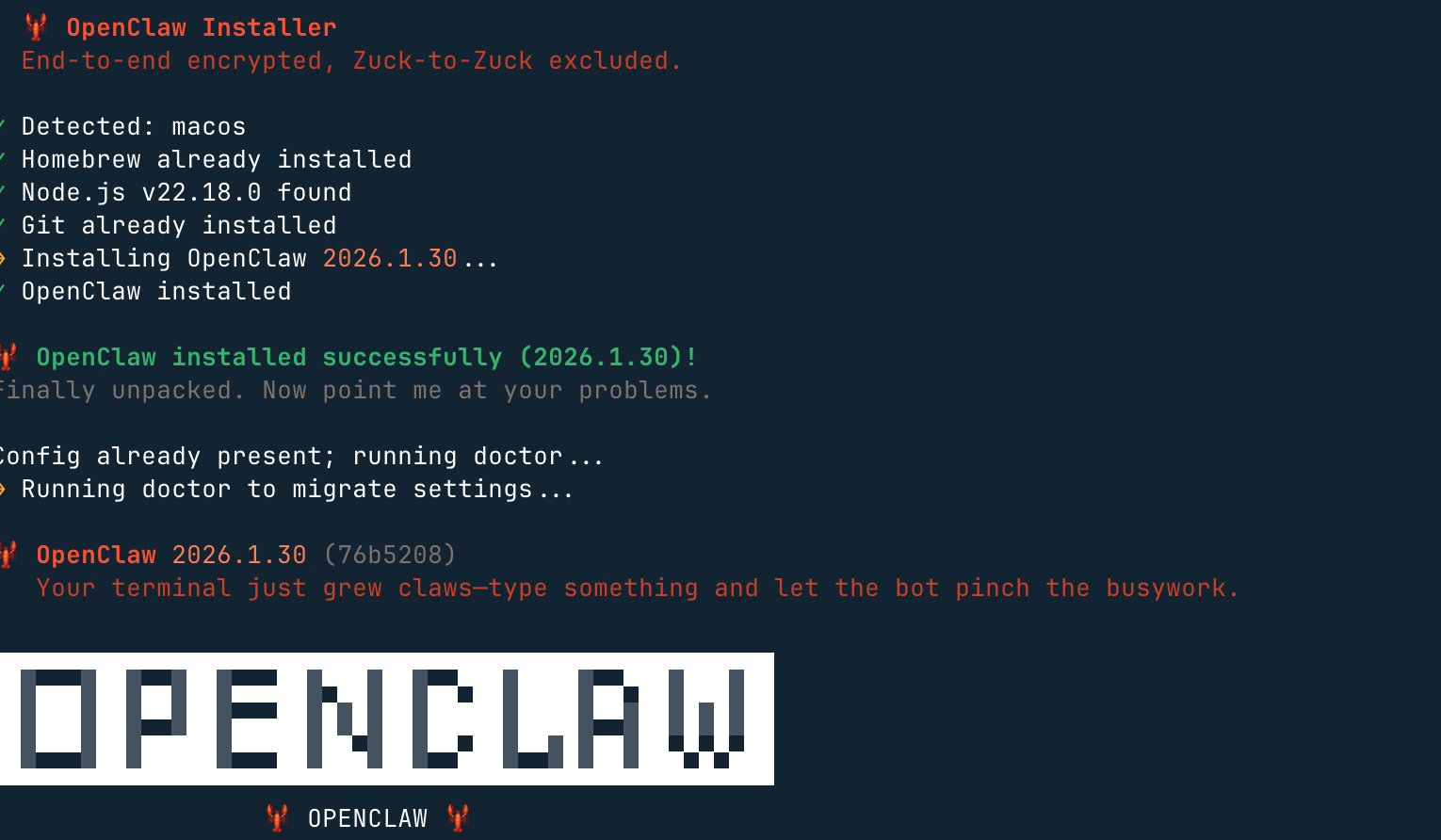
Then, it will remind you that this lobster is very powerful, and of course, the risk is also high. We selectyes(no means it won't be installed) and that's it:

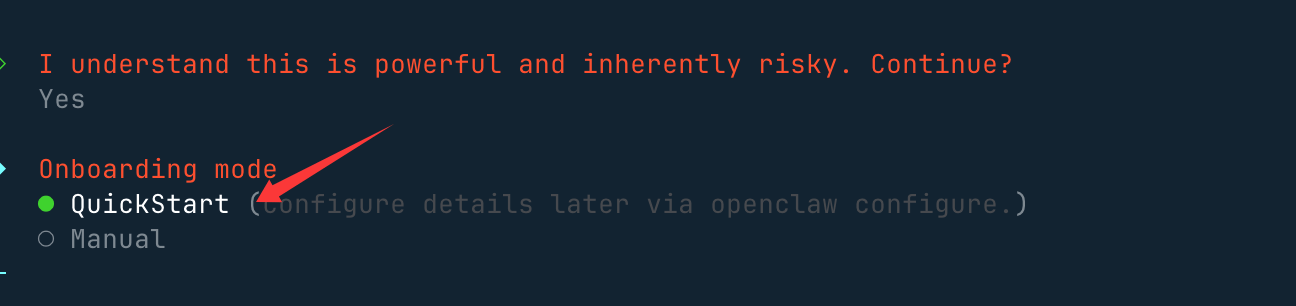
Next, we select Quick StartQuickStartOption:
Next, we need to configure a large model. For Model/Auth Provider, select an AI provider; both domestic and international providers are generally supported.
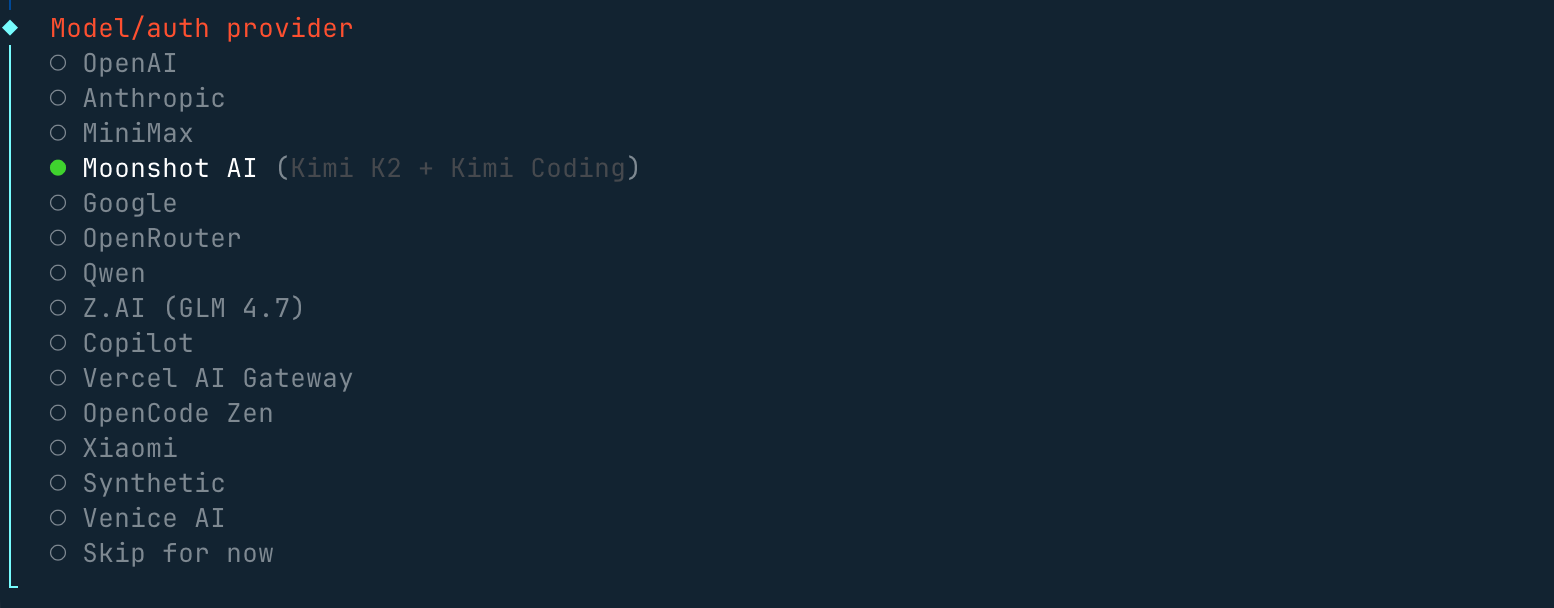
If you don't have an overseas account, you can also configure API keys from domestic providers like Qwen, MiniMax, and Zhipu. The authentication configuration file (OAuth + API key) is at~/.openclaw/agents/<agentId>/agent/auth-profiles.json, and you can modify it in this file later.
Then there will be an option to choose a chat tool. If you don't have overseas ones, you can select the last one:
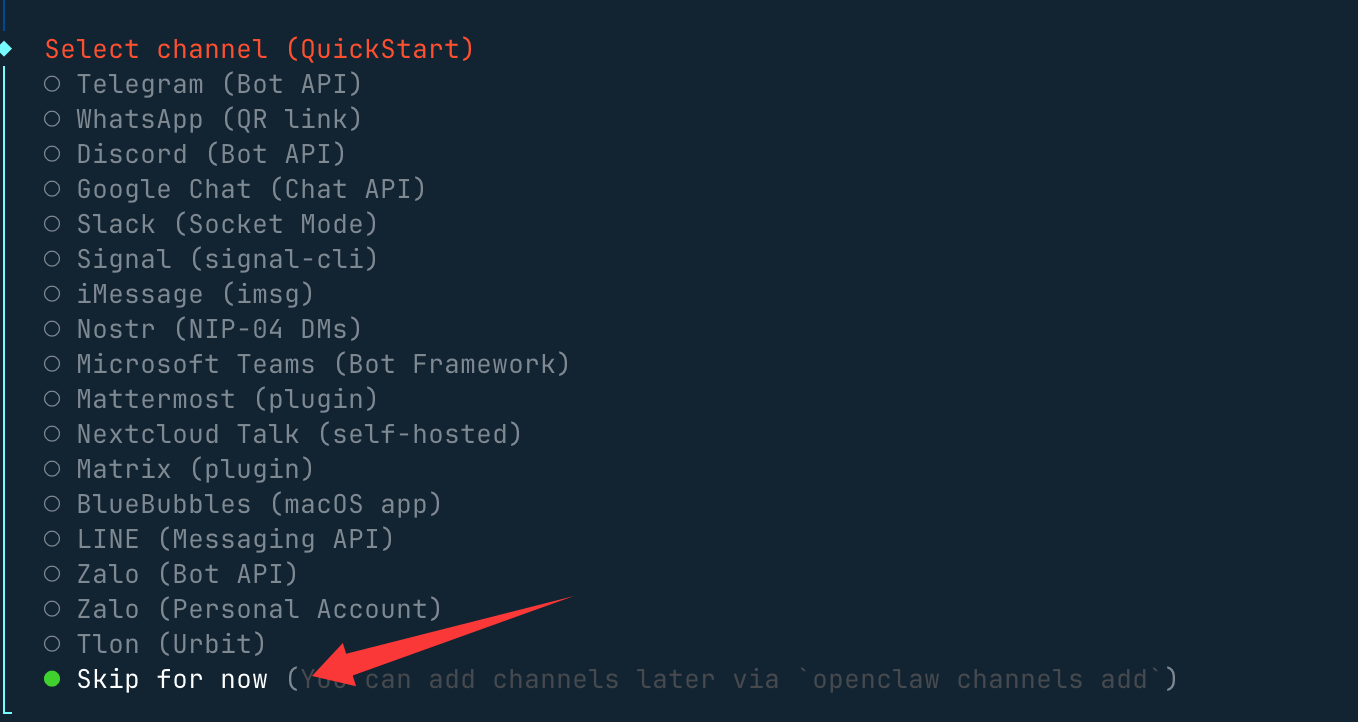
Other configurations, such as port settingsGateway Port, just use the default 18789. For example, for Skills and package manager, choose npm or others; you can keep pressing Yes all the way.
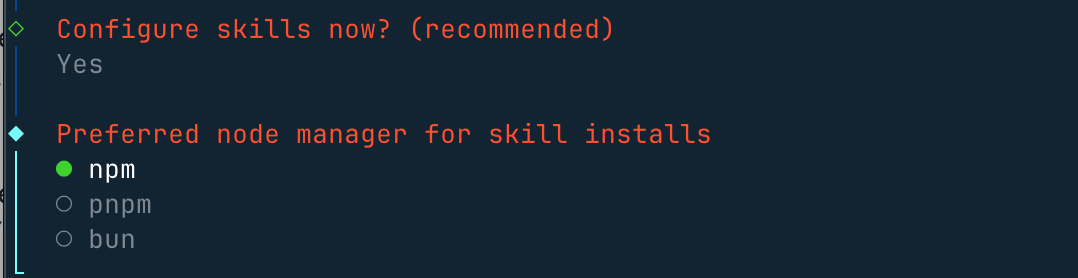
Select some skills you like, or you can skip directly, and usespacekey to select:

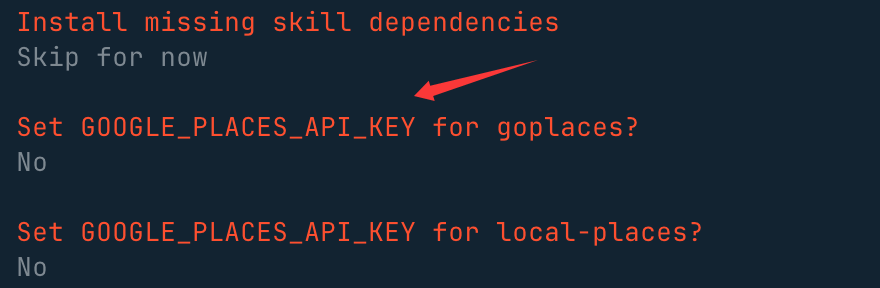
For these API keys, if you don't have them, directly selectno:
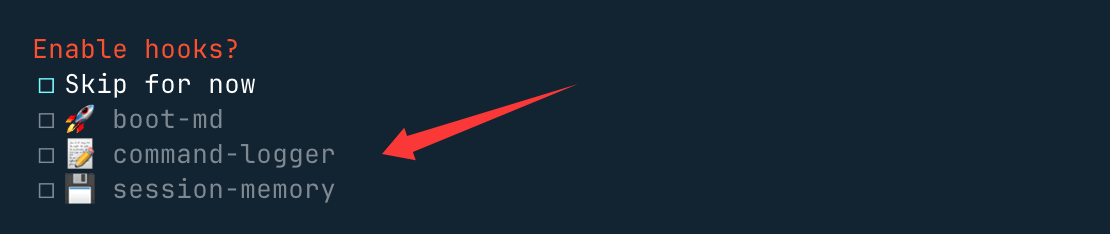
Finally, these three hooks can be enabled, usingspacekey to select, mainly for content guidance logs and session records:
Select Open the Web UI to open it in a browser:
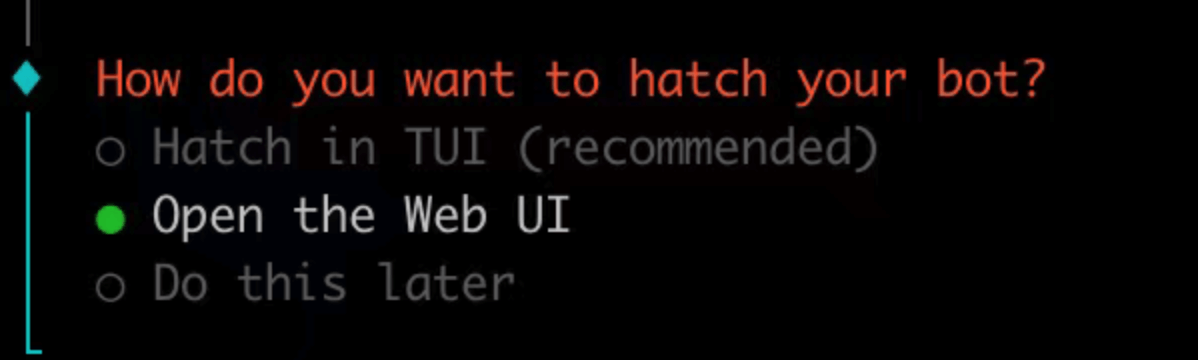
After installation, it will automatically accesshttp://127.0.0.1:18789/chat, and you can open the chat interface to let it start working.
For example, search for the latest tech news:
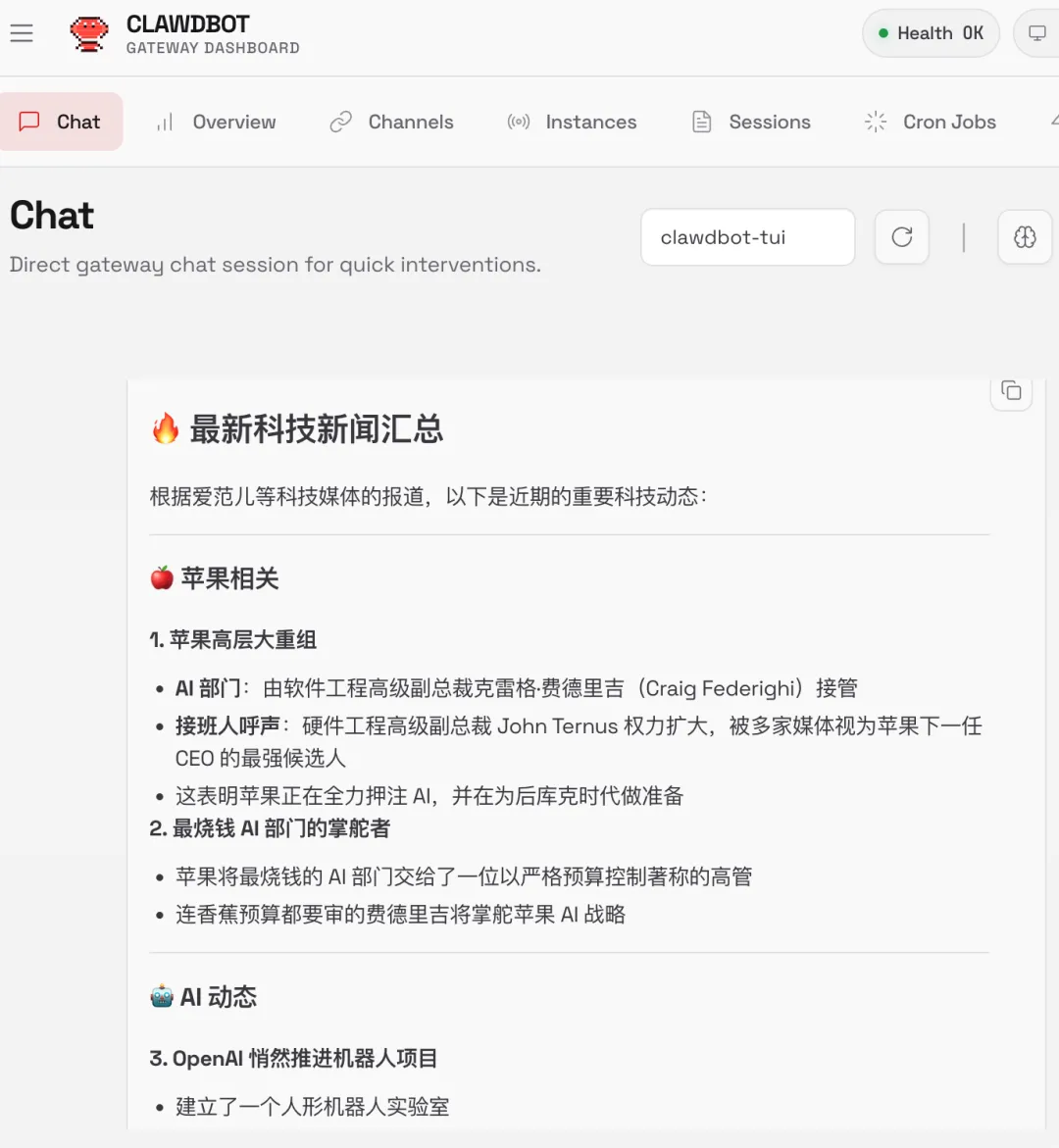
After startup, we can useopenclaw statuscommand to check the status:
openclaw status
If you installed the service during the onboarding, the Gateway should already be running:
openclaw gateway status
Manual run (foreground):
openclaw gateway --port 18789 --verbose
Commands that can be executed after installation:
- Run onboarding:
openclaw onboard --install-daemon - Quick check:
openclaw doctor - Check Gateway health status:
openclaw status+openclaw health - Open dashboard:
openclaw dashboard
Uninstall
Use the built-in uninstaller:
openclaw uninstall
Non-interactive (automation / npx):
openclaw uninstall --all --yes --non-interactive
npx -y openclaw uninstall --all --yes --non-interactive
Using Skills
Skills are standalone folders containing a SKILL.md file. If you want to extend new features for the OpenClaw agent, ClawHub is the best choice for finding and installing skills.
ClawHub skill repository address:https://clawhub.ai/
ClawHub China mirror:https://skillhub.tencent.com/
Install ClawHub tool:
# 推荐方式(npx 无需全局安装)
npx clawhub@latest --version

# 或全局安装(方便以后直接用 clawhub 命令)
npm install -g clawhub
# 或者用 pnpm
pnpm add -g clawhub
Log in:
clawhub login
Search skills:
clawhub search "postgres backups"
Download and install new skills:
clawhub install my-skill-pack
Batch update installed skills:
clawhub update --all
Plugin Management
Plugins are lightweight code modules that can extend additional functionality for OpenClaw by adding commands, tools, and Gateway RPC capabilities.
View loaded plugins:
openclaw plugins list
Install official plugins (e.g., voice call plugin):
openclaw plugins install @openclaw/voice-call
Restart the gateway after plugin installation for changes to take effect:
openclaw gateway restart
Common Commands
OpenClaw Common Commands Quick Reference:
| Category | Command | Description |
|---|---|---|
| Initialization & Installation | openclaw onboard |
Interactive wizard (configure model, channel, gateway, workspace) |
| Initialization & Installation | openclaw setup |
Initialize configuration + workspace (non-interactive) |
| Initialization & Installation | openclaw configure |
Interactive configuration wizard (model, channel, skills) |
| Gateway Management | openclaw gateway status |
Check gateway service status + RPC liveness probe |
| Gateway Management | openclaw gateway start |
Start the gateway service |
| Gateway Management | openclaw gateway stop |
Stop the gateway service |
| Gateway Management | openclaw gateway restart |
Restart the gateway service |
| Gateway Management | openclaw gateway run |
Run the gateway directly in the foreground (for debugging) |
| Gateway Management | openclaw gateway health |
Get gateway health information |
| Configuration Management | openclaw config file |
Show the full path of the current configuration file |
| Configuration Management | openclaw config get <path> |
Read configuration items |
| Configuration Management | openclaw config set <path> <value> |
Modify configuration items |
| Configuration Management | openclaw config validate |
Validate whether the configuration file is valid |
| Diagnostics & Status | openclaw doctor |
One-click health check + auto repair |
| Diagnostics & Status | openclaw status |
Show session health status and recent contacts |
| Diagnostics & Status | openclaw health |
Pull health data from the running gateway |
| Diagnostics & Status | openclaw logs |
View gateway logs in real time |
| Other Frequently Used Operations | openclaw dashboard |
Open the web control panel |
| Other Frequently Used Operations | openclaw channels status |
View connected chat channels |
| Other Frequently Used Operations | openclaw agent run |
Manually trigger a proxy run |
After changing configuration, remember to runopenclaw gateway restartTo make changes take effect ~ 🦞
Channel Management
- WhatsApp:
openclaw channels login(or scan QR) - Telegram:
openclaw channels add --channel telegram(requires Bot Token) - Discord:
openclaw channels add --channel discord(requires Bot Token) - iMessage: native macOS bridge
- Slack:
openclaw channels add --channel slack(requires Bot Token)
Workspace Structure (Workspace Anatomy)
AGENTS.md: instruction descriptionUSER.md: preference settingsMEMORY.md: long-term memoryHEARTBEAT.md: checklistSOUL.md: personality/toneIDENTITY.md: name/topicBOOT.md: startup configuration- Root directory:
~/.openclaw/workspace
In-Chat Slash Commands
/status: Health + Context/context list: Context Contributors/model <m>: Switch Model/compact: Free Window Space/new: New Conversation/stop: Abort Current Run/tts on|off: Switch Voice/think: Toggle Reasoning Mode
Key Path Mapping (Essential Path Map)
- Main Configuration:
~/.openclaw/openclaw.json - Default Workspace:
~/.openclaw/workspace/ - Agent State Directory:
~/.openclaw/agents/<cid>/ - OAuth & API Keys:~/.openclaw/agents/<agentId>/agent/auth-profiles.json, if it is in the older version
~/.openclaw/credentials/ - Vector Index Storage:
~/.openclaw/memory/<cid>.sqlite - Global Shared Skills:
~/.openclaw/skills/ - Gateway File Logs:
/tmp/openclaw/*.log
Voice and TTS
- Paid: OpenAI / ElevenLabs
- Free: Edge TTS (No API Key Required)
- Automatic TTS:
messages.tts.auto: "always"
Memory and Models
- Vector Search:
memory search "X" - Model Switching:
models set <model> - Authentication Settings:
models auth setup - Logs:
memory/YYYY-MM-DD.md
Hooks and Skills
- ClawHub:
clawhub install <slug> - Hook List:
openclaw hooks list
Troubleshooting
- No DM Reply → Pair List → Approve
- Muted in Group → Check Mention Pattern Configuration
- Authentication Expired →
models auth setup-token - Gateway Closed →
doctor --deep - Memory Bug → Rebuild Memory Index
Automation and Research
- Browser:
browser start/screenshot - Sub-agents:
/subagents list/info - Scheduled Tasks:
cron list/run <cid> - Heartbeat:
heartbeat.every: "30m"
Install and Configure Directly via Third-Party Cloud
All major platforms now support this agent. If you don't want to install it locally, you can deploy OpenClaw on the cloud with one click:
- Alibaba Cloud:https://www.aliyun.com/activity/ecs/clawdbot
- Tencent Cloud:https://cloud.tencent.com/developer/article/2624973
Install using Alibaba Cloud's lightweight server:https://www.aliyun.com/activity/ecs/clawdbot。
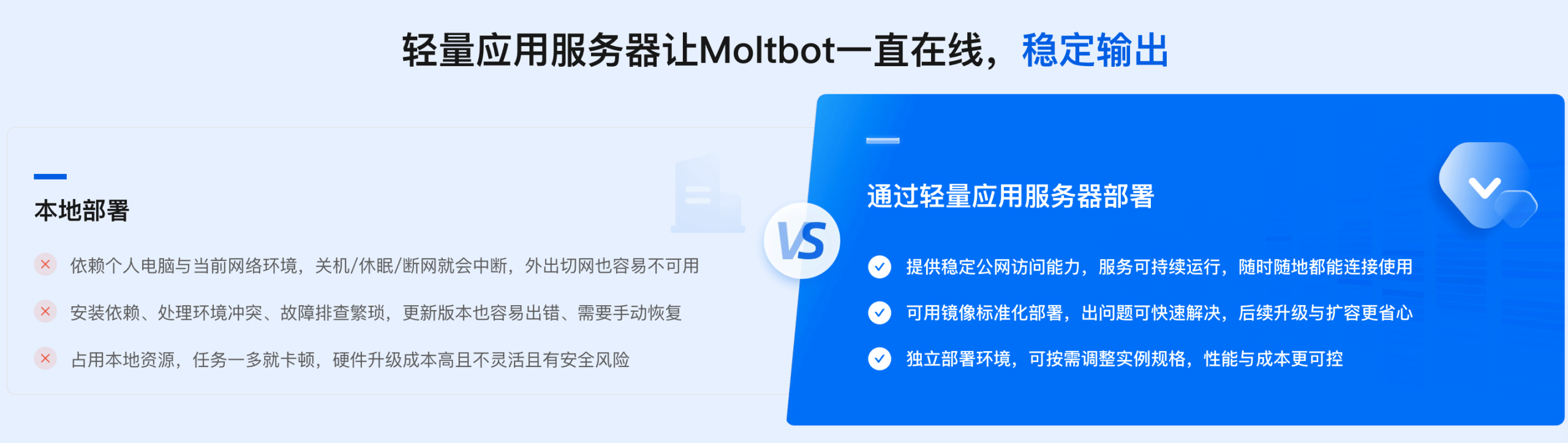
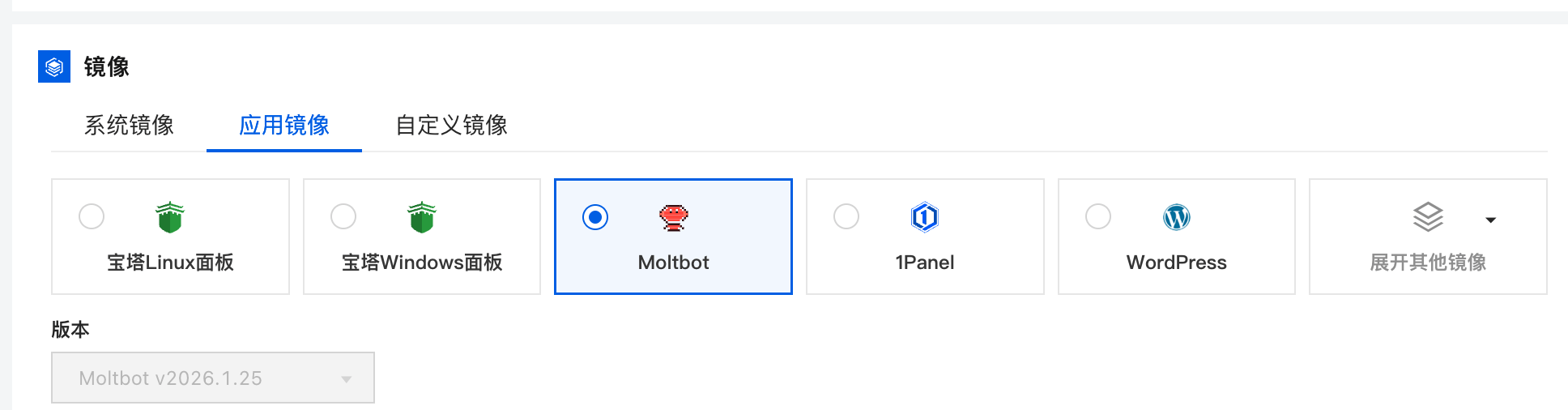
You can use their images to install with one click:
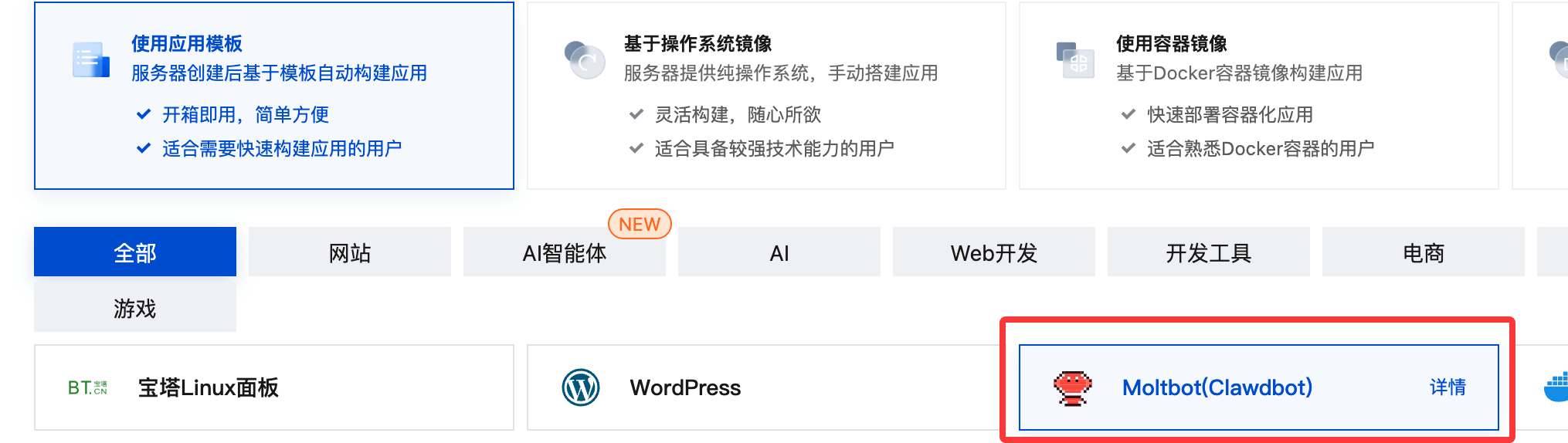
Install using Tencent Cloud's lightweight server:https://cloud.tencent.com/developer/article/2624973
Common Commands
The common OpenClaw commands are as follows:
| Command | Purpose | Remarks / Parameters |
|---|---|---|
openclaw status |
View Gateway Current Running Status | Includes Health and Context Information |
openclaw health |
Health Check | Detect Core, Dependencies, and Runtime Environment |
openclaw doctor |
Comprehensive Diagnosis and Repair Recommendations | Support--deepDeep Check |
openclaw onboard |
Interactive Initialization Wizard | Recommended for first use |
openclaw onboard --install-daemon |
Install system daemon | Run Gateway in background as a daemon |
openclaw onboard --uninstall-daemon |
Uninstall daemon | Do not delete data |
openclaw configure |
Interactive Configuration Wizard | Models, channels, credentials, etc. |
openclaw config get <path> |
Get configuration value | JSON Path |
openclaw config set <path> <value> |
Set configuration item | Supports JSON5 / raw text |
openclaw config unset <path> |
Clear configuration item | Remove a single key-value pair |
openclaw channels list |
List logged-in channels | WhatsApp / Telegram / Discord, etc. |
openclaw channels login |
Log in to a new channel account | QR code scan or authorization flow |
openclaw channels add |
Add channel | Telegram / Discord / Slack |
openclaw channels status --probe |
Channel health check | Check connection reachability |
openclaw skills list |
List skills | Installed / available skills |
openclaw skills info <skill> |
Skill details | Parameters, version info |
clawhub install <slug> |
Install skill from ClawHub | Official skill marketplace |
openclaw hooks list |
List Hooks | Event hook mechanism |
openclaw plugins list |
List plugins | View installed plugins |
openclaw plugins install <id> |
Install plugin | For example@openclaw/voice-call |
openclaw plugins enable <id> |
Enable plugin | Usually requires Gateway restart |
openclaw models list |
List available models | Includes authentication status |
openclaw models status |
Model status | Current availability |
openclaw models auth setup-token |
Model authentication configuration | Cheatsheet recommended approach |
openclaw memory search "X" |
Search long-term memory | Vector search |
openclaw memory index |
Rebuild memory index | Fix memory anomalies |
openclaw logs |
View logs | Default aggregated output |
openclaw logs --follow |
Real-time logs | --json / --plain / --limit |
openclaw gateway install |
Install Gateway system service | Register as system daemon |
openclaw gateway start |
Start Gateway service | System service mode |
openclaw gateway stop |
Stop Gateway service | |
openclaw gateway restart |
Restart Gateway service | Use after configuration changes |
openclaw gateway status |
Gateway system service status | Different fromopenclaw status |
openclaw browser start |
Launch browser agent | Automation capabilities |
openclaw browser screenshot |
Webpage screenshot | |
openclaw subagents list |
List subagents | |
openclaw cron list |
List scheduled tasks | |
openclaw cron run <id> |
Execute scheduled tasks | |
openclaw uninstall |
Uninstall Gateway service and data | Official recommendation |
openclaw uninstall --all --yes --non-interactive |
Fully automatic uninstall | Status / workspace / plugins |
openclaw uninstall --state |
Delete state files | Do not delete workspace |
openclaw uninstall --workspace |
Delete workspace | agent / workspace data |
openclaw uninstall --service |
Uninstall system service only | Do not delete data |
openclaw uninstall --dry-run |
Simulate uninstall | Display results only |
Why Is It So Popular Recently?
- It truly achieves "like JARVIS": can read/write files, run terminal commands, operate browsers, send/receive emails, calendar, write code, book flights, clear inbox...
- Local-first + long-term memory: all conversations share context across platforms, and the USER.md and memory/ directories get smarter with use
- Supports almost all major models: Claude, Gemini, OpenAI, Ollama local models, Pi, etc.
- Community skills ecosystem explosion: ClawdHub already has 500+ community skills (Slack, Discord, GitHub, browser control, macOS UI automation...)
- Installation is as simple as npm install, but the actual capabilities are quite spicy (developer's words)
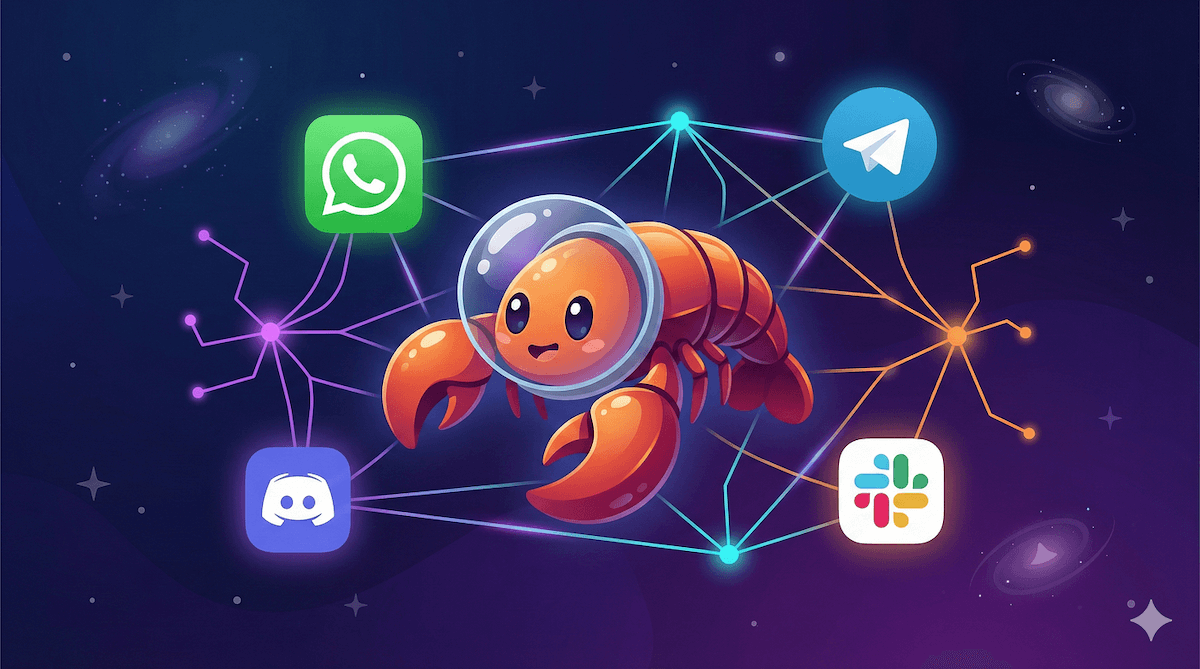
Its core capabilities include:
- Break down natural language goals into executable steps
- Automatically invoke terminal commands
- Create and modify project files
- Run code and check results
- Automatically fix based on error messages
Compared to code completion tools like Claude Code/OpenCode, OpenClaw is closer to an engineering agent with execution permissions.
- Claude Code and OpenCode excel in code quality and understanding
- OpenClaw excels in automatically completing the entire engineering process
| Capability dimension | OpenClaw | Claude Code | OpenCode |
|---|---|---|---|
| Task planning | strong | Medium | Medium |
| Automatic execution | Complete | Partial | Partial |
| Self-repair | Yes | None | None |
| Engineering-level operations | strong | strong | Medium |
| Local automation | Native support | Relatively weak | Relatively weak |