HTML canvas textBaselineProperty
Example
Draw a red line at y=100, then place each word at y=100 using a different textBaseline value:
JavaScript:
var c=document.getElementById("myCanvas");
var ctx=c.getContext("2d");
//Draw a red line at y=100
ctx.strokeStyle="red";
ctx.moveTo(5,100);
ctx.lineTo(395,100);
ctx.stroke();
ctx.font="20px Arial"
//Place each word at y=100 with different textBaseline values
ctx.textBaseline="top";
ctx.fillText("Top",5,100);
ctx.textBaseline="bottom";
ctx.fillText("Bottom",50,100);
ctx.textBaseline="middle";
ctx.fillText("Middle",120,100);
ctx.textBaseline="alphabetic";
ctx.fillText("Alphabetic",190,100);
ctx.textBaseline="hanging";
ctx.fillText("Hanging",290,100);
var ctx=c.getContext("2d");
//Draw a red line at y=100
ctx.strokeStyle="red";
ctx.moveTo(5,100);
ctx.lineTo(395,100);
ctx.stroke();
ctx.font="20px Arial"
//Place each word at y=100 with different textBaseline values
ctx.textBaseline="top";
ctx.fillText("Top",5,100);
ctx.textBaseline="bottom";
ctx.fillText("Bottom",50,100);
ctx.textBaseline="middle";
ctx.fillText("Middle",120,100);
ctx.textBaseline="alphabetic";
ctx.fillText("Alphabetic",190,100);
ctx.textBaseline="hanging";
ctx.fillText("Hanging",290,100);
Try it Yourself »
Browser Support


Internet Explorer 9, Firefox, Opera, Chrome and Safari support the textBaseline property.
Note:The textBaseline property behaves differently across browsers, especially when using "hanging" or "ideographic".
Note:Internet Explorer 8 and earlier versions do not support the <canvas> element.
Definition and Usage
The textBaseline property sets or returns the current text baseline used when drawing text.
The following diagram illustrates the various baselines supported by the textBaseline property:
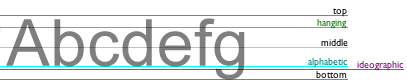
Note:fillText()andstrokeText()When positioning text on the canvas, the method will use the specified textBaseline value.
| Default value: | alphabetic |
|---|---|
| JavaScript syntax: | context.textBaseline="alphabetic|top|hanging|middle|ideographic|bottom"; |
Property Values
| Value | Description |
|---|---|
| alphabetic | Default. The text baseline is the normal alphabetic baseline. |
| top | The text baseline is the top of the em square. |
| hanging | The text baseline is the hanging baseline. |
| middle | The text baseline is the middle of the em square. |
| ideographic | The text baseline is the ideographic baseline. |
| bottom | The text baseline is the bottom of the em square. |
 HTML canvas Reference Manual Other Extensions