HTML canvas miterLimitProperty
Examples
Draw a line with a maximum miter length of 5:
JavaScript:
var c=document.getElementById("myCanvas");
var ctx=c.getContext("2d");
ctx.lineWidth=10;
ctx.lineJoin="miter";
ctx.miterLimit=5;
ctx.moveTo(20,20);
ctx.lineTo(50,27);
ctx.lineTo(20,34);
ctx.stroke();
var ctx=c.getContext("2d");
ctx.lineWidth=10;
ctx.lineJoin="miter";
ctx.miterLimit=5;
ctx.moveTo(20,20);
ctx.lineTo(50,27);
ctx.lineTo(20,34);
ctx.stroke();
Try it »
Browser Support


Internet Explorer 9, Firefox, Opera, Chrome, and Safari support the miterLimit property.
Note:Internet Explorer 8 and earlier versions do not support the <canvas> element.
Definition and Usage
The miterLimit property sets or returns the maximum miter length.
The miter length refers to the distance between the inner corner and the outer corner where two lines meet.
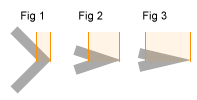
Tip:The miterLimit property is only effective when the lineJoin property is "miter".
The smaller the corner angle, the greater the miter length.
To avoid the miter lengthbeing too long, we can use the miterLimit property.
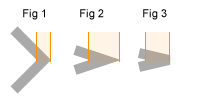
If the miter length exceeds the value of miterLimit, the corner will be displayed in the "bevel" type of lineJoin (Fig 3):
| Default value: | 10 |
|---|---|
| JavaScript Syntax: | context.miterLimit=number; |
Property Values
| Value | Description |
|---|---|
| number | A positive number. Specifies the maximum miter length. If the miter length exceeds the value of miterLimit, the corner will be displayed in the "bevel" type of lineJoin. |
 HTML canvas Reference Manual Other Extensions