Regular Expression -Syntax
A regular expression is a powerful tool for matching and manipulating text. It consists of ordinary characters and special characters (called "metacharacters") and is used to describe the text patterns to be matched.
Regular expressions can be used to search, replace, extract, and validate specific patterns in text.
For example:
runoo+b, can matchexample、runooob、runoooooobetc.,+The sign indicates that the preceding character must appear at least once (1 or more times)Try it »。
runoo*b, can matchrunob、example、runoooooobetc.,*The sign indicates that the preceding character may not appear, or may appear once or multiple times (0 times, or 1 time, or multiple times)Try it »。
colou?rcan matchcolororcolour,?The question mark indicates that the preceding character can appear at most once (0 or 1 time)Try it »。
The method of constructing regular expressions is the same as creating mathematical expressions — by combining small expressions with various metacharacters and operators, you can create larger expressions. The components of a regular expression can be a single character, a character set, a character range, a choice between characters, or any combination of all these components.
As a template, a regular expression matches a certain character pattern against the string being searched.
Ordinary Characters
Ordinary characters include all printable and non-printable characters that are not explicitly designated as metacharacters, including all uppercase and lowercase letters, all digits, all punctuation marks, and some other symbols.
| Character | Description | Example |
|---|---|---|
| [ABC] | Matches[...]all characters listed in .... For example,[aeiou]Matches all the e, o, u, and a letters in the string "google example taobao". 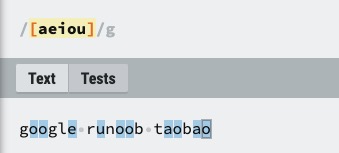
|
Try it » |
| [^ABC] | Matches all characters except[...]all characters other than those in .... For example,[^aeiou]Matches all characters in the string "google example taobao" except the e, o, u, and a letters. 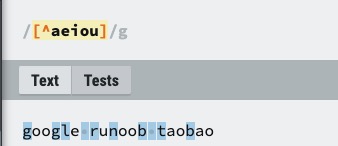
|
Try it » |
| [A-Z] | [A-Z] represents a range and matches all uppercase letters; [a-z] matches all lowercase letters; [0-9] matches all digits. 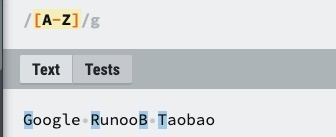
|
Try it » |
| . | Matches any single character except newline characters (\n, \r), equivalent to [^\n\r]. 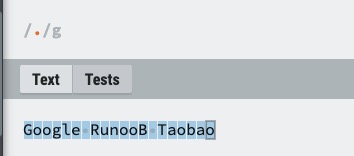
|
Try it » |
| [\s\S] | Matches all characters (including newline characters).\sMatches all whitespace characters (including newlines),\SMatches all non-whitespace characters (excluding newlines); combining the two can match any character. 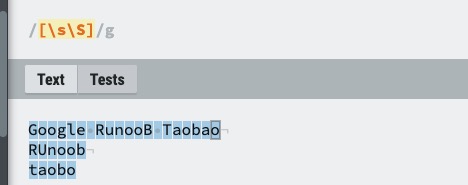
|
Try it » |
| \w | Matches letters, digits, and underscores, equivalent to [A-Za-z0-9_]. 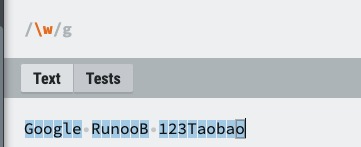
|
Try it » |
| \d | Matches any Arabic digit (0 to 9), equivalent to[0-9]。 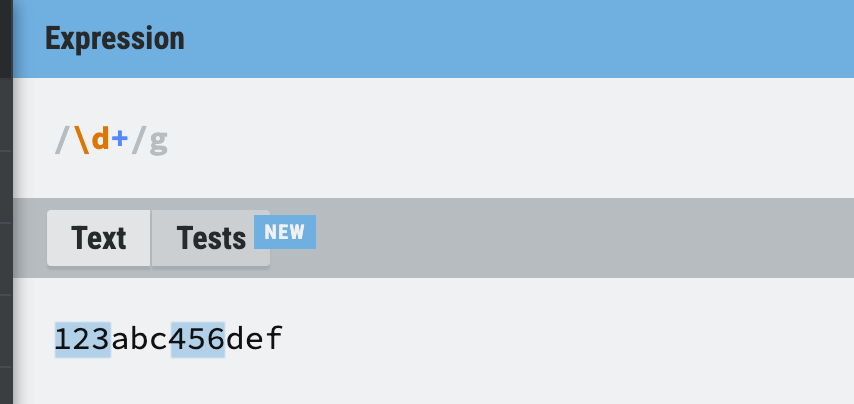
|
Try it » |
Testing Tools
Modifiers:
[0-9]+
Match text:
123abc456edf789
Non-printing Characters
Non-printing characters can also be components of regular expressions. The following table lists escape sequences that represent non-printing characters:
| Character | Description |
|---|---|
| \cx | Matches a control character designated by x. For example, \cM matches a Control-M or carriage return. The value of x must be one of A-Z or a-z; otherwise, c is treated as a literal 'c' character. |
| \f | Matches a form feed, equivalent to \x0c and \cL. |
| \n | Matches a newline character, equivalent to \x0a and \cJ. |
| \r | Matches a carriage return, equivalent to \x0d and \cM. |
| \s | Matches any whitespace character, including space, tab, form feed, etc., equivalent to [ \f\n\r\t\v]. Note that Unicode regular expressions also match full-width space characters. |
| \S | Matches any non-whitespace character, equivalent to [^ \f\n\r\t\v]. |
| \t | Matches a tab character, equivalent to \x09 and \cI. |
| \v | Matches a vertical tab character, equivalent to \x0b and \cK. |
Special Characters
The so-called special characters are characters with special meanings, such as the one mentioned aboverunoo*bin the*, meaning "any number of characters".*If you want to find the ... in a string*symbol itself, then it is necessary to\escape it by adding a backslash before itruno\*ob, that is,runo*ob。
matches the string\before them. The following table lists the special characters in regular expressions:
| Special Characters | Description |
|---|---|
| $ | Matches the end position of the input string. If the Multiline property of the RegExp object is set, $ also matches '\n' or '\r'. To match the $ character itself, use \$. |
| ( ) | Marks the start and end positions of a subexpression. The subexpression can be captured for later use. To match these characters, use \( and \). |
| * | Matches the preceding subexpression zero or more times. To match the * character itself, use \*. |
| + | Matches the preceding subexpression one or more times. To match the + character itself, use \+. |
| . | Matches any single character except the newline character \n. To match . itself, use \. |
| [ | Marks the start of a bracket expression. To match [, use \[. |
| ? | Matches the preceding subexpression zero or one time, or indicates a non-greedy quantifier. To match the ? character itself, use \?. |
| \ | Marks the next character as a special character, a literal character, a backreference, or an octal escape. For example, 'n' matches the character 'n'; '\n' matches a newline; '\\' matches "\"; '\(' matches "(". |
| ^ | Matches the start position of the input string. When used in a bracket expression, it indicates that the character set inside the brackets is not accepted (negation). To match the ^ character itself, use \^. |
| { | Marks the start of a quantifier expression. To match {, use \{. |
| | | Indicates a choice between two items. To match |, use \|. |
Quantifiers
Quantifiers specify how many times a given component of a regular expression must appear for a match to be satisfied. There are*、+、?、{n}、{n,}、{n,m}6 types in total.
| Character | Description | Example |
|---|---|---|
| * | Matches the preceding subexpression zero or more times. For example,zo*can match"z"and"zoo"。*equivalent to{0,}。 | Try it » |
| + | Matches the preceding subexpression one or more times. For example,zo+can match"zo"and"zoo", but cannot match"z"。+equivalent to{1,}。 | Try it » |
| ? | Matches the preceding subexpression zero or one time. For example,do(es)?can match"do"and"does", but cannot match"dog"。?equivalent to{0,1}。 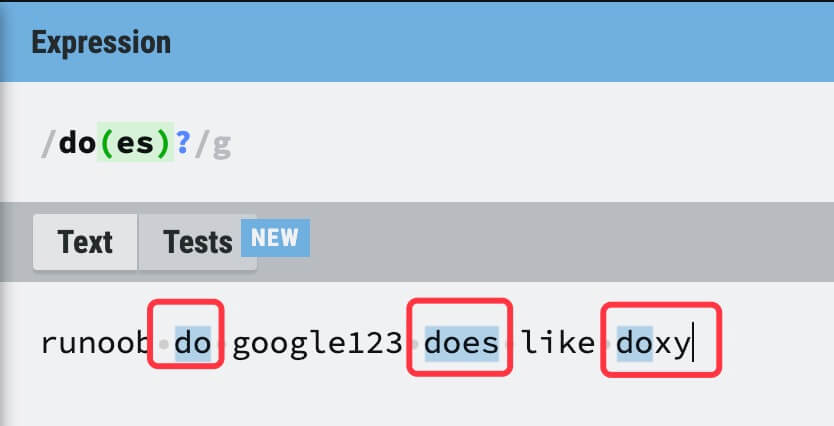 |
Try it » |
| {n} | n is a non-negative integer, matching exactly n times. For example,o{2}cannot match"Bob"the o in ..., but can match"food"the two o's in ... | Try it » |
| {n,} | n is a non-negative integer, matching at least n times. For example,o{2,}cannot match"Bob"the o in ..., but can match"foooood"all the o's in ...o{1,}equivalent too+,o{0,}equivalent too*。 | Try it » |
| {n,m} | m and n are both non-negative integers, where n <= m. Match at least n times and at most m times. For example,o{1,3}will match"fooooood"the first three o's in ...o{0,1}equivalent too?. Note: there must be no space between the comma and the two numbers. | Try it » |
The following regular expression matches a positive integer,[1-9]ensures the first digit is not 0,[0-9]*represents any number of digits:
/[1-9][0-9]*/
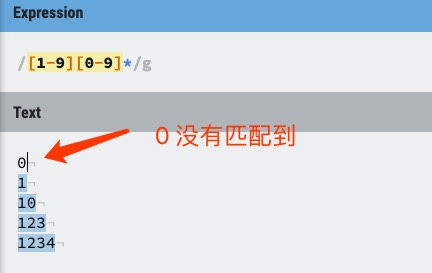
Please note that the quantifier comes after the range expression, so it applies to the entire range expression, which in this case only specifies digits from 0 to 9 (including 0 and 9).
The + quantifier is not used here, because a digit is not necessarily required in the second or later positions. Nor is the ? character used, because using ? would limit the integer to only two digits.
If you want to match two-digit numbers from 0 to 99, you can use the following expression to specify at least one digit and at most two digits:
/[0-9]{1,2}/
The above expression has a drawback: it can only match numbers within two digits, and it will match unexpected values such as 0 and 00. After improvement, the expression for matching positive integers from 1 to 99 is as follows:
/[1-9][0-9]?/
or
/[1-9][0-9]{0,1}/
*and+Quantifiers are greedy, because they match as much text as possible. Add a?after them to achieve non-greedy or minimal matching.
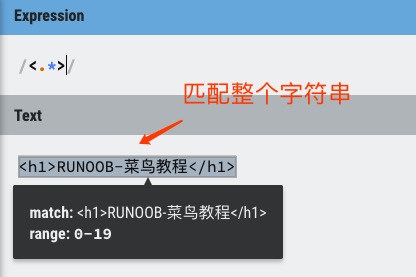
For example, you might search an HTML document to find the content inside h1 tags. The HTML code is as follows:
<h1>EXAMPLE-Example</h1>
Greedy:The following expression matches everything between the opening less-than sign (<) and the closing greater-than sign (>) of the h1 tag:
/<.*>/
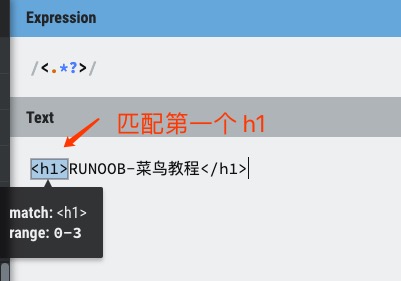
Non-greedy:If you only need to match the opening and closing h1 tags, the following non-greedy expression matches only <h1>:
/<.*?>/
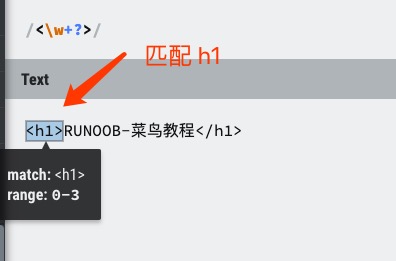
You can also use the following regular expression to match h1 tags:
/<\w+?>/
By placing*、+or?after the quantifier?, the expression changes from "greedy" to "non-greedy" (minimal matching).
Anchors
Anchors allow you to fix a regular expression to the beginning or end of a line, and can also describe the boundary positions of a word.
^and$refer to the beginning and end of a string, respectively.\bdescribe the beginning or ending boundary of a word,\Brepresents a non-word boundary.
| Character | Description | Example |
|---|---|---|
| ^ | Matches the beginning of the input string. If the Multiline property of the RegExp object is set, ^ also matches positions after \n or \r. | Try it » |
| $ | Matches the end of the input string. If the Multiline property of the RegExp object is set, $ also matches positions before \n or \r. | Try it » |
| \b | Matches a word boundary, i.e., the position between a word and a space. | Try it » |
| \B | Matches a non-word boundary, i.e., a position that is not at the beginning or end of a word. | Try it » |
Note:Quantifiers cannot be used together with anchors. Because there cannot be more than one position immediately before or after a line break or word boundary, expressions such as^*are not allowed.
To match text at the beginning of a line of text, use the^character at the beginning of the regular expression. Be careful not to^confuse this usage with the negation usage inside bracket expressions.
To match the end of a line of text, use the$character at the end of the regular expression.
To use anchors when searching for section headings, the following regular expression matches a section heading that contains only two trailing digits and appears at the beginning of a line:
/^Chapter [1-9][0-9]{0,1}/
A real section heading appears not only at the beginning of a line, but is also the only text on that line. The following expression, by anchoring both the beginning and end of the line, ensures that the specified match matches only section headings and not cross-references:
/^Chapter [1-9][0-9]{0,1}$/
Word boundaries can precisely control the matching scope. The following expression matches the first three characters of the word Chapter, because these three characters appear after a word boundary:
/\bCha/
\bThe position is very important: when at the beginning of a string, it finds a match at the beginning of a word; when at the end of a string, it finds a match at the end of a word. For example, the following expression matches the string ter in the word Chapter, because it appears before a word boundary:
/ter\b/
The following expression matches the string apt in Chapter, but does not match apt in aptitude:
/\Bapt/
The string apt appears at a non-word boundary in the word Chapter, but appears at a word boundary in the word aptitude. For the\Bnon-word boundary operator, it cannot match the beginning or end of a word, so the following expression does not match Cha in Chapter:
/\BCha/
Alternation
Use parentheses()to enclose all alternatives, and separate adjacent alternatives with||.
()Indicates a capturing group,()which saves the matched value in each group. Multiple matched values can be viewed through the number n (n is a digit representing the content of the nth capturing group).
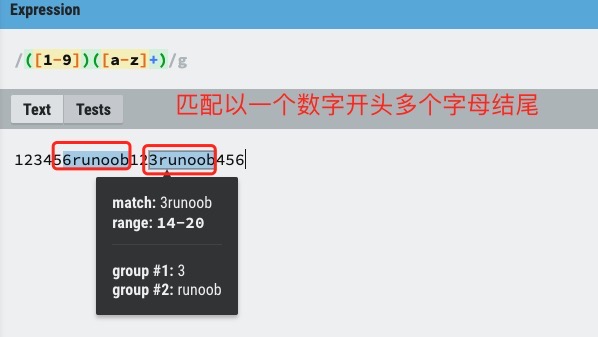
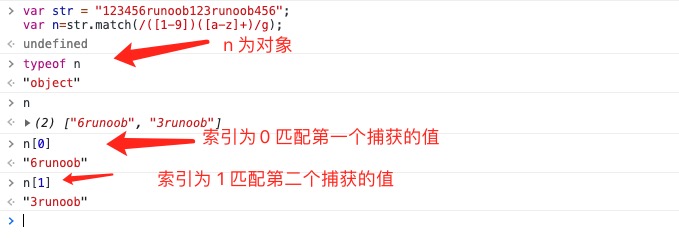
Using parentheses has a side effect: the related matched content will be cached (captured). If capturing is not needed, you can use?:before the first alternative to eliminate this side effect. At this point, the parentheses are used only for grouping and do not store matched content.
Where?:is one of the non-capturing metacharacters, and the other two non-capturing metacharacters are?=and?!: the former is a positive lookahead, which matches the search string at any position where the regular expression pattern inside the parentheses begins to match; the latter is a negative lookahead, which matches the search string at any position where that regular expression pattern does not begin to match.
Usage Differences of ?=, ?<=, ?!, ?<!
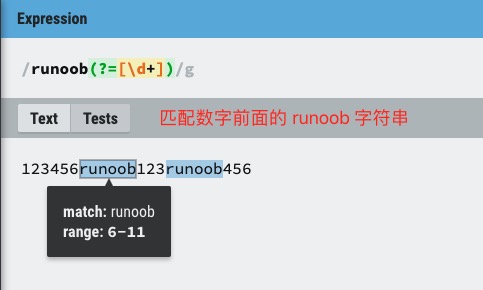
exp1(?=exp2): Find exp1 before exp2 (positive lookahead).
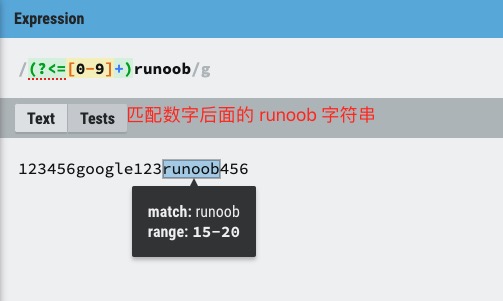
(?<=exp2)exp1: Find exp1 after exp2 (positive lookbehind).
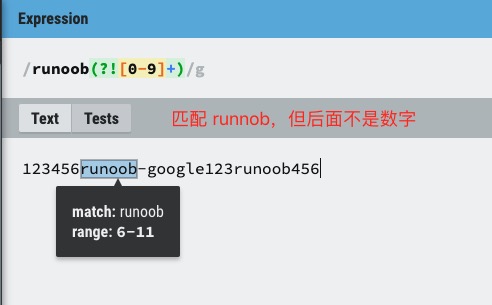
exp1(?!exp2): Find exp1 that is not followed by exp2 (negative lookahead).
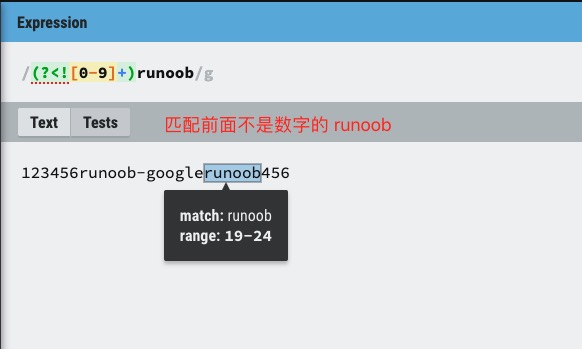
(?<!exp2)exp1: Find exp1 that is not preceded by exp2 (negative lookbehind).
For more information, see:Lookahead and lookbehind assertions in regular expressions
Backreferences
Adding parentheses around a regular expression pattern or part of a pattern causes the corresponding match to be stored in a temporary buffer. Each captured submatch is stored in the order in which it appears from left to right in the regular expression pattern. Buffer numbers start at 1, and up to 99 captured subexpressions can be stored. Each buffer can be accessed using\nwhere n is a one- or two-digit decimal number that identifies a specific buffer.
You can use the non-capturing metacharacter?:、?=or?!to rewrite the capture, ignoring the saving of the associated match.
One of the simplest and most useful applications of backreferences is to find two identical adjacent words in text. Take the following sentence as an example:
Is is the cost of of gasoline going up up?
The sentence above contains several repeated words. The following regular expression uses a single subexpression to locate these duplicates:
Example
Find repeated words:
var patt1 = /\b([a-z]+) \1\b/igm;
document.write(str.match(patt1));
Try it »
The captured expression[a-z]+matches one or more letters. The second part of the regular expression\1is a backreference to the first submatch (the content captured in parentheses), requiring that the same word as the first word immediately follows.
The word boundary metacharacter\bensures that only whole words are detected; otherwise, phrases such as "is issued" or "this is" will not be correctly identified.
At the end of the expression, theg(global) flag specifies that the expression is applied to all matches found in the input string;i(ignore case) flag specifies case-insensitive matching;m(multiline) flag specifies that potential matches may appear on either side of a line break.
Backreferences can also break a URI into its components. Suppose you want to break the following URI into protocol (ftp, http, etc.), domain address, and path:
https://www.example.com:80/html/html-tutorial.html
The following regular expression provides this functionality:
Example
Output all matched data:
var patt1 = /(\w+):\/\/([^/:]+)(:\d*)?([^# ]*)/;
arr = str.match(patt1);
for (var i = 0; i < arr.length; i++) {
document.write(arr[i]);
document.write("<br>");
}
Try it »
str.match(patt1)Returns an array containing 5 elements: index 0 corresponds to the entire matched string, indices 1 to 4 correspond to the respective parenthesized capturing groups, and so on.
- The first parenthesized subexpression(\w+): captures the protocol part of the web address, matching any word before the colon and two forward slashes. Result:https
- The second parenthesized subexpression([^/:]+): captures the domain address part, matching one or more characters that are not : or /. Result:www.example.com
- The third parenthesized subexpression(:\d*): captures the port number (if any), matching zero or more digits after the colon. Result::80
- The fourth parenthesized subexpression([^# ]*): captures the path and page information, matching any sequence of characters that does not include # or spaces. Result:/html/html-tutorial.html